EN - 14 WWW.SENIXTOOLS.COM
OPERATION
WARNING:
Always wear eye, hearing, hand protection to
reduce the risk of injury when operating the
tool. Keep all parts of your body away from the
rotating bit.
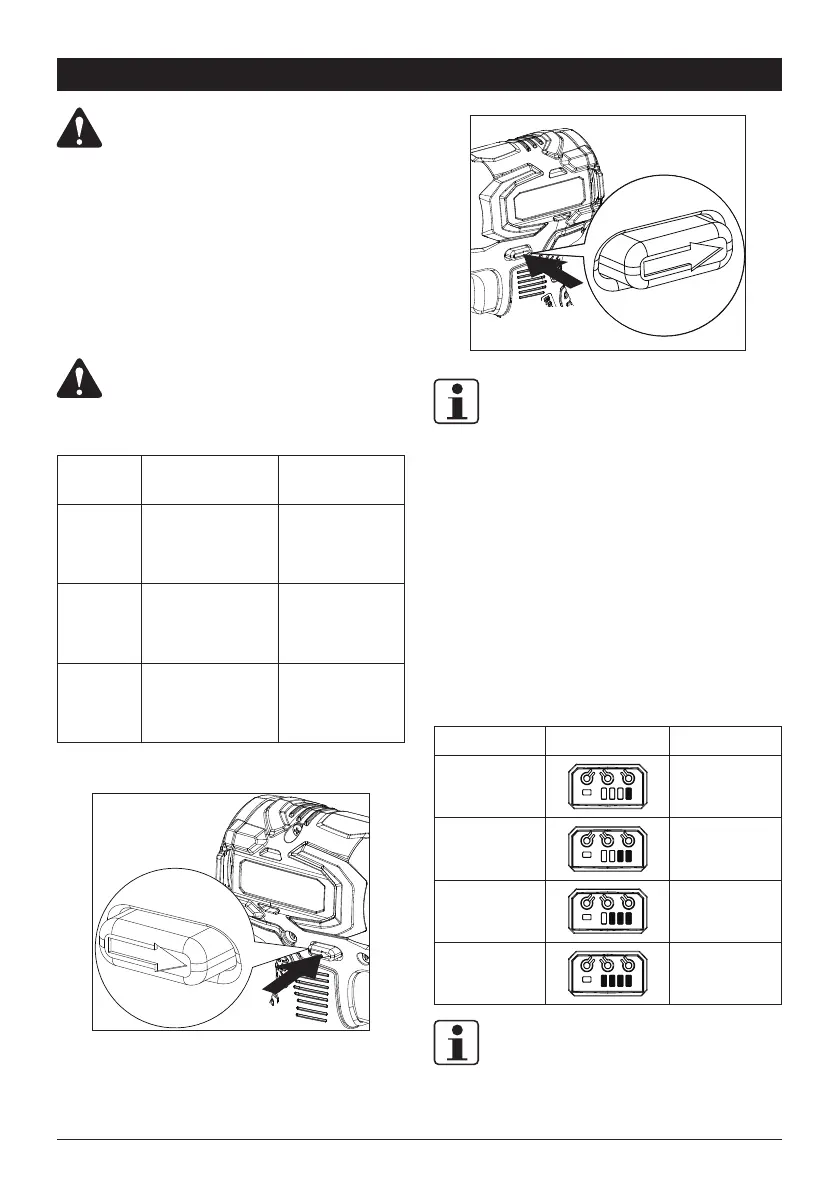
RUNNING DIRECTION
The tool is designed to loosen or tighten bolts/nuts. Press
the direction selector to achieve different using purposes.
WARNING:
Do not change direction of rotation while chuck
is rotating.
Mode Setting Application
Forward Shift to left side
Drilling/tightening
screw
Reverse Shift to right side
Loosening jammed
drill bit or screw
Center Lock
Shift to middle
position
Locking the trigger
Forward
Reverse
NOTE:
When changing bits or when the tool is not in use, the
direction selector shall be kept in "locking" position to avoid
unintended start.
SWITCH TRIGGER
Press the switch trigger to start tool. The further you push,
the higher speed will reach. Release the trigger to stop tool.
ROTATION SPEED
Different rotation speed can be realized by pressing the
button 1 on control panel. Find details in below table.
Press time Indicator Speed
Once
0-1100r/min
Twice
0-2100r/min
Three times
0-3000r/min
Four times
0-3300r/min
NOTE:
The tool will keep the latest setting after restart or battery
reinstallation.



 To Next Page