Product overview
ACCENTUM PLUS | 9
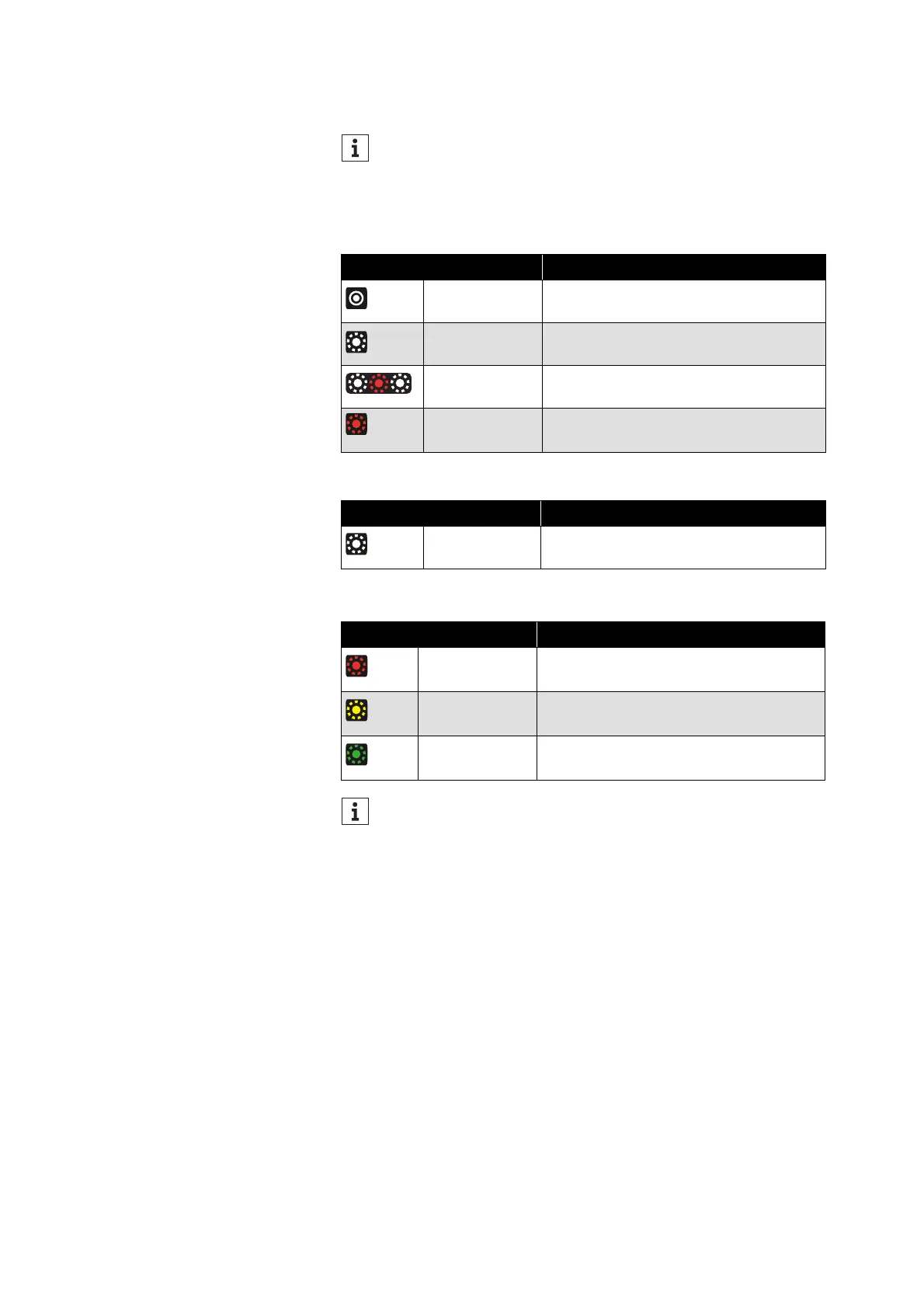
Overview of the LED display
During operation
During phone calls
During charging
The headphones are equipped with a sensor that automatically
detects whether the headphones are worn or taken off from
your ears (Smart Pause function). You can find more informa-
tion here: > 31.
LED Meaning/headphones...
lights up white
for 5 seconds
... switch on
flashes white
3x
... are connected to a device via Blue-
tooth
flashes
white-red
... are in Bluetooth pairing mode
flashes red 3x ... switch off
LED Meaning
flashes white
10x repeatedly
Incoming call
LED Meaning
flashes red
Battery charge is 0 % to 20 %.
flashes yellow
Battery charge is 20 % to 90 %.
flashes green
Battery charge is 90 % to 100 %.
If the LED display does not light up:
• Clean the charging socket (> 36).
• Charge the rechargeable battery until the LED display lights
up again (at least 30 minutes) (> 13). If the rechargeable bat-
tery is completely discharged, it may take several minutes
for the LED display to indicate the charging process.
3x
3x
10x















 To Next Page