Using the SKP 100 G4
96
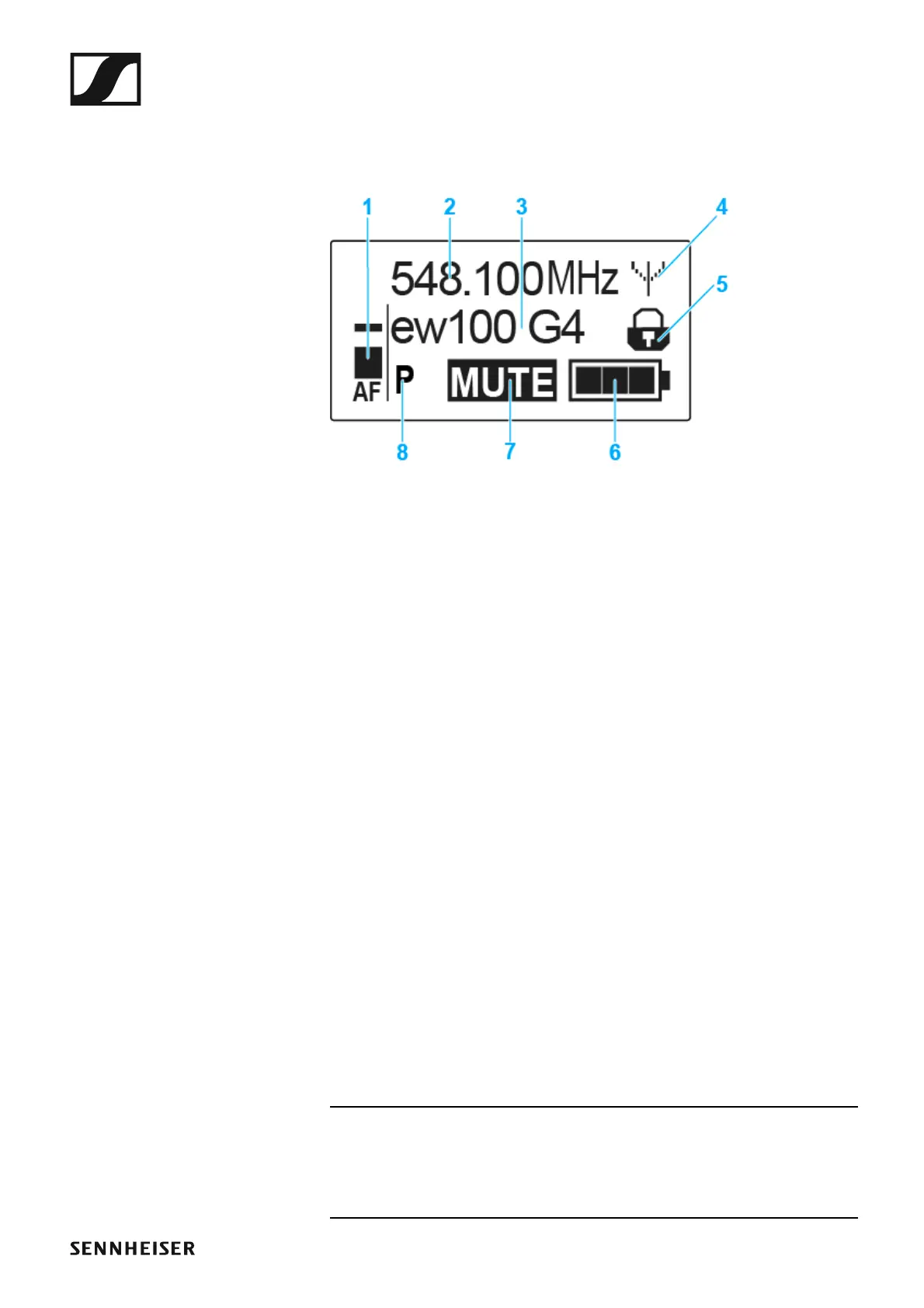
Displays on the SKP 100 G4 plug-on transmitter dis-
play panel
You can view the following information on the transmitter display.
►
1 AF audio level
• Displays the audio level with peak hold function
• See “Sensitivity menu item”
2 Frequency
• Configured transmission frequency
• See “Frequency Preset menu item”
3 Name
• Freely selectable name of the receiver
• See “Name menu item”
4 Transmission icon
• RF signal is being transmitted
• See “Deactivating the RF signal (RF mute)”
5 Lock-off function
• Lock-off function is activated
• See “Auto Lock menu item”
6 Battery status
• See “Inserting and removing the batteries/rechargeable batteries”
7 MUTE muting function
• The audio signal is muted
• See “Muting the plug-on transmitter (AF mute)”
8 P pilot tone
• Pilot tone transmission is activated
• See “Advanced > Pilot Tone menu item”
>> “Buttons for navigating the SKP 100 G4 menu”
>> “Setting options in the menu”




 To Next Page