Chapter 3: Quick Start
This section presents a useful guide for first-time programming of
the Model 1104. Follow instructions for installation before
attempting to program the Model 1104. Refer to Chapter 2:
Installation.
3.1 The Local Keypad
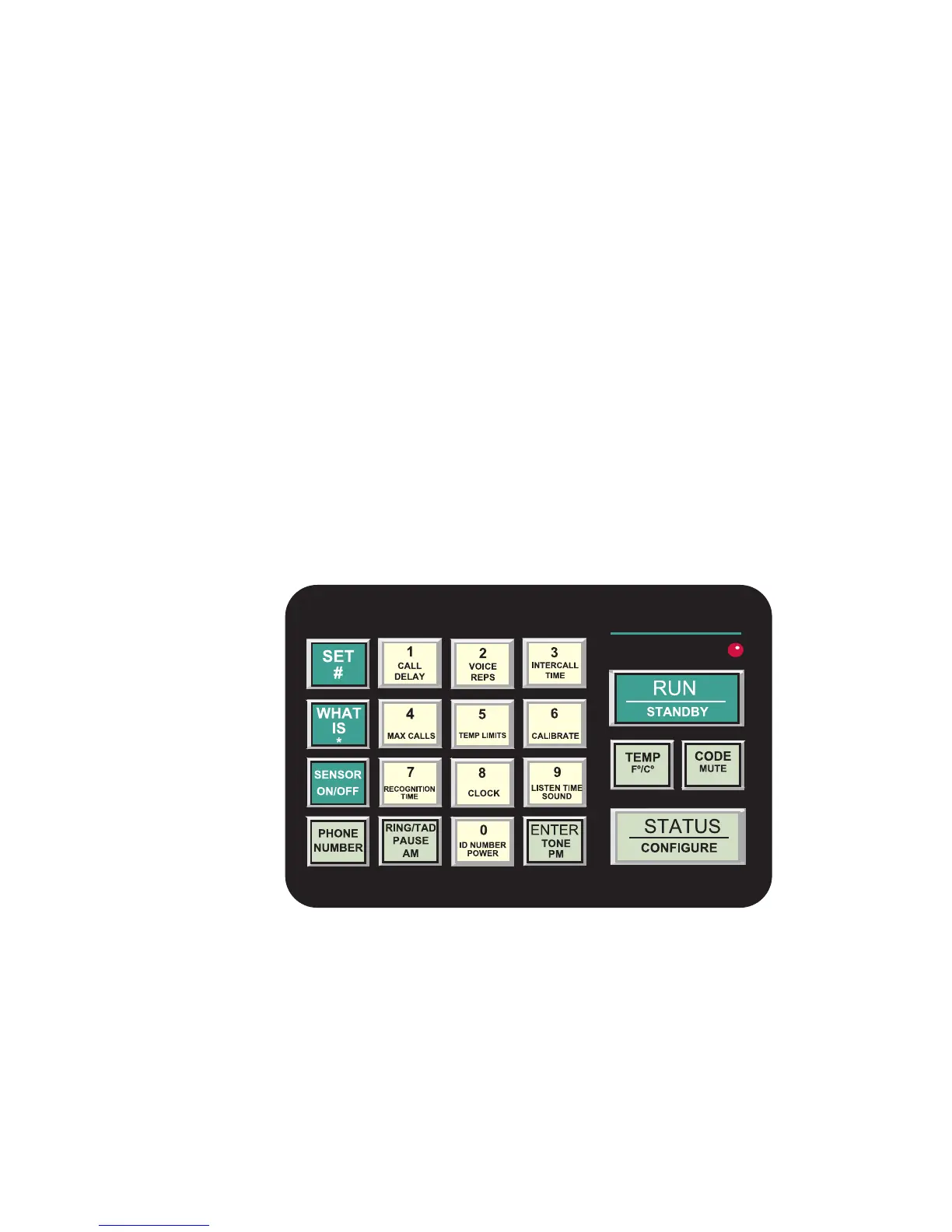
Programming is accomplished using the local keypad (shown
below, Figure 3-1). Notice that a single key has several functions
assigned to it; programming results are determined by the order in
which keys are pressed.
Individual keystrokes are illustrated to show programming steps
in the correct order. If you make a mistake by entering the wrong
key, do not press another key until you hear the message “Error
1.” Then, start over with the first key in the programming
sequence.
Figure 3-1. The Model 1104 Keypad
3.2 Preparation for Programming
Read complete instructions in Chapter 2: Installation, and make
sure to follow these three steps first:
1. Plug the AC adaptor into the 120 VAC outlet.
2. Install the batteries.
25


 To Next Page