Doc 6001050, Rev C
Page 3 of 5
SECTION 1
PROGRAMMING OVERVIEW
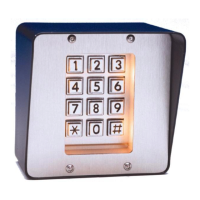
1. All programming is done through the system's main keypad including sites that utilize the remote (second) keypad.
2. Once in the programming mode, the system will remain in this mode until told to exit to the "run" mode, or until 60
seconds pass without an entry on the keypad. If the system does not emit any beeps or tones, the keypad may be
blocked by the "strikes-and-out" feature. Wait 3 minutes and then try again.
Enter Programming Mode
• Press the pound key three times (###).
• Enter the six-digit password. The default is six zeroes (000000)
• The unit will emit two short beeps is now ready to accept programming instructions.
Exit Programming Mode
• Press the zero two times and the pound key once. (00#).
3. The MINIKEY system provides audio feedback to aid programming and operation. The following is a list of
responses and their meanings:
• 1 short beep: key was pressed
• 2 short beeps: programming step was valid
• 1 long beep: input was not valid
• 2 long beeps: duplicate entry code was entered or code not available to erase. Also used in normal
operation to indicate invalid entry due to timezone restrictions.
• 3 long beeps: memory is full
• 4 long beeps: unit has reset or is powering up
• 5 short beeps: exited the programming mode
• 10 short beeps: entry code is accepted and access is granted.
4. If a mistake was made in the middle of an entry, press
"✱" to cancel current programming step.


 To Next Page