23
When the ECG waveform is being replayed, you can
Select to change the waveform amplitude.
Select to pause it.
Select to return Daily Check list.
After the ECG waveform is replayed, it will automatically return to
the previous interface.
Select to view the trend of heart rate or SpO
2.
Select to return to the Daily Check list.
6.2 Reviewing ECG Recorder
To review ECG Recorder records, in the Data Review menu, select . The
operations you can perform are almost the same with Daily Check,
however, there is no trending graph.
6.3 Reviewing Pulse Oximeter
To review Pulse Oximeter records, in the Data Review menu, select .
The operations you can perform are the same as ECG Recorder.
6.4 Reviewing Thermometer
To review Thermometer records in the Data Review menu, select . The
operations you can perform are the same as ECG Recorder, however,
there is no waveform to replay.
24
7. Maintenance
Warnings and Cautionary Advice
Call Sentier customer service if you think your device needs repair
Do not perform your own maintenance on the Vetcorder;
performing your own repairs will void the warranty.
7.1 Warranty
The Vetcorder is warranted to be free from manufacturer defects in
materials and workmanship within the warranty period, which starts
upon your date of purchase:
1-year warranty on the Vetcorder Monitor and Red Case.
6-month warranty on all Vetcorder Accessories.
7.2 Battery
This monitor is designed to operate on rechargeable Lithium-ion battery.
The battery charges automatically when the monitor is connected to AC
power or devices that can output electronic power through USB
connector, such as personal computer and mobile battery bank etc.
On-screen battery symbols indicate the battery status as follow:
The battery is fully charged.
The solid portion represents the remained battery energy. If the
solid portion moves from left to right, then it means that the
battery is being charged.
Indicates that the battery is almost depleted and needs to be
charged immediately. If not charged the device will shut down
automatically.
To charge the battery,
1. Connect the smaller end of the USB charging cable to the connector
at top of monitor. The Vetcorder may not be used while charging.
25
2. Connect the other end of the USB charging cable to the USB
charging port.
3. Please make sure that the LED is blue and press the Home button to
enter the Main Screen, if needed.
4. When the LED turns to green, it means the battery is fully charged.
Then you can unplug the USB cable.
Warnings and Cautionary Advice
The device cannot be used for any measurement during charging.
Use charging adapter provided by manufacturer, or USB charging
devices that comply with the standard of IEC 60950.
8. Clean the device weekly, carefully swabbing the device surface with
a soft cloth or cotton swab with rubbing alcohol. Do not pour
alcohol or spray anything directly onto or into the device. Do not
submerge in any liquid.
Warnings and Cautionary Advice
Call Sentier customer service if you think your device needs repairs.
Do not perform your own maintenance on the Vetcorder;
performing your own repairs will invalidate the warranty.
33
Guidance and Declaration - Electromagnetic Immunity
The Vetcorder is intended for use in the specified electromagnetic environment. The customer or the User of the Vetcorder
should assure that it is used in such an environment as described below.
Immunity test IEC60601 test
level
Compliance
level
Electromagnetic environment - guidance
Conduced RF
IEC61000-4-6
3 Vrms 150
kHz to
80 MHz
outside ISM
bands
3 Vrms 150
kHz to
80 MHz
outside ISM
bands
Portable and mobile RF communications equipment
should be used no closer to any part of the system,
including cables, than the recommended separation
distance calculated from the equation appropriate for the
frequency of the transmitter. Recommended separation
distances:
Radiated RF
IEC61000-4-3
3 V/m 80 MHz
to
2.5 GHz
3 V/m 80 MHz
to
2.5 GHz
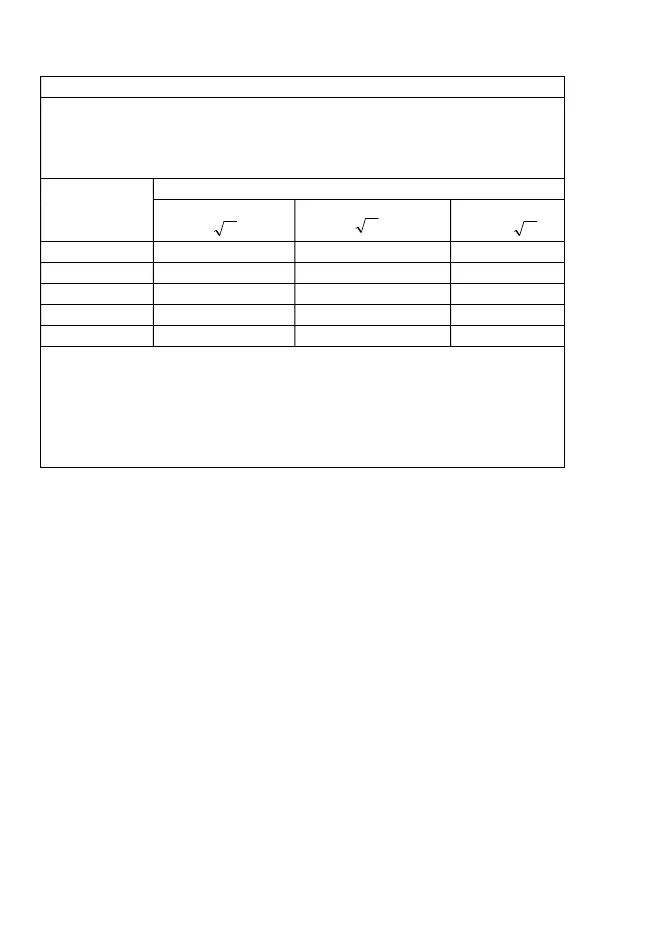
Recommended separation distances:
80 MHz㹼800 MHz:
800MHz-2.5GHz:
Where, P is the maximum output power rating of the
transmitter in watts (W) according to the transmitter
manufacturer and d is the recommended separation
distance in meters (m).
Field strengths from fixed RF transmitters, as determined
by an electromagnetic site survey
a
, should be less than
the compliance level in each frequency range
b
.
Interference may occur in the vicinity of equipment
marked with the following symbol:
Note 1: At 80 MHz to 800 MHz, the separation distance for the higher frequency range applies.
Note 2: These guidelines may not apply in all situations. Electromagnetic propagation is affected by absorption and reflection
from structures, objects and people.
a
Field strengths from fixed transmitters, such as base stations for radio (cellular/cordless) telephones and land mobile radios,
amateur radio, AM and FM radio broadcast and TV broadcast cannot be predicted theoretically with accuracy. To assess the
electromagnetic environment due to fixed RF transmitters, an electromagnetic site survey should be considered. If the
measured field strength in the location in which the device is used exceeds the applicable RF compliance level above, the
device should be observed to verify normal operation. If abnormal performance is observed, additional measures may be
necessary, such as re-orienting or relocating the device.
b
Over frequency range 150kHz to 80MHz. For Resp field strength should be less than 1V/m.
34
Recommended separation distances between portable and mobile RF communications equipment and the device
The Vetcorder is intended for use in an electromagnetic environment in which radiated RF disturbances are controlled. The
customer or the User of the Health Monitor can help prevent electromagnetic interference by maintaining a minimum distance
between portable and mobile RF communications equipment (transmitters) and the monitor as recommended below,
according to the maximum output power of the communications equipment.
Rated max. output
power of transmitter
(W)
Separation distance according to frequency of the transmitter (m)
150 kHz - 80 MHz
80 MHz - 800 MHz
800 MHz - 2.5 GHz
0.01 0.12 0.12 0.23
0.1 0.38 0.38 0.73
1 1.20 1.20 2.30
10 3.80 3.80 7.30
100 12.00 12.00 23.00
For transmitters rated at a maximum output power not listed above, the recommended separation distance d in metres (m)
can be estimated using the equation applicable to the frequency of the transmitter, where P is the maximum output power
rating of the transmitter in watts (W) according to the transmitter manufacturer.
Note 1: At 80 MHz and 800 MHz, the separation distance for the higher frequency range applies.
Note 2: These guidelines may not apply in all situations. Electromagnetic propagation is affected by absorption and reflection
from structures, objects and people.
Pd 2.1
Pd 2.1
Pd 3.2
Sentier HC LLC (Hereinafter called Sentier) owns the intellectual property
rights to this Sentier product and this manual. This manual may refer to
information protected by copyrights or patents and does not convey any
license under the patent rights of Sentier, nor the rights of others.
Sentier intends to maintain the contents of this manual as confidential
information. Disclosure of the information in this manual in any manner
whatsoever without the written permission of Sentier is strictly
forbidden.
Contents of this manual are subject to changes without prior notice. All
information contained in this manual is believed to be correct. Sentier
shall not be liable for errors contained herein nor for incidental or
consequential damages in connection with the furnishing, performance,
or use of this manual.
© Copyright 2016 Sentier Health Connect. All right reserved.
Version: A September 2021
PN: 7100-1710
Sentier HC LLC
161 W Sunset Dr., Ste. 102
Waukesha, WI 53189 USA
844-VETCORDER (844-838-2673)
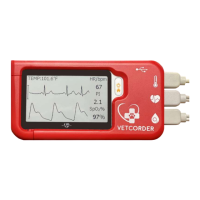
Vetcorder
A New Standard of Monitoring


 To Next Page
 Loading...