3. Install the device back to the bracket inserting the bottom clips first (1) and pushing it towards the
bracket at the top (2).
2.2 Electrical connection overview
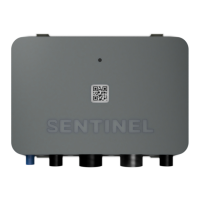
Device features 5 external connectors (cables). From left to right there are:
1. External GPS antenna connection (Standard and Pro version),
2. 5-pin M12 CAN2 connector (Pro version),
3. 18-pin Main cable (Standard and Pro version) or 10-pin Main cable (Lite version),
4. RJ45 ethernet connector (Pro version),
5. 5-pin M12 CAN1 (NMEA2000) connector (Standard and Pro version).
Main device connection is achieved through an 18 wire main cable harness (or 10 wire in case of Lite version).
Power is supplied through red and black wires of the harness; individual wire functions are listed in the table below.
2.3 Wire color code description
Voltage Input 2 - Engine battery (port)
Digital input 1 - Shore power**
Voltage input 1 - Service battery + BM-50 power supply
Digital input 3 - Door sensor**
Digital input 2 - Bilge sensor**
Voltage input 4 - general purpose


 To Next Page