Home
serverLink
LCD Drawer
LKS-CD17SR
Page 21 (Step a (Install Console))
serverLink LKS-CD17SR - Step a (Install Console)
34 pages
Manual
Save Page as PDF
To Next Page
To Next Page
To Previous Page
To Previous Page
Loading...
LKS-CD17SR / CD19SR User Manual
15
3.1.3
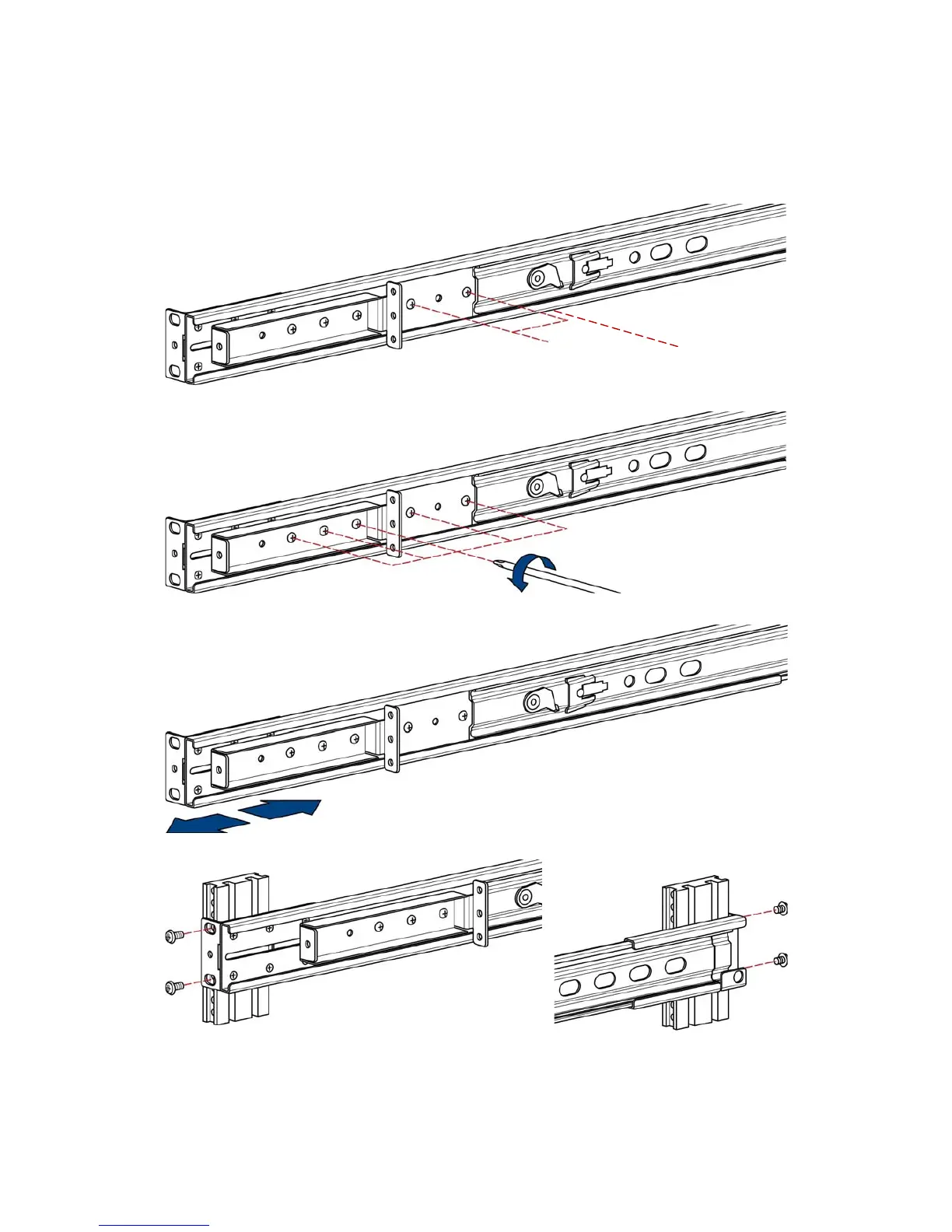
Step
A
(Install Console)
1. Adjust rail until
two screws appear.
2. Loosen (Do not rem
ove) five screws.
3. Adjus
t rail to fit you
r cabinet
4. Install front and r
ear
bracket on cabinet.
two screws
rail
20
22
Table of Contents
Main Page
Default Chapter
2
Packing List
2
Safety Instructions
3
Table of Contents
5
1 General Information
7
Features
7
Benefits
8
Product Specification
9
LKS-CD17SR Specification
9
LKS-CD19SR Specification
11
2 Panel Controls and OSD Function
13
Auto Tune
13
Input Source
14
Brightness
14
Contrast
15
Color
15
Position
16
Language
17
Recall
17
Exit
18
Power Indicator
18
3 Installation
19
Install 17" / 19" Single Rail Console into Cabinet
19
Notes
19
Hardware Kits Contents
19
Step a (Install Console)
21
Step B (Replace Short Bracket)
23
Step C (Replace Extended Bracket)
24
Install Modular KVM Switch
26
Install KVM Switch (8 / 16 Port High Density 15 Pin KVM)
26
Install KVM Switch (8 / 16 / 32 Cat 5 KVM)
27
Unload Steps
30
Installing the Video Card and Video Driver
32
Configuring the Display Settings
32
Connecting the Console
33
Turning on the Console
33
Testing the Console
33


 To Next Page