25
ENGLISH
Instruction Manual
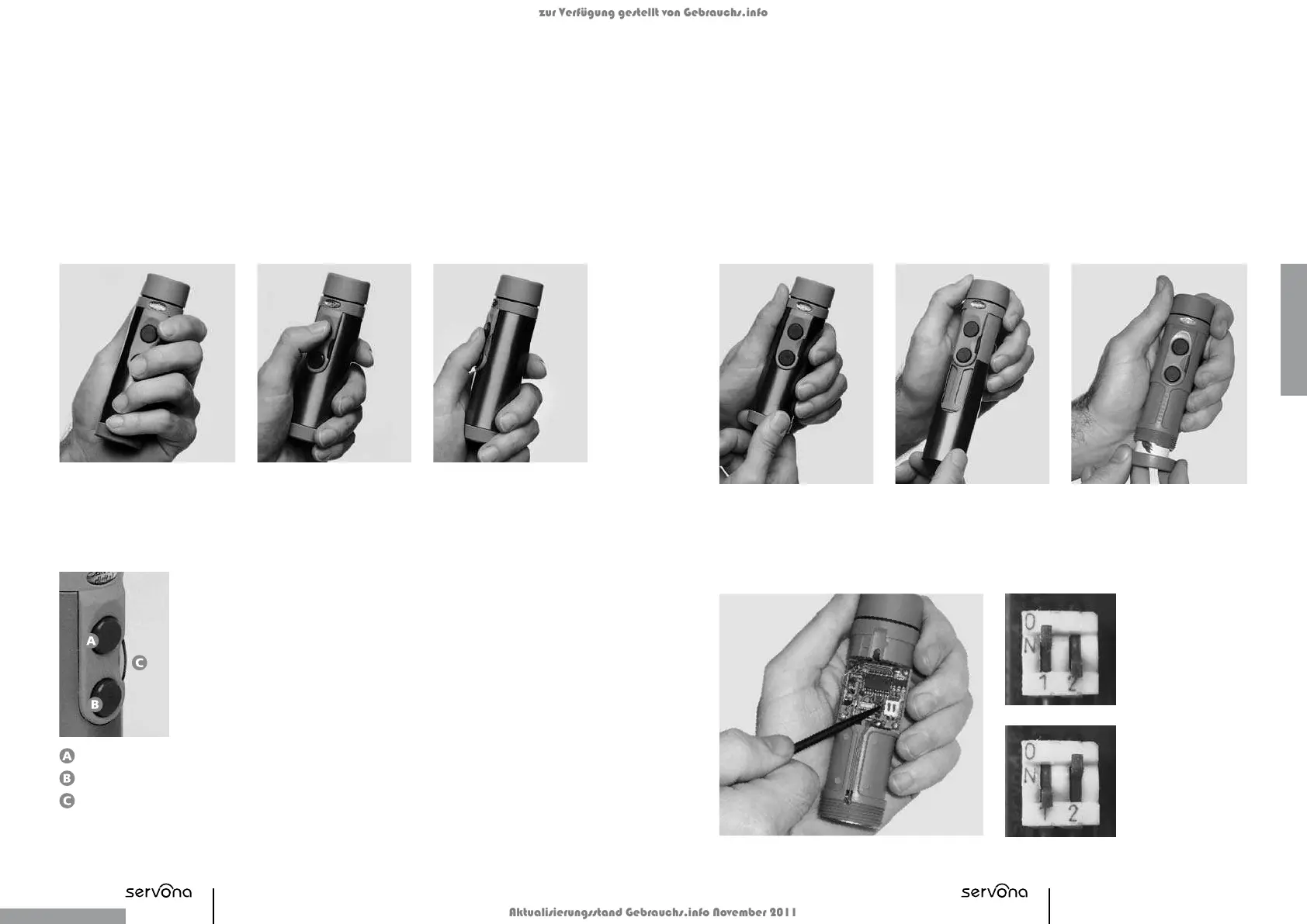
Operating the Buttons
The upper button (A) is used to produce the base vocal tone. Additional accentuation can be
produced using the lower button (B). All
SERVOX
®
digital Speech Aid users should first practice
speaking using button A only. Button B should only be used once you have become comfortable
using button A.
...or the thumb (2nd and 3rd illustration).Both buttons can be
operated using either the
index or middle fingers
(1st illustration)...
Adjusting the Volume
The volume can be adjusted using the volume controller (rocker switch).
The following modes are possible:
a) Setting buttons A and B with different volume levels.
To adjust the volume of each button separately: first push the button (a
tone is audible), then either increase the volume by pushing the rocker
switch upwards at the same time, or lower the volume by pushing it
downwards.
b) Changing the volume for both buttons A and B
No button is pressed in this case (no tone is heard). Increase
the volume by pushing the rocker switch upwards or decrease the volume
by pushing it downwards. Press the corresponding button to check that
the volume has been set accordingly.
Adjusting the Pitch
It is recommended that a similar pitch is chosen to that of the natural voice. The pitch must
be adjusted separately for each button.
The following steps are necessary for changing the pitch:
1.
Unscrew the bottom cover
and remove battery.
2.
Hold the top of the device
and slide off the titanium
housing.
4.a
Setting button A:
Push DIP switch 1
to the ON position
and DIP switch 2
to the OFF position.
4.b
Setting button B:
Push DIP switch 1
to the OFF position
and DIP switch 2
to the ON position.
3.
Place the battery back into the
battery compartment and screw
the bottom cover back on.
Button A
Button B
Volume
Contr
oller
(Rocker
Switch)
zur Verfügung gestellt von Gebrauchs.info
Aktualisierungsstand Gebrauchs.info November 2011


 To Next Page