28
Maintenance and care: Trouble shooting
Loc
The message indicates that the unit is locked. If no buttons are pressed within 5
seconds the display will return to previous fail state.
Follow the steps below in order to unlock the unit.
Step Action Description
1
UnLo (unlock function) is displayed
2
tESt (test function) is displayed
3 test is activated. The test will detect if the error is xed.
• cccc indicates that the error has been xed and the unit is un-
locked successfully.
• faIL indicates that the error is NOT xed yet and the unit will
still be locked.
If the dehumidier is not functioning correctly, shut it down immediately!
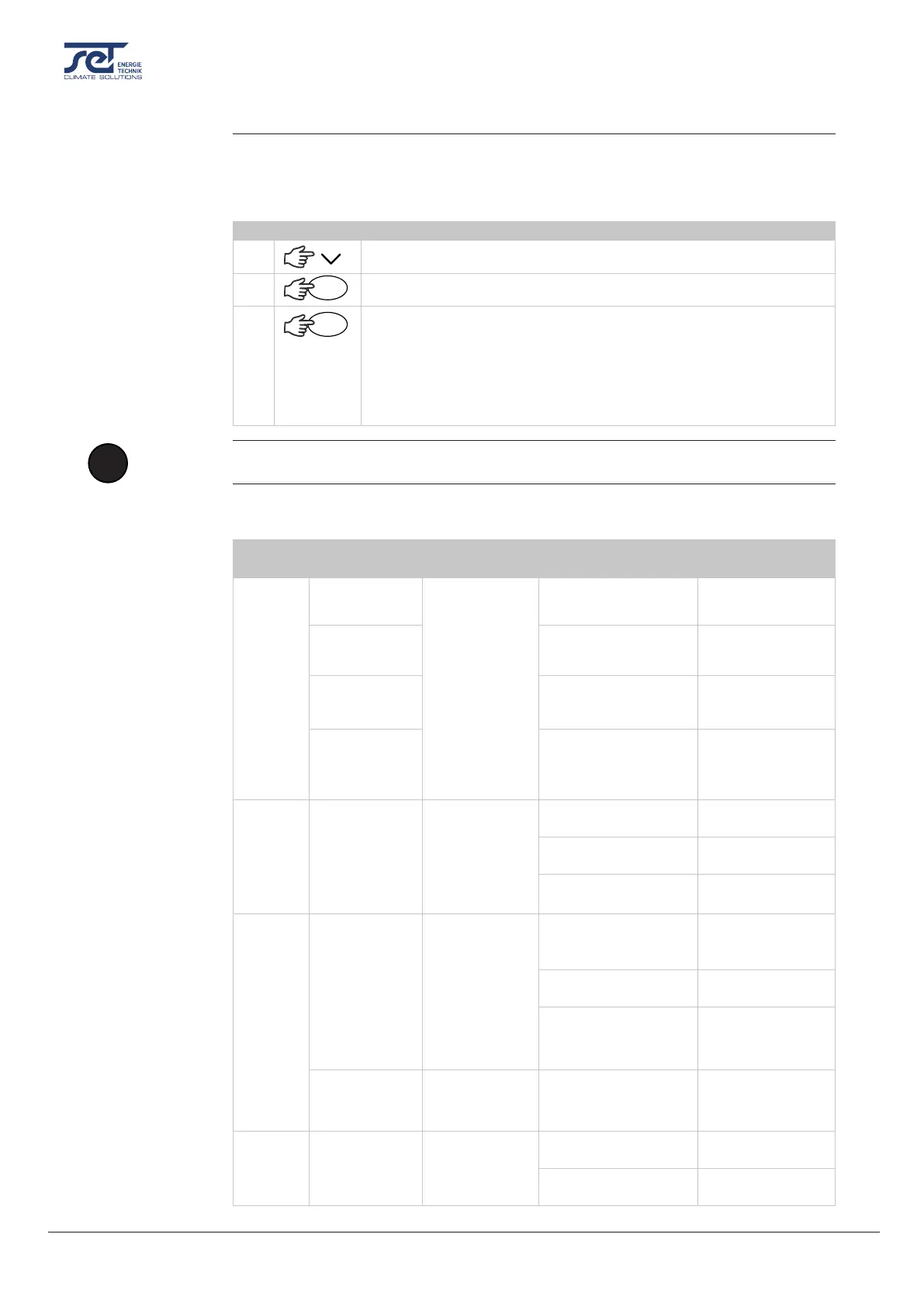
Use this table to understand the LED lights or localize and solve a possible problem/ fault:
Led
colour
Audible alarm Problem Possible cause(s) Solution
OFF
-
230V connected
but no function
Power outlet in wall is
disconnected
Restore the power
(Electrical)
-
Fuse F1 on main PCB
are blown
Replace the fuse
-
Defective power sup-
ply on main PCB
Replace main PCB
-
Disconnected/loose
230V connection
inside the unit
Check 230V con-
nections according
to wiring diagram
RED
(constant)
3 sec. initiating
beep
HP fault - Can’t
turn on /shuts
down
Defective fan Replace fan
Dirty lter Clean the lter
Dirty condenser coil Clean coil
RED
(ashing)
Double beep
every 1 min.
LP fault - Can’t
turn on /shuts
down
Leaking refrigerant
Find leak and repair
leak + rell refriger-
ant
Malfunction of
thermostatic valve
Replace thermo-
static valve
Insucient
refrigerant
Rell refrigerant
Single short
beep every 5
min.
Sensor fail -
check display
Defective sensor Replace sensor
RED/
YELLOW
(ashing)
Single short
beep
Ambient tem-
perature out of
range
Ambient temperature
too high
Cool down the
room
Ambient temperature
too low
Heat up the room
Unlock Sequence
OK
OK
!
NOTICE
LED light and
troubleshooting


 To Next Page