3.OPERATION
03
SAVING ENERGY TIPS
● Do not open the appliance frequently if unnecessary.
● Make sure leave enough space to ventilating.
● Deforest the appliance once a layer of ice forms.
● Allow warm food to cool down first before placing it in the freezer to keep cool.
ECO
MAX
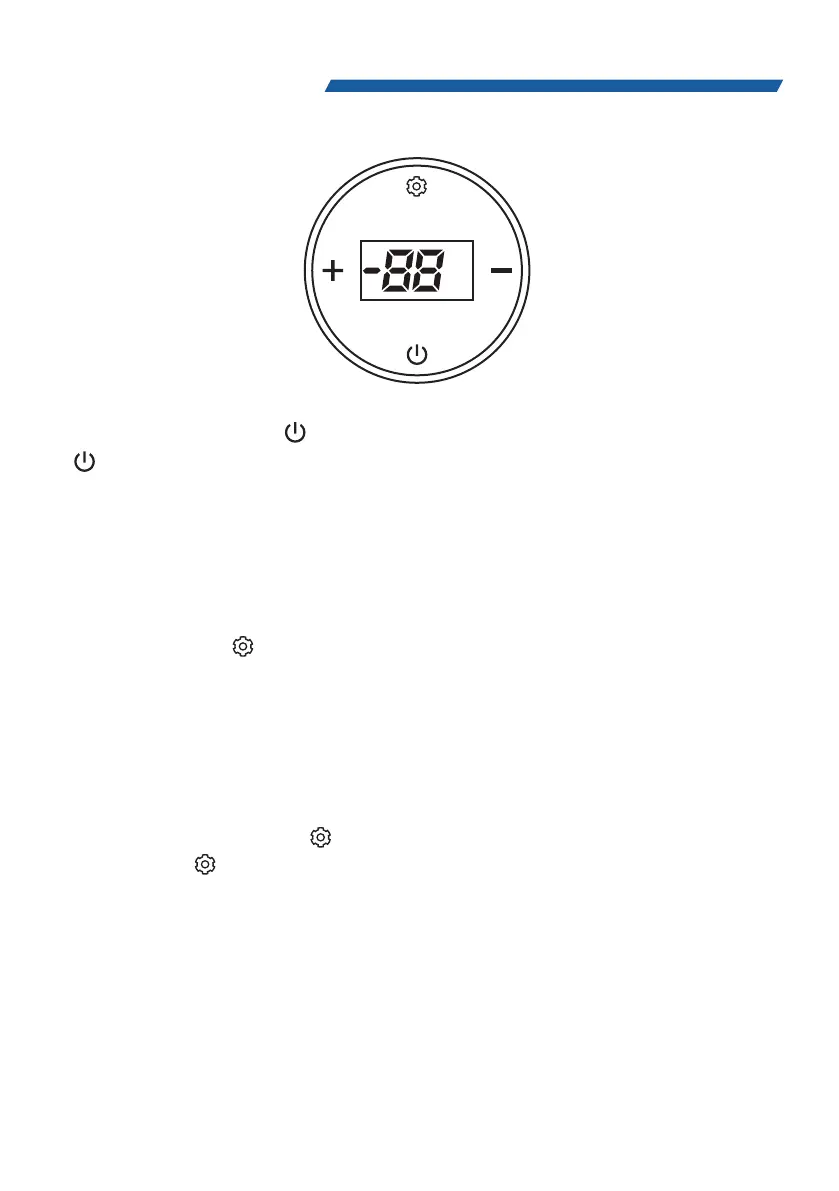
In standby mode, long press " " button for 3 seconds, to turn on the fridge. Long press
" " button for 3 seconds, to power off.
Battery Protection Setting Method:
In the standby mode, long press " + " and " - " at the same time for 3 seconds, then show and
flash the current value, short press" + " or " - "button up and down can set the battery
protection level (High level is default mode).
ECO&MAX Mode:
Power on, short press " " button, switch between MAX and ECO mode ( MAX is default mode).
Temperature Setting:
In standby mode, short press " + " or " - " button, display will show on and flashes, then short
press " + " or " - "can adjust the temperature up and down. Long press during flashes, setting
value will adjust 4 degree per seconds.
Conversion between Celsius and Fahrenheit
In the standby mode, long press " " button for 3 seconds, current mode shows on the display,
then short press " " to choose "C" (Celsius) or " F" (Fahrenheit), Fahrenheit is default mode.
Flicker in no operation for 3 seconds will back to standby status.


 To Next Page