32
GB
10. Press the “ ” button to switch off the hotplate
7
.
11. Run the device through two rinsing cycles, ►“7.3 Running water
through the appliance” on page 31, to remove the remains of the
water/vinegar solution.
7.5 Cleaning surfaces
Clean the surfaces of the appliance with a soft, lint-free cloth.
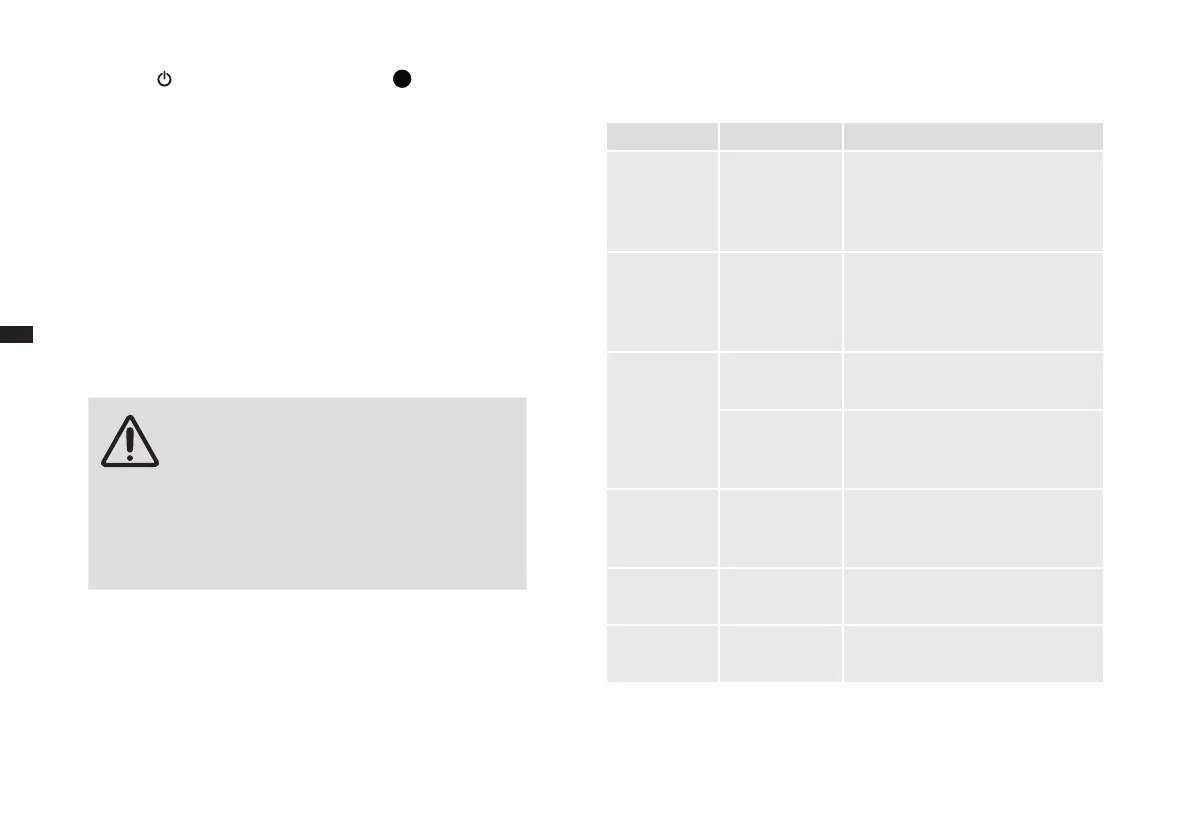
8 Troubleshooting
8.1 Remedying problems yourself
WARNING!
Risk of injury! The appliance does not contain any
parts that you can repair yourself.
– Never attempt to operate a defective appliance.
– Never attempt to repair the appliance by your-
self. If your appliance is defective, contact our
customer service department (see ►“ Service
Centres” on page 192).
Before contacting our customer service, check with the aid of the table below
whether you can remedy the problem yourself.
Problem Cause Remedy
The appliance
will not switch
on.
The appliance is
not connected
to the power
supply.
Plug the power plug into a socket
outlet with earthing contact.
Coffee does
not ow out of
the outlet (drip
stop).
Coffee jug not
placed correctly
under outlet.
Check that the coffee jug is placed
correctly on the hotplate and that is
presses up the valve in the outlet.
Coffee is too
watery.
Grind set too
coarse.
Set the grind ner, ►“Adjusting the
grind” on page 27.
Too little ground
coffee.
Refer to the measurement table,
►“5.2 With ground coffee” on page
28.
All display
indicators
ash.
The device must
be descaled.
Carry out descaling ►7.4 Descale
device
Error codes
E01 / E14
Problem with
the grinder
Call customer service.
Error codes
E12 / E13
PCB fault Call customer service.


 To Next Page
 Loading...