13sharkclean.co.uk12 sharkclean.co.uk
USING YOUR VACUUM
DETECT TECHNOLOGY EXPLAINEDCONTROLS AND CLEANING MODES
USING YOUR VACUUM
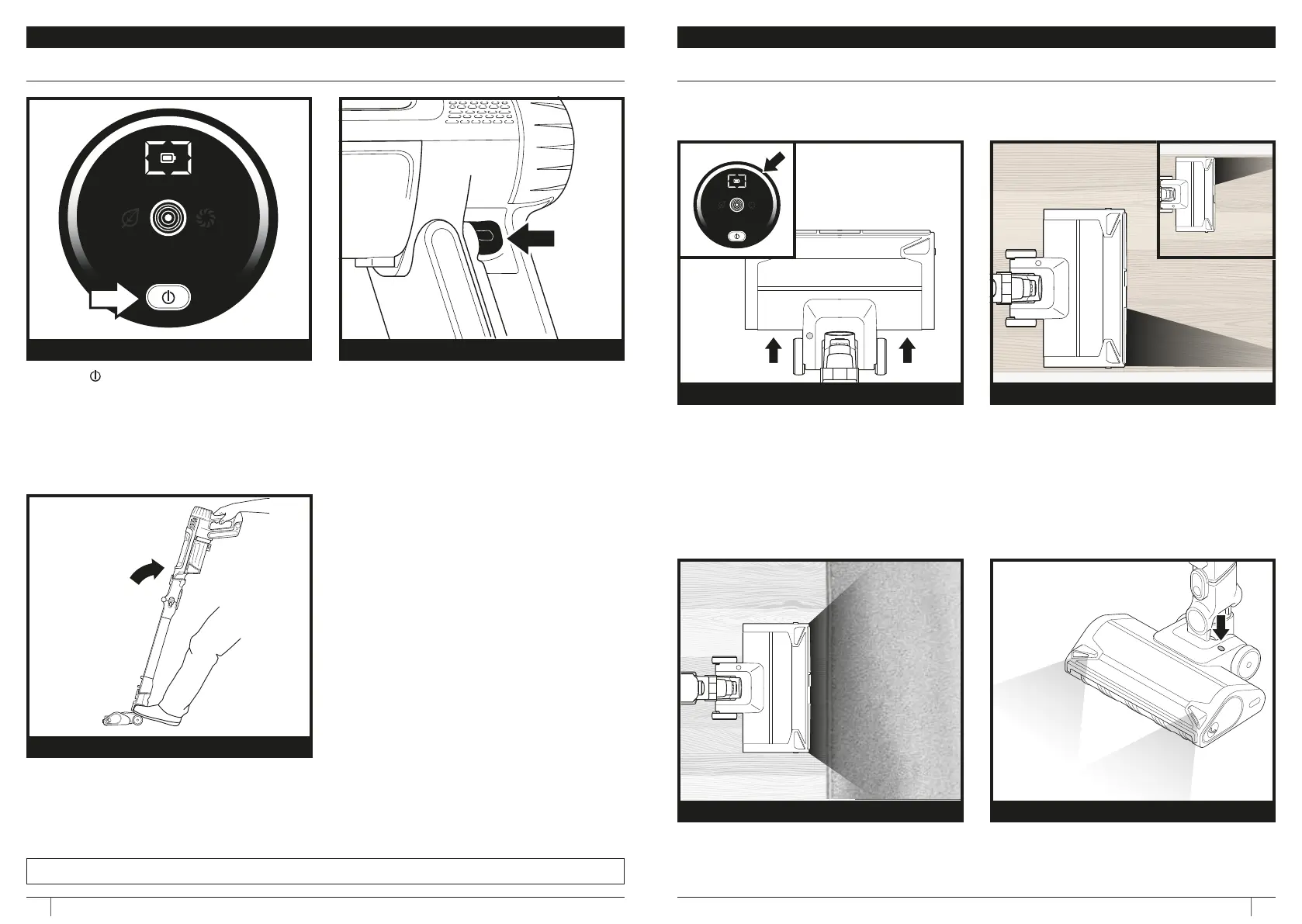
Press the button on the UI Screen to
turn on power. To turn o power, press the
button again.
To toggle between ECO, DETECT, and
BOOST modes, press the mode selection
trigger on the handle (shown above).
In DETECT mode, Detect Technology
automatically adjusts vacuum and nozzle
power to maximise cleaning performance
and optimise runtime.
POWER MODE SELECT
To begin cleaning with the floor nozzle,
disengage the lock by stepping on the nozzle
and tilting the hand vac down.
UPRIGHT LOCK
Brushroll and vacuum responds to surface
changes and automatically adjusts to
optimise your clean.
NOTE: Detect Technology is ONLY operational in Detect Mode and is activated automatically
when the unit is in use.
Vacuum floor nozzle detects edges and
corners and maximises suction and power
to remove stubborn dirt.
Senses low-light situations and
automatically illuminates dark areas to help
you spot debris.
CLEAN INDICATOR
FLOOR DETECT
EDGE INDICATOR
LIGHT DETECT
Vacuum identifies dirtier areas and
automatically boosts suction power to pull in
hidden dirt.
White LED = No heavy debris detected, low suction
Pink LED = Debris is being cleaned, medium suction
Purple LED = Heavy debris detected, high suction
NOTE: For - Best Cleaning on ASTM and IEC Cleaning Tests, Use BoostMode.







 To Next Page