21sharkclean.co.uk20 sharkclean.co.uk
MAINTAINING YOUR VACUUM
NOZZLE MAINTENANCE
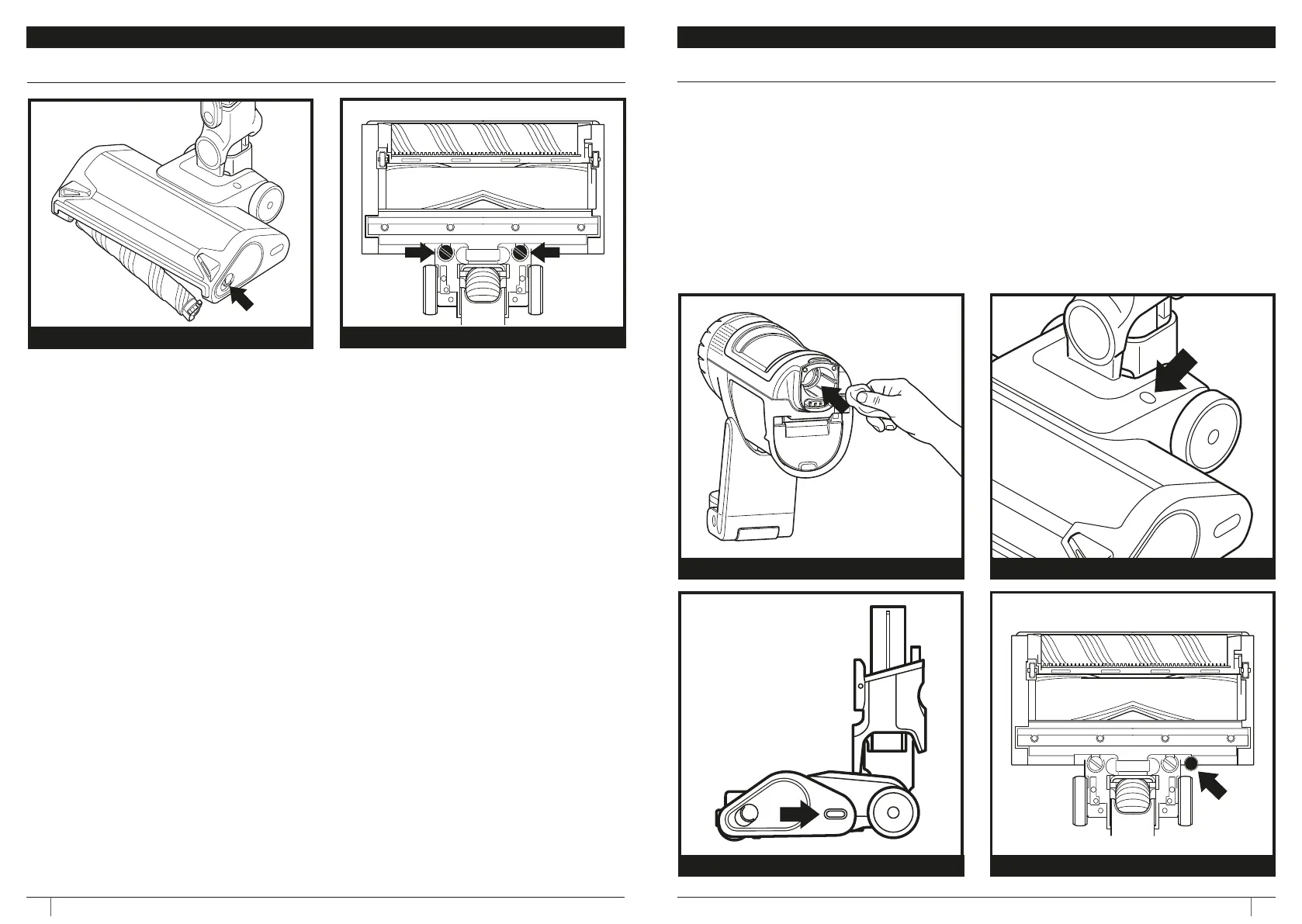
1. Turn o the vacuum.
2. Press the nozzle release button to detach
the nozzle from the wand.
3. Press the soft roller release button and
slide the soft roller out of the nozzle.
4. Clear any blockages and remove any
debris from the soft roller and floor
nozzle.
5. Tap o loose debris and wipe the soft
roller clean with a dry towel. Hand wash
the soft rollerif needed, using only water,
and then let it air dry completely before
reinstalling.
6. When the soft roller is completely dry,
reinstall it into the nozzle by inserting it
into the nozzle until it clicks.
1. Turn o the vacuum.
2. Press the nozzle release button to detach
the nozzle from the wand.
3. Remove rear squeegee by turning screws.
4. Clear our any blockages and debris from
behind the squeegee.
5. Reinstall squeegee and turn screws until
they lock into place.
REMOVING SOFT ROLLER REMOVING SQUEEGUEE
MAINTAINING YOUR VACUUM
CLEANING THE SENSORS
Make sure to clean the Detect sensors regularly, as hair and other debris may build up and
obstruct them. If the sensors are partially obstructed, Clean Sense Detect mode will not function
as expected.
To clean the sensors:
1. Turn o power and remove the floor nozzle.
2. Locate the Dirt Detect Sensor in the nozzle of the hand vac (Fig. 1), the Light Detect Sensor
on the top of the nozzle (Fig. 2), the Edge Detect sensor on the side of the nozzle (Fig. 3),
and the Floor Detect Sensor (Fig 4) on the bottom of the nozzle.
3. Gently wipe the sensors with a microfibre cloth and remove all hair and debris.
4. Reattach the floor nozzle to the rest of the unit and turn on power. Verify that the unit is
functioning normally.
DIRTDETECT SENSORS
Fig. 1
LIGHTDETECT SENSOR
Fig. 2
EDGEDETECT SENSOR FLOORDETECT SENSOR
Fig. 3 Fig. 4







 To Next Page