EasyManua.ls Logo

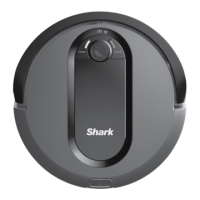
Shark IQ ROBOT AV970 Series - User Manual

Shark IQ ROBOT AV970 Series
13 pages
Print Icon
To Next Page IconTo Next Page
Loading...
Robot Vacuum
AV970 Series
OWNER’S GUIDE

Questions and Answers

  • B
    bethkellyAug 20, 2025
    What to do if the battery icon is flashing red on my Shark IQ ROBOT AV970?
    • J
      James EvansAug 20, 2025
      If the battery icon is flashing red, it means the battery is critically low and needs recharging. Pick up your robot and place it on the base, ensuring the base indicator light turns blue to confirm correct placement.
  • C
    coreyjohnsonAug 22, 2025
    Why is the CLEAN and '!' light flashing red on my Shark IQ ROBOT AV970 Vacuum Cleaner?
    • C
      calebclarkAug 22, 2025
      The CLEAN and '!' lights flashing red indicates a suction motor failure. Remove and empty the dust bin, clean the filters, and remove any blockages.
  • C
    Christopher WeberAug 25, 2025
    How to fix CLEAN (BLUE) and ! (RED) flashing on Shark Vacuum Cleaner?
    • K
      Kara WarrenAug 25, 2025
      The CLEAN (BLUE) and '!' (RED) lights flashing indicate a blockage in the brushroll. Remove any debris from around the brushroll so that it can spin freely.
  • J
    Juan BlevinsAug 26, 2025
    What does it mean when the CLEAN and '!' lights are flashing red alternately on my Shark IQ ROBOT AV970?
    • R
      rcontrerasAug 27, 2025
      When the CLEAN and '!' lights flash red alternately, it indicates a blockage in the brushroll. Remove any debris from around the brushroll so that it can spin freely.
  • M
    Michael VelazquezAug 27, 2025
    What should I do if the DOCK light is flashing red and the '!' light is solid red on my Shark IQ ROBOT AV970 Vacuum Cleaner?
    • S
      Shawn LopezAug 28, 2025
      If the DOCK light is flashing red and the '!' light is solid red, this indicates a blockage in the dust bin. Check the base and robot dust bin for clogs. Clear any debris and reinstall the dust bin, ensuring that it clicks into place.
  • S
    Steven DudleyAug 29, 2025
    Why is the CLEAN light flashing red on my Shark Vacuum Cleaner?
    • J
      Jonathan HaydenAug 30, 2025
      The robot may be stuck on an obstacle. Move the robot to a new location on a level surface.
  • M
    melaniewagnerAug 31, 2025
    What to do if CLEAN and DOCK lights are flashing red on my Shark IQ ROBOT AV970 Vacuum Cleaner?
    • J
      Jasmine BurkeAug 31, 2025
      The robot dust bin needs to be reinstalled. Insert the dust bin until it clicks in place.
  • W
    william16Sep 2, 2025
    How to resolve DOCK (RED) flashing on Shark Vacuum Cleaner?
    • C
      curtistorresSep 2, 2025
      The front bumper may be jammed. Clean the bumper and make sure it moves in and out freely.
  • K
    kroblesSep 4, 2025
    What does it mean when the CLEAN light is flashing red and the DOCK light is flashing blue alternately on my Shark IQ ROBOT AV970?
    • J
      Julie ReyesSep 4, 2025
      The robot is stuck. Move your robot to a new location and make sure the front bumper moves in and out freely.
  • J
    John JohnsonSep 6, 2025
    What should I do if the DOCK and '!' lights are flashing red on my Shark IQ ROBOT AV970?
    • S
      Sharon ClarkSep 6, 2025
      The side brush is stuck. Remove any debris from around the side brushes so they move freely.

Summary

Important Safety Instructions

Safety Warnings

General and specific warnings for safe operation and use of the robot.

Battery Use and Safety

Guidelines and precautions for using the robot's battery.

BotBoundary Strips Usage

Instructions and warnings for using BotBoundary strips.

Dock Setup and Charging

Home Preparation and Operation

App, Voice Control, and Connectivity

Maintenance Procedures

Cleaning and Replacing the Filter

Instructions for cleaning and replacing the robot's filter for optimal suction.

Ongoing Maintenance Tasks

Cleaning Sensors and Charging Pads

How to clean robot cliff sensors and dock charging pads for performance.

Cleaning Robot Wheels

Procedures for cleaning the front caster and drive wheels.

Cleaning Side Brushes

How to clean side brushes and ensure they are installed correctly.

Error Code Troubleshooting Guide

Regulatory and Disposal Information

Shark IQ ROBOT AV970 Series Specifications

General IconGeneral
TypeRobot Vacuum
ModelAV970 Series
Battery LifeUp to 90 minutes
Wi-Fi ConnectivityYes
Self-EmptyingYes
BaglessYes
CordlessYes
Battery TypeLithium-ion
Filter TypeHEPA
Surface RecommendationHard floors and carpets
Voice ControlYes
Smart FeaturesApp control, scheduling, mapping
Self-Empty Base Capacity30 days
Cleaning ModesAuto, Spot, Edge
Boundary SettingYes

Related product manuals