15
7.4 Macro manager
Usingthemacromanagerallowsyoutocreateyourownmacros,whichthenmaybeassignedtoany
button(see7.3.2).
Thereare3waystocreateascript:
1.Addthedesiredfunctionsusingthefunctionsbuttonsandfunctionsmodules.
2.Tapemousemovementsandkeycombinationsusingtherecordfunction.
3.Enterinstructionsusingtheinputarearesp.thekeyboardconnectedtothePC.
Saveyoursettingsbyclicking“”.
Viathebutton“”inthemainwindowyoursettingswillbetransferredtothemouse.
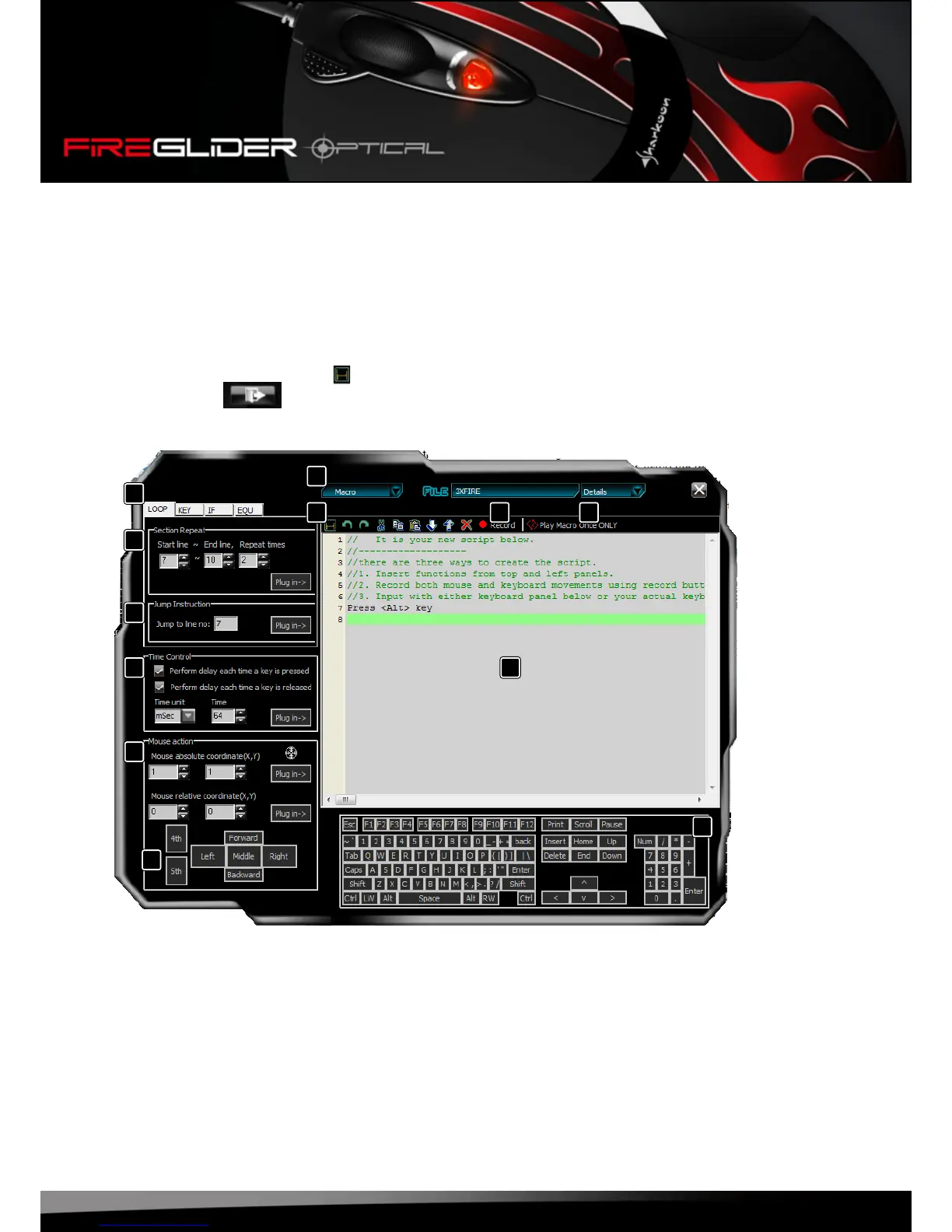
7.4.1 Overview
A – Thetabs“Loop”,“Key”,“If”and“Equ”(seebelow7.3.4.2)
B – Menubar
C – Commandicons(seebelow7.3.4.3)
D – Recordfunction(seebelow7.3.4.4)
E – Macroplaybackmode(seebelow7.3.4.5)
F – Insertsectionrepeat(seebelow7.3.4.6)
G– Insertjumpinstruction(seebelow7.3.4.7)
H – Denedelaytime(seebelow7.3.4.8)
I – Deneabsoluteandrelativemousecursormovements(seebelow7.3.4.9)
J – Deneasequenceofmousebuttonstrokes
K – Codearea
L – Deneasequenceofkeystrokes
A
B
C
D
E
F
G
I
J
K
L
H















 To Next Page