18
7.4.5 Macro play back mode
Choosebetweenthefollowingmenuitems:
PlayMacroOnceONLY:themacrowillbeexecutedoncebypressingthebutton.
PlayMacroRepeatedly:themacrowillbeexecutedseveraltimes.Youmaydeneifthemacroisreplayed
untilthebuttonisreleased(Presstostartreleasetostop)orifthemacroisexecutedaslongafterhitting
thebuttonuntilanyotherbuttonispressed(Presstostart.Re-presstostop).
7.4.6 Time control
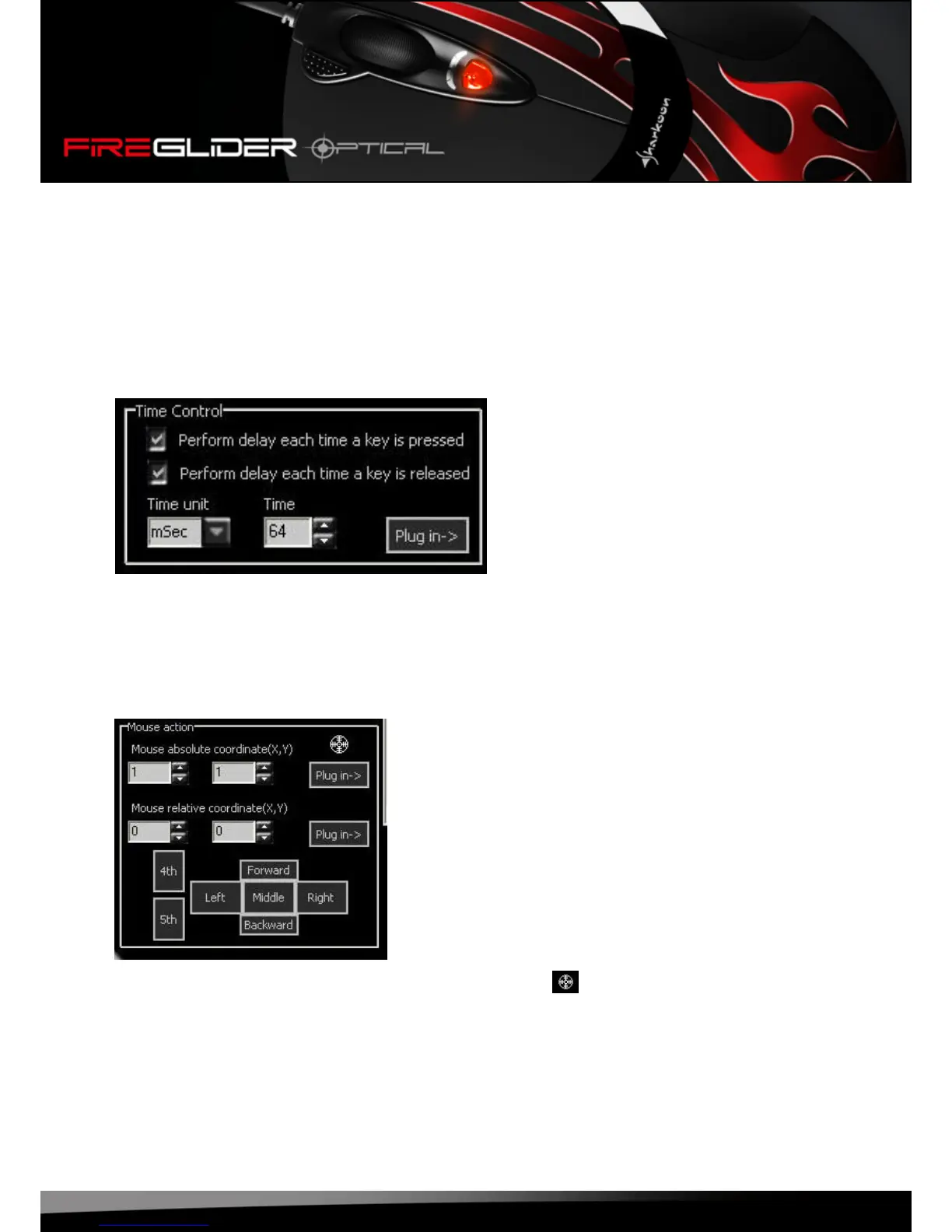
Tickthecheckboxestodeneifthetimedelayshallbecarriedoutafterpressingthebuttonorafter
releasing it.
Thecomboboxesallowyoutosettimeunitandtimedelay.
“Plugin”copiesyoursettingstothecodearea.
7.4.7 Absolute/relative movements
Todetectthecurrentabsolutecoordinatesgrabthecrosshairs()bypressing(andnotreleasing)the
mousebuttonandmovingthecrosshairsacrossthescreen.
Relativecoordinatesaredenedusingtherespectiveinputforms.
With“Plugin”youcopythesettingstothecodearea.








 To Next Page