8
8.2 Main Menu
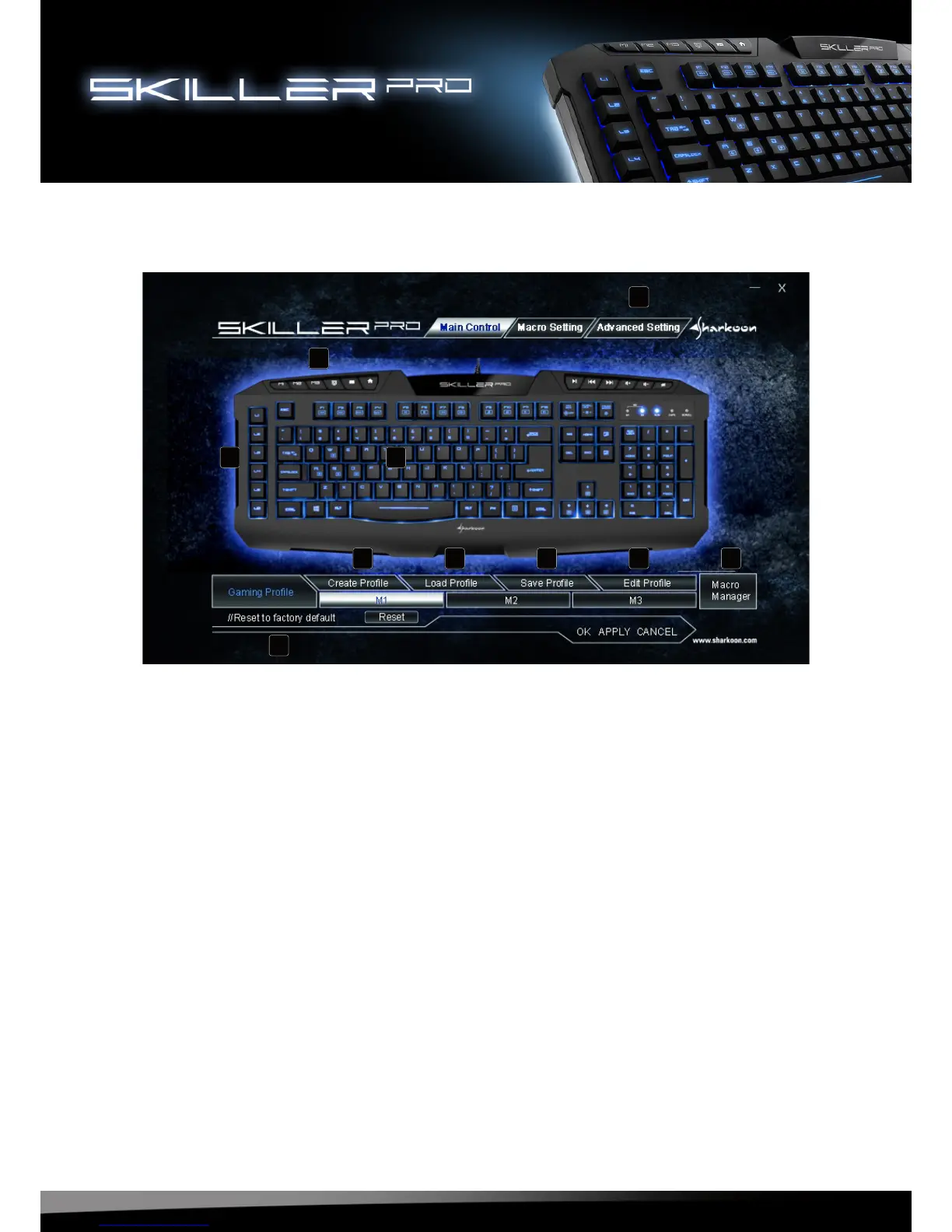
A -The SKILLER PRO offers three different profiles with the selection of tabs M1, M2, M3
( see 8.3 ).
B - Each key on the keyboard can be individually programmed (excluding multimedia
keys) ( see 8.4 ).
C - All profile settings reset the to default settings.
D - Through these tabs profiles can be created, loaded, saved or edited.
E - Through Macro Setting, desired functions of the keys L1 to L6 are assigned ( see 8.5 ).
F - Fine tuning (Polling Rate, Key Response time, Window Key Setting and Light
Intensity) options are made in the Advanced Setting tab ( see 8.6 ).
G -Through Macro Manager, individually stored macros can be called directly.
A
B
C
D D D D
E
F
G





 To Next Page