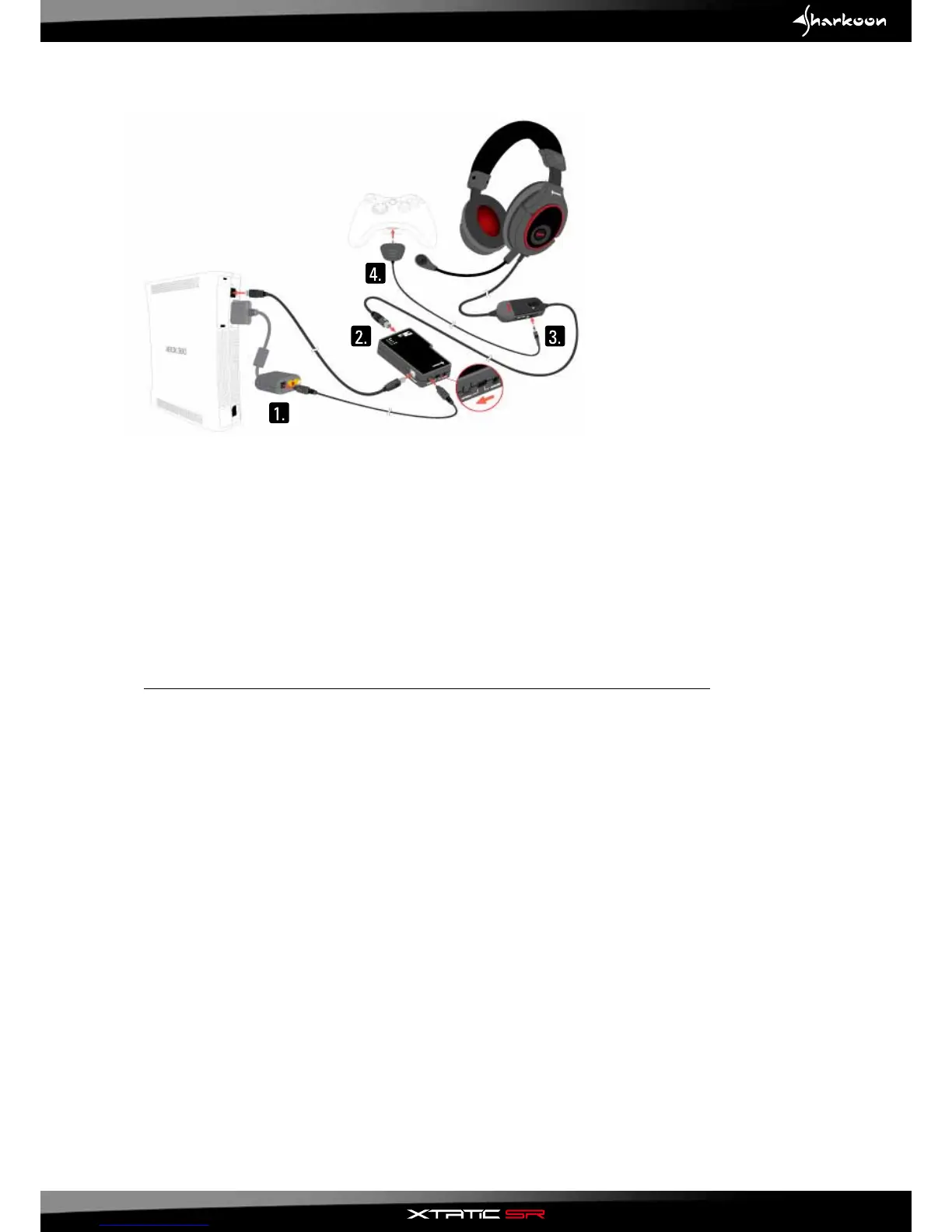
1. Connect the optical cable to your console and the SCU.
Note:
Some versions of the Xbox
®
360 already include the adapter cable greyed out in the drawing above.
In case your Xbox
®
360 does not include one of the cables mentioned below, you need to buy one of
them in order to connect the X-Tatic SR:
When connecting your Xbox
®
using "Component Video" or "Composite Video" you require the respective
Microsoft adapter cable with TOSLINK connector.
When connecting the Xbox
®
via HDMI you need the Microsoft Xbox
®
360 HDMI cable with optical audio
adapter.
You will find further information here:
http://en.wikipedia.org/wiki/Xbox_360_accessories#AV_Connectors_and_Cables
2.ConnecttheUSBcabletotheconsoleandtheSCU.
3. Connect the X-Tatic SR to the SCU.
4. Connect the chat cable to the Xbox
®
360 controller and the connector on the volume controller of
the X-Tatic SR headset.
5.ActivatetheopticalinputontheSCU.
6. Switch on your console and the SCU.
7.Insidethesettingsmenuofyourconsolecongurethesettingsforsoundoutputandmicrophoneas
described below:
13



 To Next Page