7.2.3 PC/Laptop
The X-Tatic SR can be connected to a PC in different ways:
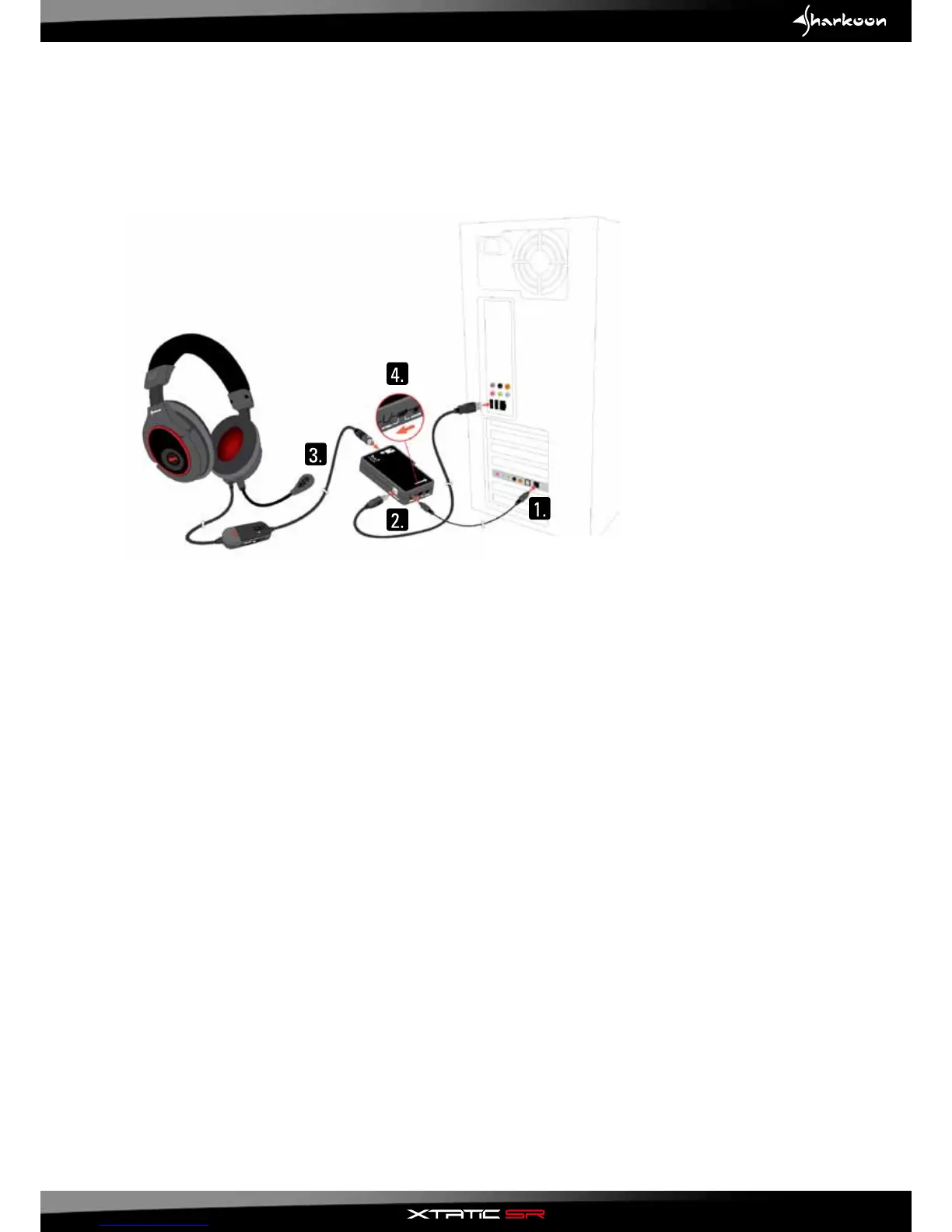
7.2.3.1 With SCU via optical connection
1. Connect the optical cable to the optical connector of your PC sound card and the SCU.
2.ConnecttheUSBcabletothePCandtheSCU(powersupplyandmicrophoneconnection!).
3. Connect the X-Tatic SR to the SCU.
4.ActivatetheopticalinputontheSCU.
5. Inside the audio settings menu of your PC operating system set "Optical digital out" as output device
and"CMediaUSBAudiodevice"asrecordingdevice(dening"CMediaUSBAudiodevice"asoutput
device will cause pure sound reproduction).
Note:
Please pay attention to the microphone level, as this level may be set to zero by default under
Windows 7.
Alternative:
In case your PC soundcard does not have an optical output, you may alternatively connect the SCU
using the included stereo connection cable (3.5 mm jack > 3.5 mm jack / step 1).
In this case you need to activate the analog input on the SCU (step 4).
17



 To Next Page