EasyManua.ls Logo

Sharp 14LK22 - User Manual

Sharp 14LK22
53 pages
Print Icon
To Next Page IconTo Next Page
Loading...
1
CONTENTS
PAGE
IMPORTANT INFORMATION .......................
2
Supplied Accessories .................................
2
IMPORTANT SAFEGUARDS ............ 3~ 4
Before Operating Your Television ...............
5
Antenna Connections .................................
6
Quick Reference Control Operation ..........
7
EZ SETUP during First Use ........................
8
Demo Mode ..................................................
9
Accessing the MAIN MENU screen
without Remote Control ..............................
9
Language ....................................................
10
Sleep Timer ...................................
10 ~ 11
On Timer .....................................................
12
Clock Set ....................................................
13
Video Adjust ............................................... 14
Closed Caption ..........................................
15
Parent Control ..............................
16 ~ 18
View Timer .................................
16 ~ 18
Energy Save ...............................................
18
Set Up ...........................................
19 ~ 22
EZ SETUP ................................................ 19
Channel Setting ........................
20 ~ 22
Blue Screen ............................................
22
Using the Video and Audio Input Jacks .....
23
Specifications ...............................................
24
Before Calling for Service .........................
25
Calling for Service ..................................... 25
COLOR TELEVISION
OPERATION MANUAL
MODEL
14LK22
7400 GJ
READ THIS OPERATION MANUAL
COMPLETELY BEFORE OPERATING
THIS PRODUCT.
01-07 14LK22 [E].p65e 29/5/01, 7:52 PM1
Downloaded from: http://www.usersmanualguide.com/
Question and Answer IconNeed help?

Do you have a question about the Sharp 14LK22 and is the answer not in the manual?

Overview

This document is an operation manual for the SHARP 14LK22 Color Television.

Function Description:

The SHARP 14LK22 is a color television designed for home entertainment. It allows users to watch broadcast television channels and connect to external video and audio sources such as camcorders, video games, VCRs, and DVDs. The television features a remote control for convenient operation and on-screen display menus for adjusting various settings. Key functions include channel tuning, volume control, picture adjustments, closed captioning, parental control, sleep timer, on timer, clock setting, and energy-saving modes. The EZ SETUP feature simplifies the initial setup process by automatically scanning and memorizing available channels.

Important Technical Specifications:

  • Model: 14LK22
  • Receiving System: NTSC
  • Reception Channels:
    • AIR: VHF (2-13 CH), UHF (14-69 CH)
    • CATV: 1-125 CH
  • Channel Tuning: 181-Channel Reception PLL tuning system
  • Antenna Input Impedance: VHF/UHF 75 ohm, Unbalanced
  • Screen Size: 14" (diagonally measured)
  • Terminals: Audio/Video input x 2 (Front x 1, Rear x 1)
  • Sound Output: 1.0 W (MAX)
  • Power Source: AC 110-220 V, 50/60 Hz
  • Power Consumption: 53 W
  • Dimensions: 14¹⁵/₃₂" (W) x 12¹¹/₁₆" (H) x 14⁵/₈" (D) [355.5 mm (W) x 322.0 mm (H) x 372.0 mm (D)]
  • Weight (approx.): 18.7 lbs (8.5 kg)

Usage Features:

Initial Setup:

The television features an "EZ SETUP" mode that guides users through the initial setup process. This includes selecting the preferred language (English or Español), connecting the antenna or cable, and automatically scanning for available channels. The tuner will search for broadcast channels and memorize them, displaying the number of memorized channels upon completion.

Basic Operation (Front Panel and Remote Control):

  • POWER: Turns the TV on or off.
  • CHANNEL UP/DOWN: Selects the next higher or lower channel.
  • VOLUME UP/DOWN: Increases or decreases the sound.
  • MENU: Accesses the main menu.
  • INPUT: Switches between external video input modes.
  • FLASHBACK: Returns to the previous channel.
  • MUTE: Mutes or unmutes the sound.
  • DISPLAY: Displays the receiving channel for 4 seconds.
  • CLOSED CAPTION: Temporarily displays receiving information in Closed Caption mode.
  • REMOTE KEYPAD: Enters channel numbers directly.

The main menu provides access to various settings, including:

  • TIMER: Allows setting the Sleep Timer and On Timer.
  • VIDEO ADJUST: For customizing picture settings.
  • CLOSED CAPTION: For managing closed captioning.
  • PARENT CONTROL: To restrict TV viewing time and content.
  • ENERGY SAVE: To enable power-saving modes.
  • SET UP: For initial channel setup and other system settings.

Picture Adjustments:

Users can adjust various picture settings through the "VIDEO ADJUST" menu:

  • PICTURE: Increases or decreases contrast.
  • TINT: Adjusts skin tones (greenish to purplish).
  • COLOR: Increases or decreases color intensity.
  • BRIGHT: Increases or decreases brightness.
  • SHARP: Increases or decreases sharpness.
  • FAVORITE COLOR: Selects between RED, BLUE, or STANDARD color tone.
  • RESET: Returns all adjustments to factory preset levels.

Timer Functions:

  • Sleep Timer: Automatically turns off the television in increments of 30, 60, 90, or 120 minutes.
  • On Timer: Sets the TV to turn on at a preset time. Users can select the hour, minute, and status (ON/OFF).
  • Clock Set: Allows setting the current time (hour and minute).

Closed Caption:

The television supports Closed Caption (CC) functionality, displaying subtitles for TV programs and home videos. It supports two modes: CAPTION (subtitles for TV programs) and TEXT (displays various information like news or weather forecasts).

Parental Control:

This feature allows users to restrict TV viewing time.

  • VIEW TIMER: Sets an accumulative timer for children's viewing.
  • VIEWING TIME: Sets the maximum viewing duration (e.g., 30 minutes to 10 hours).
  • OFF TIME: Sets the duration for which the TV remains off after the viewing time is reached.
  • STATUS ON/OFF: Activates or deactivates the viewing timer.
  • SECRET No.: A 4-digit secret number is used to access and modify parental control settings.

Energy Save:

This feature reduces power consumption by turning off the TV's video circuit when no signal is received for 15 minutes. It also allows users to adjust the brightness level to reduce power consumption, making the picture less bright but saving energy.

Connecting External Devices:

The television has two Audio/Video input jacks (one front, one rear) for connecting external devices such as camcorders, video games, VCRs, and DVD players. The "INPUT" button on the remote control or front panel cycles through the available input modes (AIR, INPUT).

Maintenance Features:

General Care:

  • Cleaning: Unplug the television from the wall outlet before cleaning. Use a damp cloth for cleaning; avoid liquid cleansers or aerosol cleansers.
  • Ventilation: Ensure the TV is located in an area with adequate ventilation. Do not block the ventilation openings on the back or bottom of the TV.
  • Placement: Avoid placing the TV on an unstable cart, stand, or table. Do not place it in a built-in enclosure unless proper ventilation is provided.
  • Magnetic Fields: Avoid placing the TV near strong magnetic fields, which can distort the color picture.
  • Power Cord: Do not place anything on the power cord. Do not locate the television equipment where the cord will be abused by persons walking on it.

Battery Replacement (Remote Control):

The remote control requires two AA batteries. To replace them, pull up the slit as indicated by the arrow to remove the back cover. Insert new batteries, ensuring correct polarity.

Safety Precautions:

  • WARNING: To reduce the risk of fire or electric shock, do not expose this appliance to wet locations.
  • CAUTION: Risk of electric shock. Do not open. Refer servicing to qualified service personnel.
  • Antenna Grounding: For added protection against lightning or power-line surges, ensure the antenna lead-in wire is properly grounded according to national electrical codes.
  • Overload: Do not overload wall outlets and extension cords, as this can result in fire or electric shock.
  • Foreign Objects/Liquids: Never push objects of any kind into the television through openings, as they may touch dangerous voltage points or short-out parts that could result in fire or electric shock. Never spill liquid of any kind on the television equipment.
  • Service: Do not attempt to service this television yourself. Refer all servicing to qualified service personnel. Unplug the television from the wall outlet and refer servicing to qualified service personnel under the following conditions:
    • When the power-supply cord or plug is damaged or frayed.
    • If liquid has been spilled into the television.
    • If the television has been exposed to rain or water.
    • If the television does not operate normally following the operating instructions.
    • If the television has been dropped or the cabinet has been damaged.
    • If the television exhibits a distinct change in performance.

Troubleshooting:

The manual includes a "QUICK SERVICE CHECK LIST" to help users identify and resolve common problems before calling for service. This list covers issues related to picture, sound, remote control, and connections, providing possible remedies.
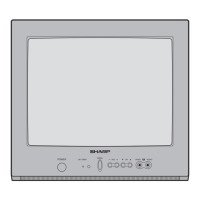
Sharp 14LK22 Specifications

General IconGeneral
BrandSharp
Model14LK22
CategoryTV
LanguageEnglish

Related product manuals