22
SET UP
V I DEO ADJUST
CAPT I ONCLOSED
PARENT CONTROL
ENERGY SAVE
TIMER
LA GUAGEN
BL E NSCREEU
CH SETT I NG
D+:
AIR
C
H MEMORY
ADTO
2
1
E–:
AIR
CH MEMORY
ESTO AR
21
L BLUE SCREEN
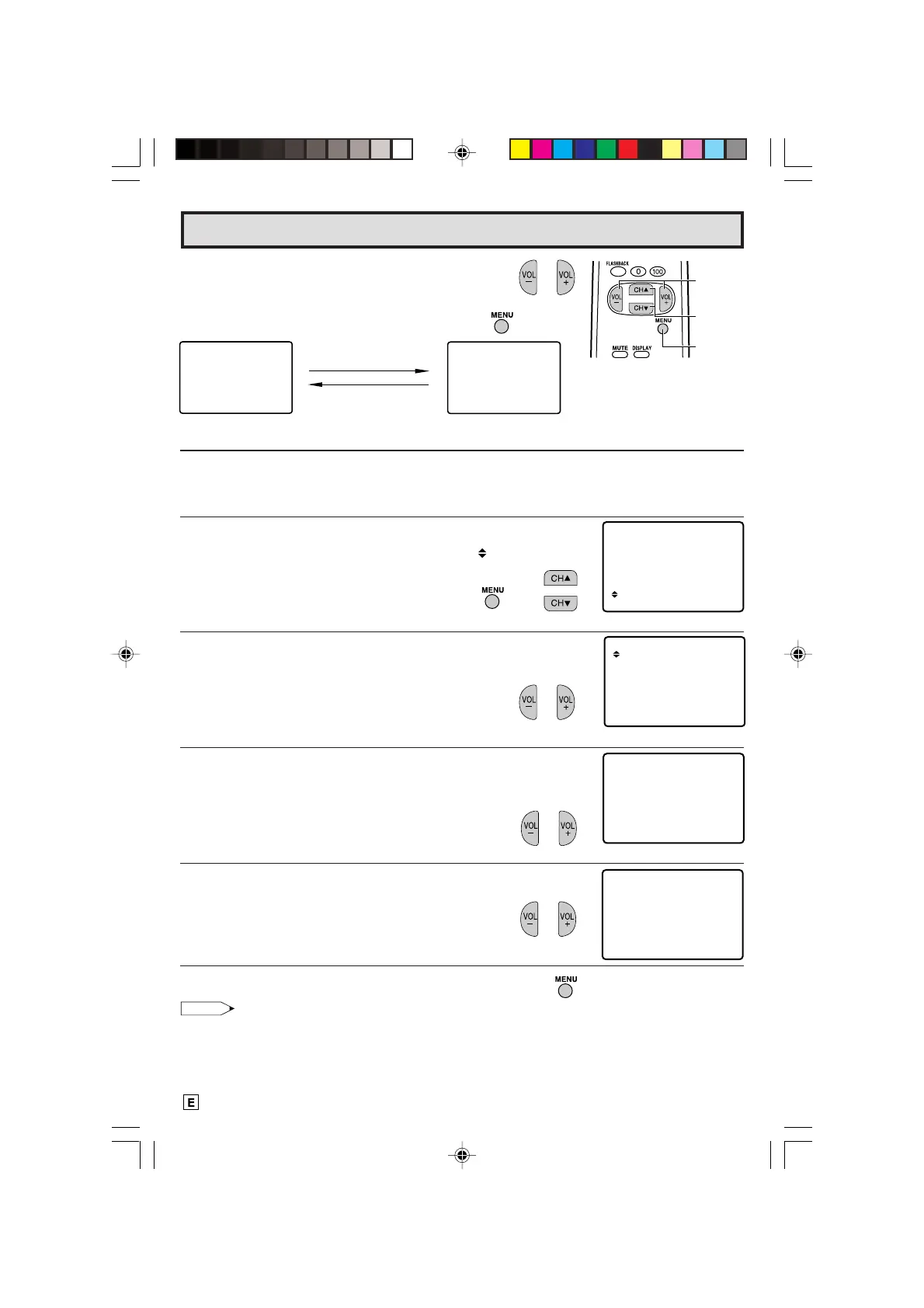
Automatically turns the screen blue if a broadcast signal is not received (e.g. when a TV
station closes down). After 15 minutes of non-reception, the TV set turns off.
1 Press
MENU
to access the MAIN MENU screen.
2 Press
CH UP (
8
)
or
DOWN (
9
)
to move the “ ” mark to “SET
UP”.
3 Press
VOL (+)
or
(–)
to access SET UP mode.
4 Press
VOL (+)
or
(–)
to access BLUE SCREEN select mode.
5 Press
VOL (+)
or
(–)
to select “ON”.
6 Press
MENU
to exit.
Note:
• Poor reception due to weak signals, or too much noise might activate the BLUE SCREEN function
despite the presence of a broadcast signal. To continue watching TV under these conditions, switch
the BLUE SCREEN “OFF”.
→
(MAIN MENU screen)
Set Up (Continued)
VOLUME
(+)/(–)
CHANNEL
UP (8)/
DOWN (9)
MENU
(SET UP mode)
(BLUE SCREEN select mode)
2.3 Press
VOL (+)
to add a channel to the TV’s
memory or press
VOL (–)
to erase a
channel from the TV’s memory.
2.4 Press
MENU
to exit.
VOL (+)
To add channel 12 to the
TV memory
VOL (–)
To erase channel 12 from
the TV memory
(CH MEMORY
memorized channel)
(CH MEMORY
unmemorized channel)
18-22 14LK22 [E].p65e 28/5/01, 10:48 AM22
Downloaded from: http://www.usersmanualguide.com/


 To Next Page