E 9
Dimension: 176 x 250 mm
M&M Printers (M) Sdn. Bhd
21E-FG1F_07-11E
• Select an appropriate volume so as not to injure your hearing.
• To avoid injuring your hearing, do not put on the headphone before plugging them into the headphone
jack and before the power is turned on.
• The proper impedance for the headphone is 32 ohms.
• Remove the headphone plug from the jack when not using the headphone.
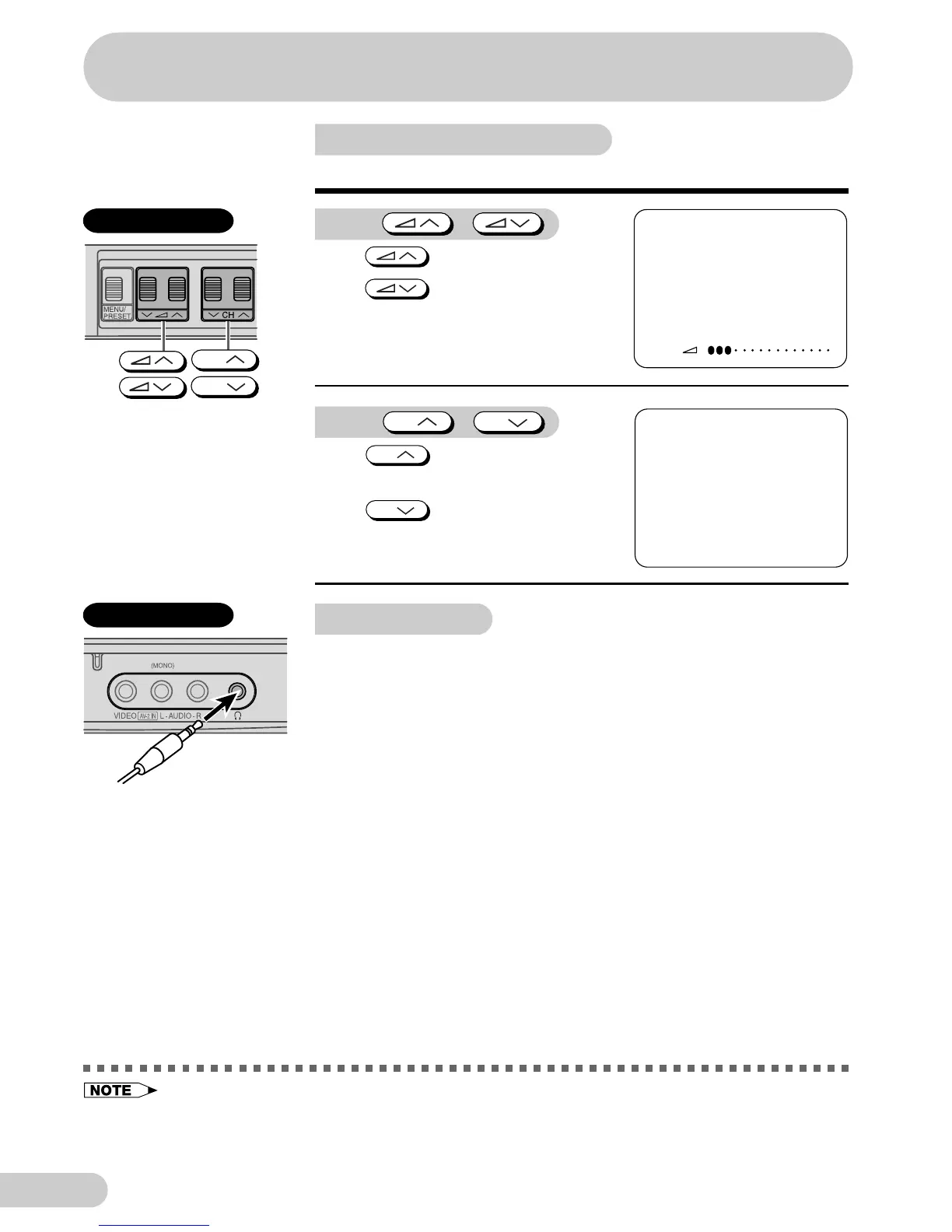
Operating the TV buttons
Simple operation of the TV set
Using /
Press to increase volume.
Press to decrease volume.
CH
CH
VOLUME 10
5
PAL
B/G
Using
CH
/
CH
Press
CH
to increase channel
number.
Press
CH
to decrease channel
number.
Using headphone
Insert headphone plug into headphone jack to listen to audio with
headphone.
• The audio from the speakers is turned off.
Behind the door
Behind the door
Watching TV



 To Next Page