31
Dimension: 140mm x 215mm
Ch Setup (Continued)
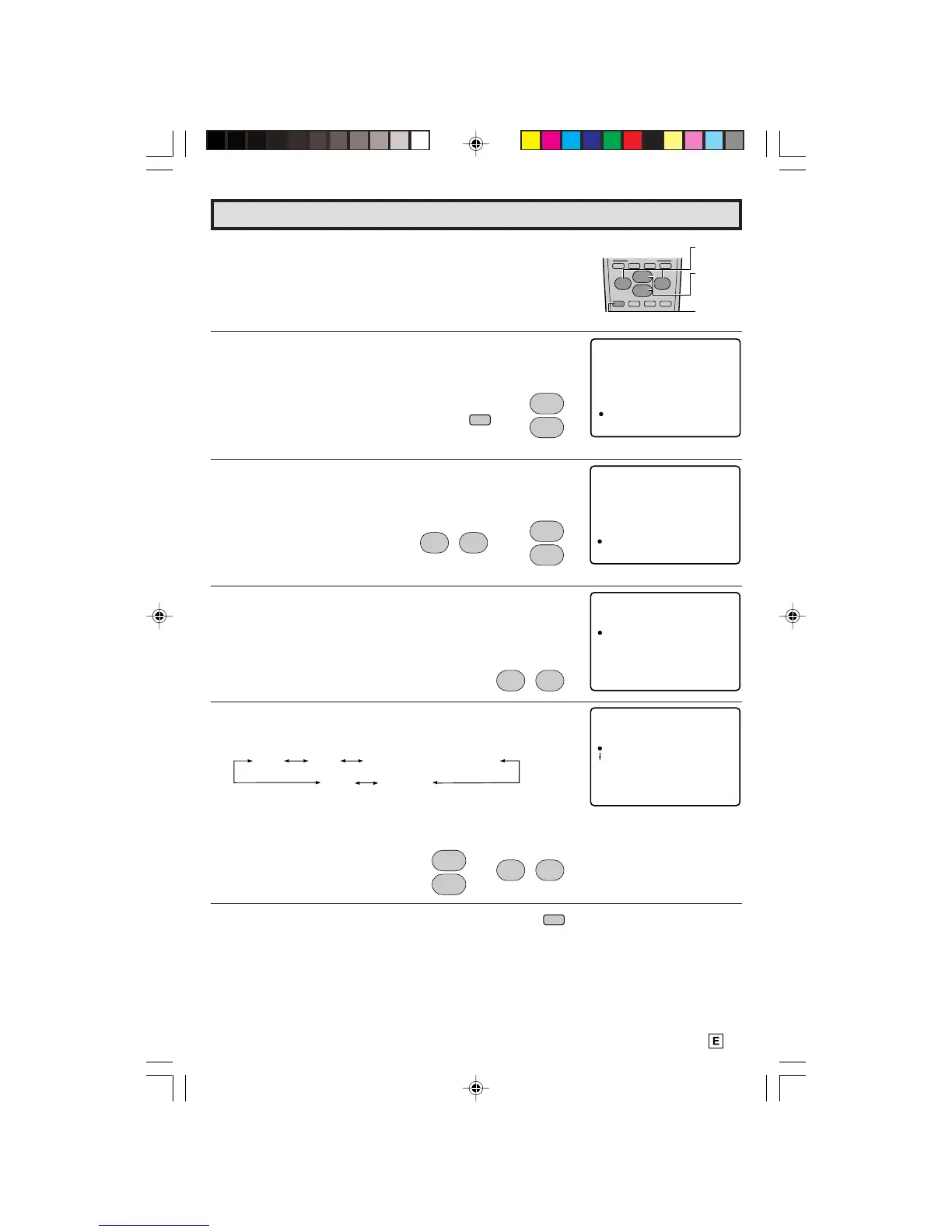
L UNIVERSAL PLUS FUNCTION
VCR or DVD input mode will be selected automatically by
pressing the VCR or DVD PLAY buttons on the UNIVERSAL
REMOTE CONTROL.
1 Press
MENU
to access the MAIN MENU screen.
2 Press
CH (
8
) or
(
9
) to move the “a” mark to “CH SETUP”.
3 Press
VOL (+)
or
(–)
to access CH SETUP mode, then press
CH (
8
) or
(
9
) to move the “a” mark to “UNIVERSAL PLUS”.
4 Press
VOL (+)
or
(–)
to access UNIVERSAL PLUS to select
VCR or DVD mode.
5 Press
CH (
8
) or
(
9
)
to select the VCR or DVD, and press
VOL (+)
or
(–)
to select “CH3, CH4”, “INPUT 1 (or
COMPONENT)”, “INPUT 2” or “OFF”.
Set mode to the input in which your VCR or DVD is connected
to. If done through RF, select either channel 3 or 4 to match
the setting of the VCR or DVD.
6 Press
MENU
to exit.
(CH SETUP mode)
(MAIN MENU screen)
VOL
(+)/(–)
CH
(8)/(9)
MENU
(UNIVERSAL PLUS select mode)
PER
S
O
NAL P
R
EF.
UN I
V
E
RSAL PL US
EZ
S
E
TUP
AI /CABLR
CH MEM
R
Y
O
CH SE A
C
H
R
CH P
SE
E
TU


 To Next Page