6
27L-S500,27L-X2000
CL27S50,CL27X200
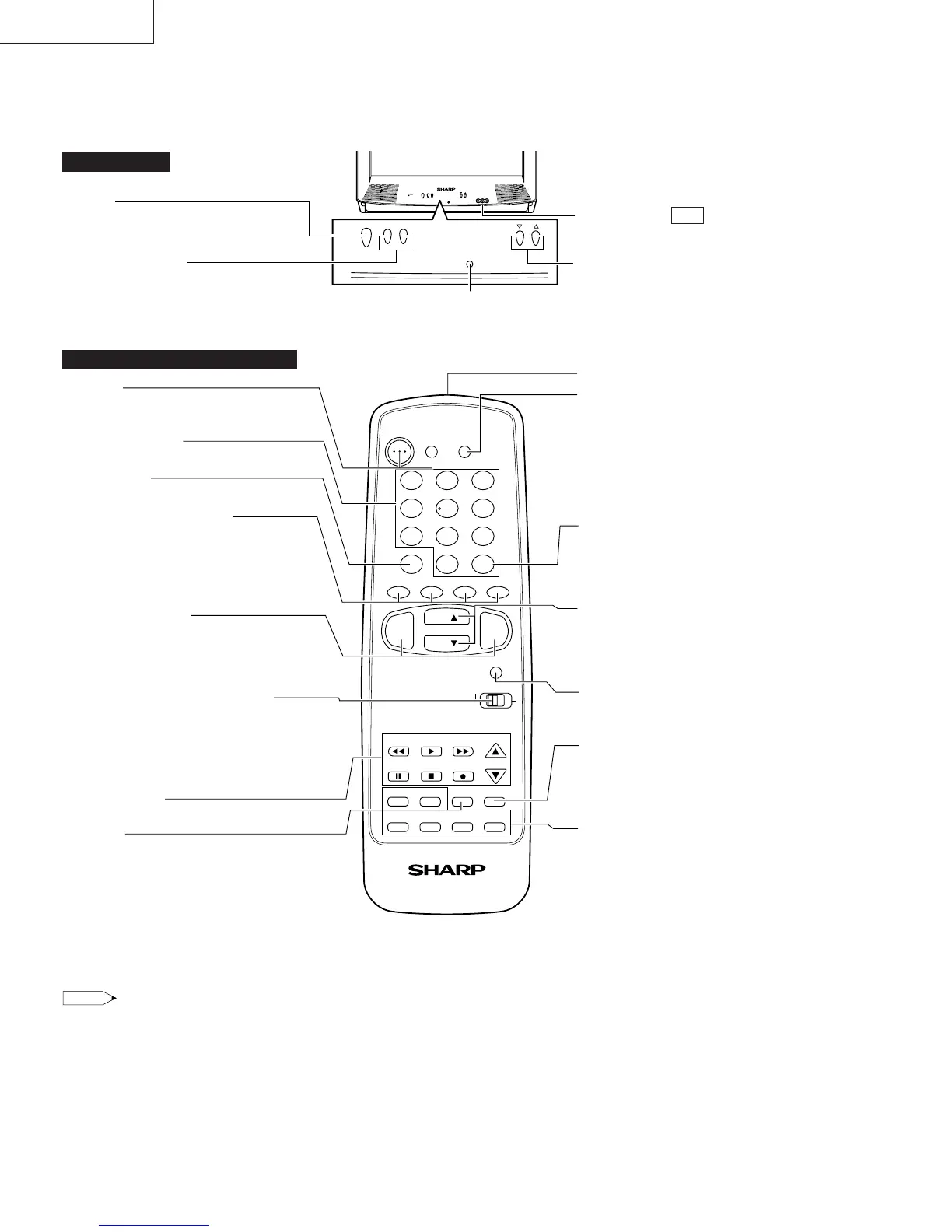
LOCATION OF USER'S CONTROL
(27L-S500, CL27S50)
Note:
• The above shaded buttons on the Remote Control glow in the dark. To use the glow-in-the-dark display on the remote control, place it under
a fluorescent light or other lighting.
• The phosphorescent material contains no radioactive or toxic material, so it is safe to use.
• The degree of illumination will vary depending on the strength of lighting used.
• The degree of illumination will decrease with time and depending on the temperature.
• The time needed to charge the phosphorescent display will vary depending on the surrounding lighting.
• Sunlight and fluorescent lighting are the most effective when charging the display.
Front Panel
CHANNEL UP/DOWN
( ) Selects next higher channel.
( ) Selects next lower channel.
POWER
Press → On.
Press again → Off.
Basic Remote Control Functions
SENSOR AREA FOR REMOTE CONTROL
VOLUME UP/DOWN
(+) Increases sound.
(–) Decreases sound.
POWER
Press → On.
Press again → Off.
REMOTE KEYPAD
Accesses any channel from keypad.
FLASHBACK
Returns to previous channel.
PERSONAL PREFERENCE
With the Personal Preference buttons,
you can program your favorite programs by
using the 4 categories A, B, C and D. The
channels can be accessed quickly by using
these buttons.
VOLUME UP/DOWN
(+) Increases sound.
(–) Decreases sound.
• In menu mode, changes or selects the TV
adjustments.
TV-CATV MODE SELECT SWITCH
In TV position, sends power and channel select
commands (Channel up/down and Random
Access buttons) to the TV.
In CATV position, sends power and channel
select commands to a cable TV converter.
VCR CONTROL
DISPLAY
Press → Display receiving channel for 4
seconds.
Press again → Displays remaining time of
SLEEP TIMER and VIEW TIMER.
Press 3 times → Temporarily displays receiving
channel when in Closed Caption mode.
Infrared Transmitter Window
INPUT
Press → Switch to external video INPUT 1
mode.
Press again → Switch to external video INPUT
2 mode.
Press 3 times → Switch back to the original
TV mode.
ENTER
Used in some instances where a VCR or Cable
Converter Box requires an “enter” command
after selecting channels, when using the
REMOTE KEYPAD button.
CHANNEL UP/DOWN
( ) Selects next higher channel.
( ) Selects next lower channel.
• Moves the “
|
” mark of the MENU screens.
MENU
Press → Accesses MAIN MENU.
Press again → Exits MAIN MENU.
MUTE
Press → Mutes sound.
Press again → Restores sound.
• CLOSED CAPTION appears when sound is
muted.
PIP FUNCTION
With the VIDEO inputs, you can watch two
pictures at the same time.
VIDEO/AUDIO TERMINALS
(VIDEO/AUDIO terminals are also provided on
the rear.)
IN 2
1 2 3
4 5 6
7 8 9
0
100
POWER
TV
VCR
MENU
CATV
PAUSE
PIP
TV
FLASHBACK
INPUT
TV • VCR • CATV
STOP REC
REW PLAY FF
VCR CH
SWAP FREEZE MOVE SELECT
CM SKIP DISPLAY MUTE
VOL
—
CH
CH
VOL
+
ENTER
A B C D
PERSONAL PREFERENCE
POWER
CH
– VOL +
POWER
CH
– VOL +
'
"
'
"


 To Next Page