18 Getting Started
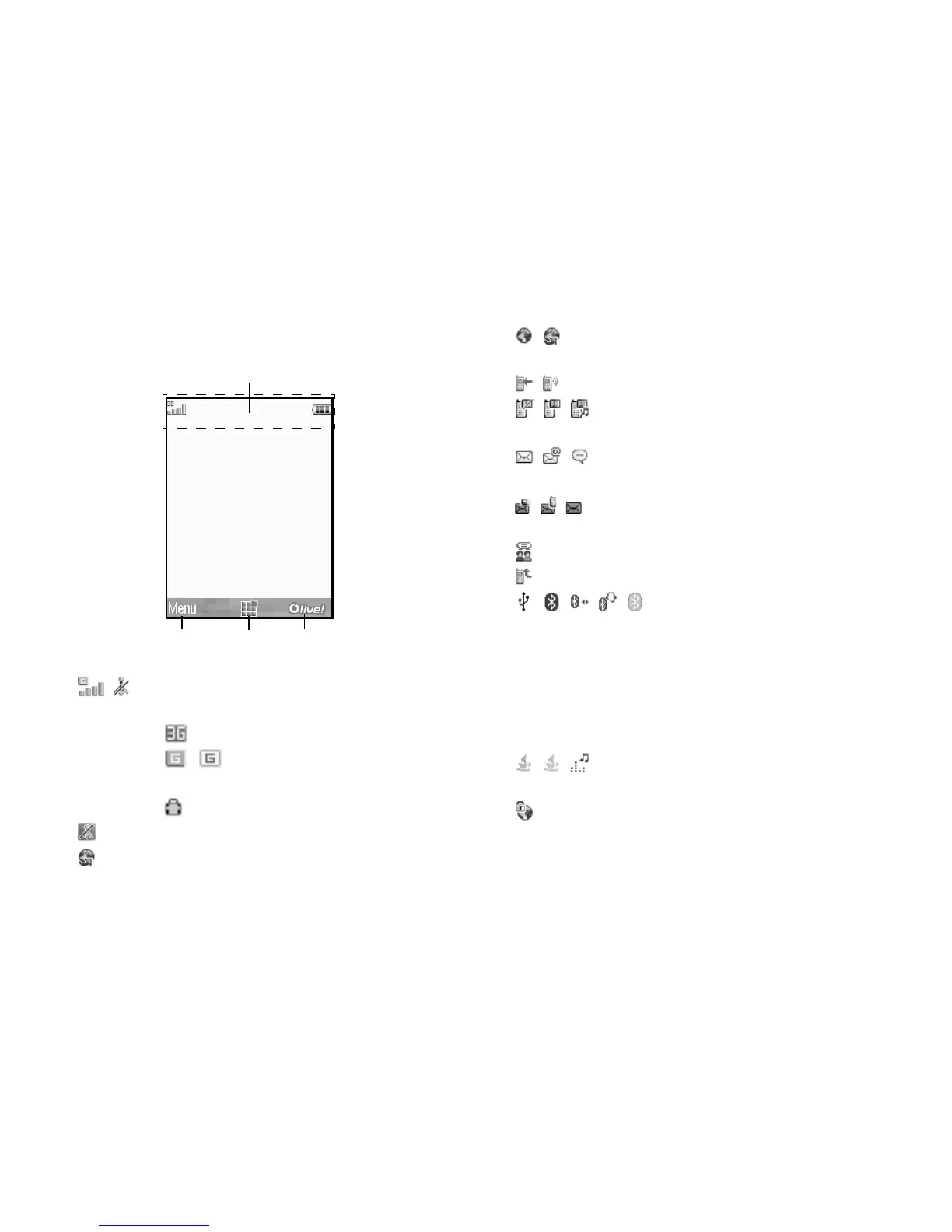
Display Indicators
1. / : Strength of received signal/Service out
of range
: 3G (UMTS)/GPRS
/ : GPRS enabled/GPRS
disabled
: Roaming outside network
2. : Flight mode
3. : Data exchange with external device
4. / : Connection to the server [established/
communicating]
5. / : Voice call [incoming/in progress]
6. / / : Video call communication mode
enabled [voice/video/voice and video]
7. / / : Alerts [text message and multimedia
message/Email/Instant messenger]
8. / / : Mailbox full (SIM card only/handset
only/both SIM card and handset)
9. : Logging in the Instant messenger
10. : “Voice Calls” diverts set to “Always”
11.////:
Connection status
[USB cable/Bluetooth wireless setting
[enabled (in standby or except in
standby)/exchanging information/
talking with the Bluetooth headset/Hide
my phone]]
12. / / : Java™ application [executed (colour)/
suspended (grey)]/Music player
13. : Secure WAP page displayed
Right soft keyCentre keyLeft soft key
Indicator area


 To Next Page