Contents
1. Part Names
2. Basic Operation
3. Menu Operation
4. USB Media
5. Connecting Other
Devices
1. Connecting 8K Output-
compatible
Device/Quad-screen
display(4K or less)
5. Connecting 4K Output-
compatible Device
7. Viewing HDR Video
(INPUT1, INPUT7,
INPUT8)
9. Using the HDMI CEC
11. Connecting Recorder,
Player, etc.
21. Connecting Audio
Device
22. Connecting PC
6. Operating the Monitor
Using a PC (IP control)
7. Troubleshooting
>
<
Connecting Other Devices
Connecting Recorder, Player, etc.
Switching to the screen of a BD recorder, etc.
To skip unused inputs
• Unused inputs (INPUT1 to 4, INPUT6, INPUT7, INPUT8) can be skipped during input change.
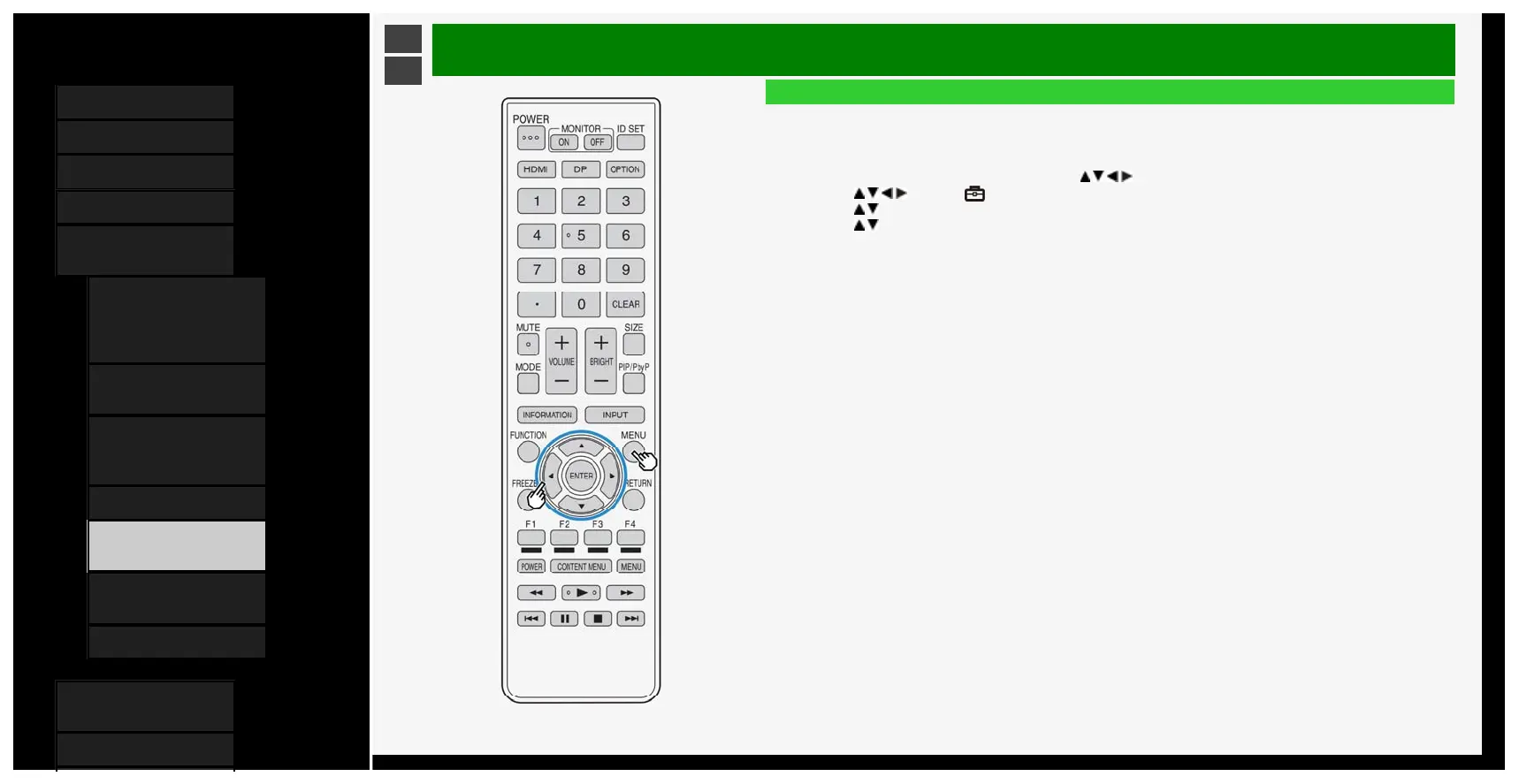
1. Press MENU to display the Menu, followed by / / / to select "Setup", and then press ENTER
2. Press
/ / / to select " (Option)" - "Terminal setting"
3. Press / to select "Input skip", and then press ENTER
4. Press / to select an input you want to skip, and then set the input to "Yes"
• To cancel the input skip, select "No".
5-19
4/9/2020 Sharp operation manual



 To Next Page