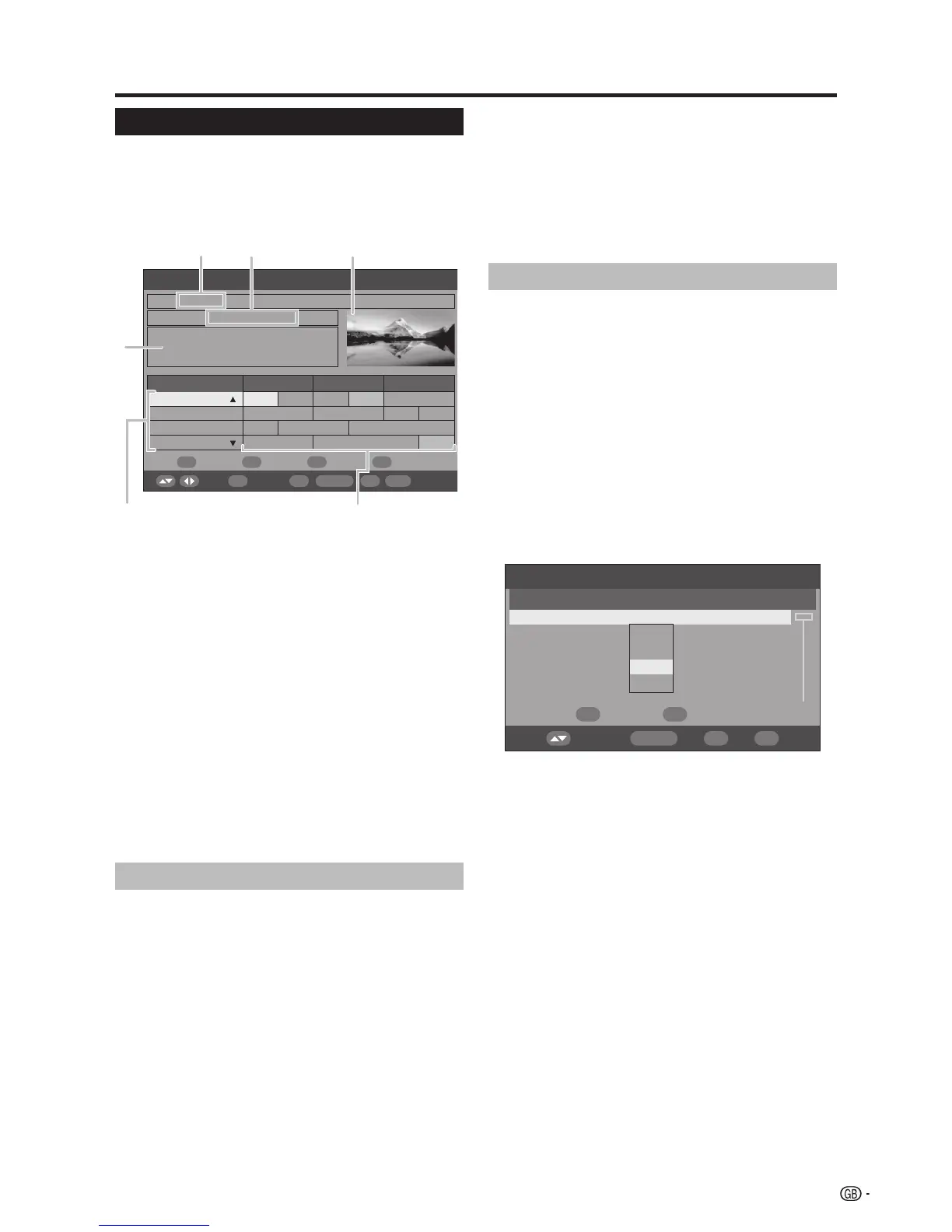
1 Service name
2 Event name
* Programme information
3 Picture window
4 Service list
• Shows the list of all services currently available. As
you scroll down the list, the rows in the Event name
list on the right will be refreshed correspondingly.
5 Event name list
• Shows the names of current events in a grid of
rows and columns. You can check scheduled event
information up to several days ahead, depending on
conditions.
• If a received programme does not contain a name,
either “No event name” or a blank space will be
displayed. However, the programme can still be
watched.
Using the EPG
Press EPG.
• Pressing RADIO will switch between DTV and Radio
mode.
Press a/b/c/d to access the desired service
or event.
• There is a slight lag from the time of the a/b/c/d
operations to the time the “Programme information”
and “Picture window” display is affected.
• The image shown in the picture window changes.
In the Service list:
1 Press a/b to scroll the page up/down. Or,
2 Press RED (Page l) or GREEN (Page k) to skip
to the previous/next page in one step.
In the Event name list:
1 Press c/d to scroll the page left/right. Or,
2 Press YELLOW (Prev. Day) or BLUE (Next Day) to
skip to the previous/next day in one step.
1
2
To watch an event currently on-air, press OK
(OK/Timer).
• The TV will show the image in full screen.
• Selecting an event that has not yet started will
activate the EPG Timer mode instead.
NOTE
• Pressing
p opens the EPG Description screen that
provides more information about the selected event. Press
p or END to exit.
Using the EPG Timer
When the Timer is set, the TV automatically tunes to a
preset TV event when its on-air time begins.
Press EPG.
Press a/b/c/d to select the desired event
to be preset from the Event name list, and then
press OK (OK/Timer).
• Select an event not yet started.
Press RED (Timer Mode), and then press a/b
to select the desired parameter (Once, Daily,
Weekly, or Monthly), and then press OK.
• Once set, the preset event is indicated with an
orange background in the EPG event name list.
• To cancel the preset, select the event to delete, press
GREEN (Delete Timer)
, press c/d to select “Yes”,
and then press OK.
NOTE
• This function cannot be set for locked services or when
Child Lock applies. (See pages 24 and 27.)
• Up to 8 events can be preset using the Timer function.
• If you are watching another event, an alarm message
displays on the screen a few seconds before the preset
time.
• An alert message displays when the preset events overlap
one another.
• The TV power may not come on for several seconds if you
preset an event using the EPG Timer and if the AC cord
has been disconnected.
• When you set the EPG Timer, the power consumption
during the standby mode will be higher (33 W or more)
than normal.
• When the TV is turned off, the EPG Timer will not operate.
l When using the EPG Timer for recording:
• Make sure to set the timer of your recording equipment as
well.
• Do not switch channels while recording.
• If the TV is in standby mode when the preset on-air time
nears, it will output signals for recording without displaying
images on the screen.
3
1
2
3
*
29
1 2
4
5
3










 To Next Page