12
Before turning on the power
21
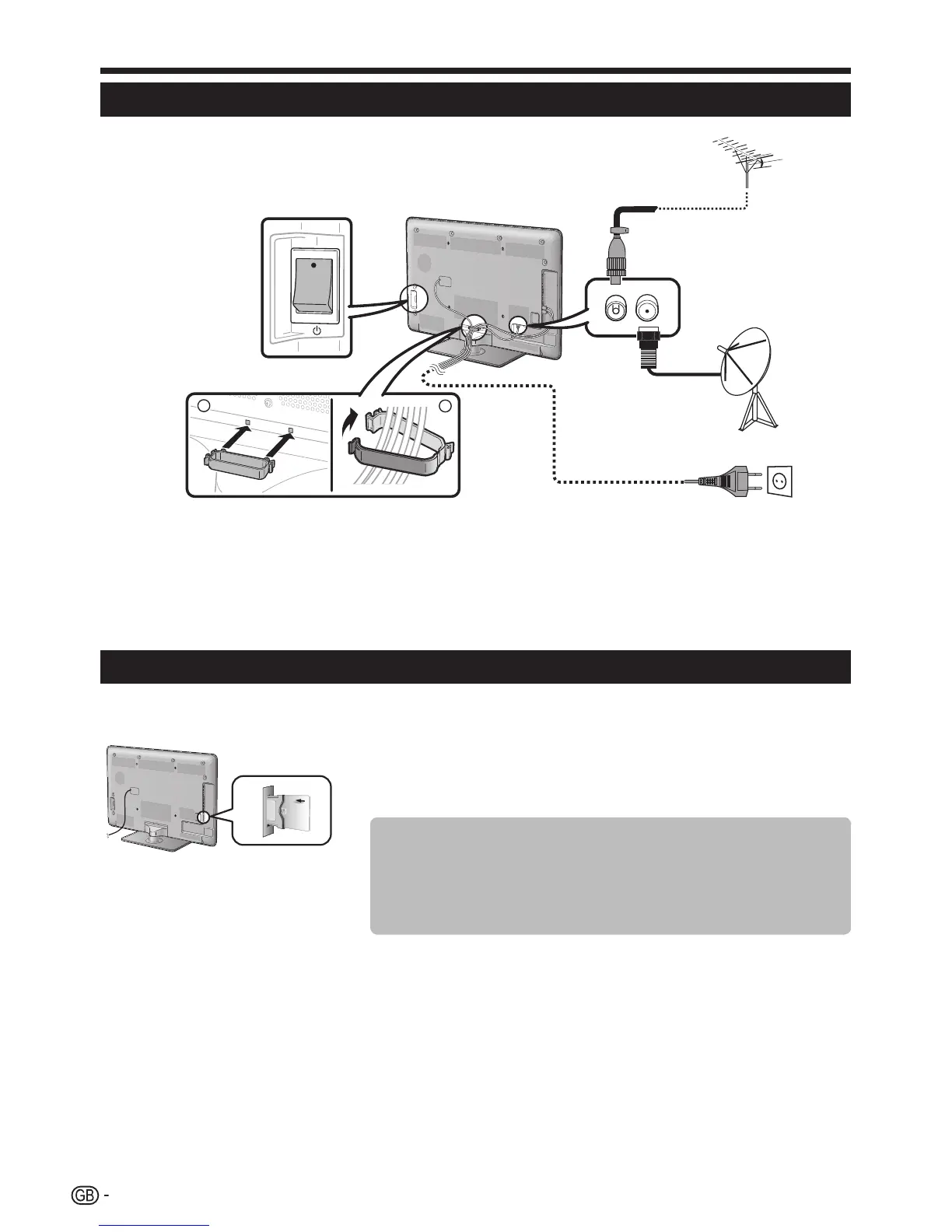
n Standard DIN45325 plug (IEC 169-2) 75 q coaxial cable
o Satellite antenna cable
p AC cord (product shape varies in some countries)
q Check that the MAIN POWER switch on the rear of the TV is turned on
(;).
r Cable clamp (bundle the cables with the clamp)
PlacetheTVclosetotheACoutlet,
andkeepthepowerplugwithin
reach.
Inserting the CA card into the CI module
Inordertoreceivecodeddigitalstations,acommoninterfacemodule(CImodule)andaCAcardmustbeinsertedinthe
CIslotoftheTV.
1 CarefullyinserttheCImodulein
theCIslotwiththecontactside
forward.
2 ThelogoontheCImodulemust
befacingoutwardfromtherear
oftheTV.
Checking CI module information
Go to “Menu” > “Setup” > “Option” > “CI menu”.
• Thismenuisonlyavailablefordigitalstations.
• ThecontentofthismenudependsontheprovideroftheCImodule.
Module
GeneralinformationonCImoduledisplays.
Menu
AdjustmentparametersofeachCAcarddisplays.
Enquiry
Youcaninputnumericalvaluessuchaspasswordshere.
NOTE
• Ittakesabout30secondstocertifythelicensekeywhenyouinsertaCAcardintotheCI+compatibleCImoduleforthefirsttime.This
processmayfailwhenthereisnoantennainputoryouhaveneverrun“Autoinstallation”.
• TheCI+compatibleCImodulesometimesupgradesitsfirmware.YoumaynotreceiveanyTVimagesbeforeupgrading.Youcanonlyuse
thepowerbuttonduringupgrading.
• TheCI+compatibleCImoduledoesnotallowyoutooutputanycopyprotectedprogrammesusingmonitorout.Inthiscase,thecopy
protecticon*isshownintheprogrammeinformationwhenP. INFOispressed.
* Protecticon:X
• IftheTVdisplaysanupdateconfirmationmessagefortheCAcardwhilereceivingCI+compatiblebroadcasts,followthescreenprompts.
• MakesurethattheCImoduleisproperlyinserted.
Quick guide





 To Next Page