50
Connecting a PC
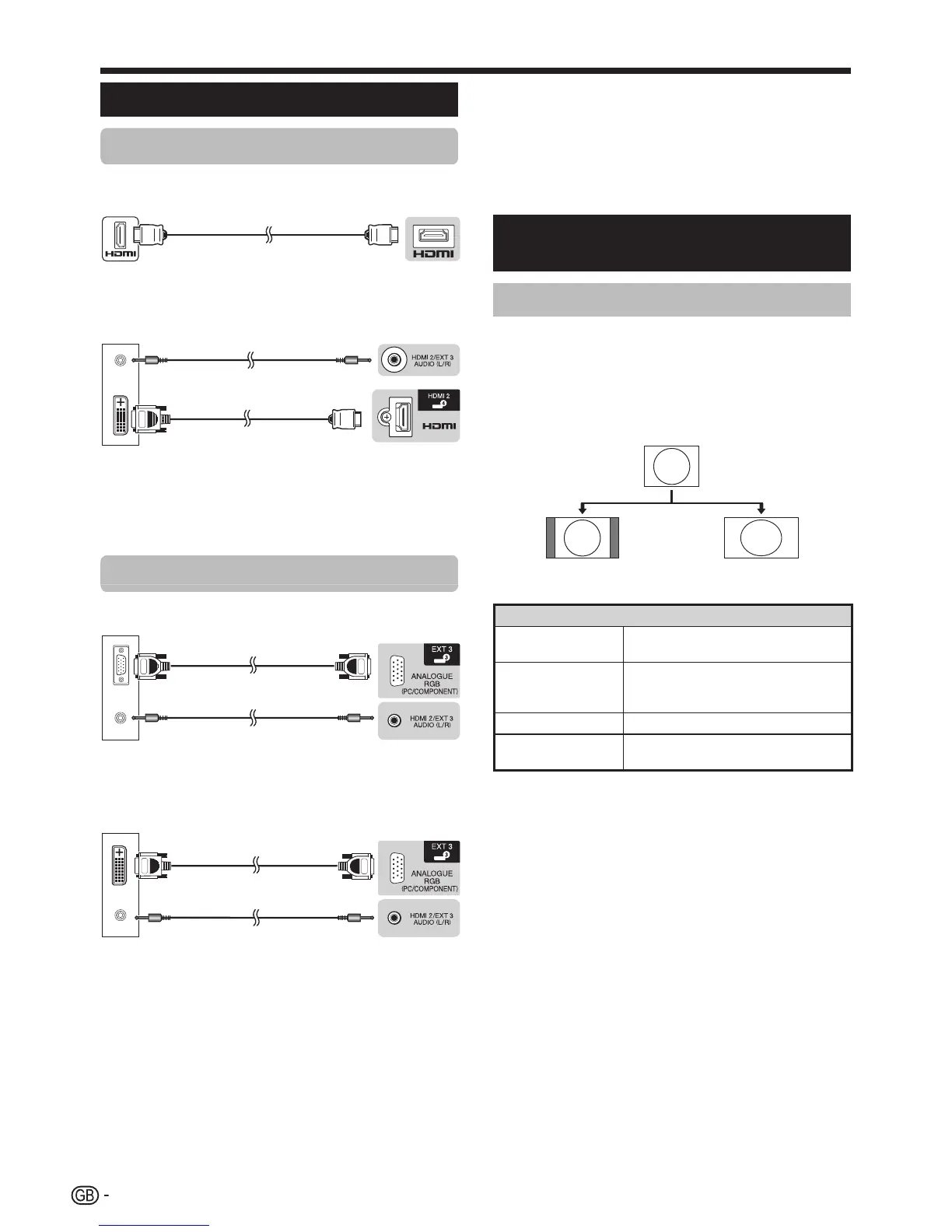
HDMI connection
PC HDMI 1, 2, 3 or 4
n HDMI-certified cable
PC HDMI 2*
o ø 3.5 mm stereo
minijack cable
p DVI/HDMI cable
* WhenusingtheHDMI2terminal,youmustselecttheproper
iteminthe“Audioselect”menudependingonthetypeofHDMI
cableconnected(refertopage32fordetails).
Analogue connection
PC EXT 3*
q RGB cable r ø 3.5 mm stereo
minijack cable
PC EXT 3*
s DVI/RGB conversion
cable
t ø 3.5 mm stereo
minijack cable
* WhenusingtheEXT3terminal,youmustselect“Video+Audio”
inthe“Audioselect”menu(refertopage32fordetails).
E After connecting
Youmustalsoset“RGB”fromthe“Inputselect”menu
whenselecting“EXT3”fromthe“INPUT”menu(Pages
19and44).
NOTE
• ThePCinputterminalsareDDC2B-compatible.
• Refertopage51foralistofPCsignalscompatiblewiththeTV.
Displaying a PC image on the
screen
Selecting the picture size
Youcanselectthepicturesize.
1 Press f.
• The“Widemode”menudisplays.
2 Press f or a/b to select the desired item.
EXAMPLE
Normal Full
Item
Normal
Keepstheoriginalaspectratioinafull
screendisplay.
Cinema
Forletterboxpictures.Barsmayappear
onthetopandbottomwithsome
programmes.
Full
Animagefullyfillsthescreen.
Dot by Dot
Displaysanimagewiththesame
numberofpixelsonthescreen.
NOTE
• Youcanalsoselectanitembypressingfontheremote
controlunit.
• ConnectthePCbeforemakingadjustments.
• Selectablepicturesizemayvarywithinputsignaltype.
• Refertopage41forAVsignals.
HDMI:480i/480p/576i/576p/720p/1080i/1080p
ANALOGUERGB:576p/720p(50Hz)/1080i
• TheANALOGUERGB(PC)terminal(EXT3)isnotcompatible
with480i/576i/1080psignals.
Connecting a PC





 To Next Page