26
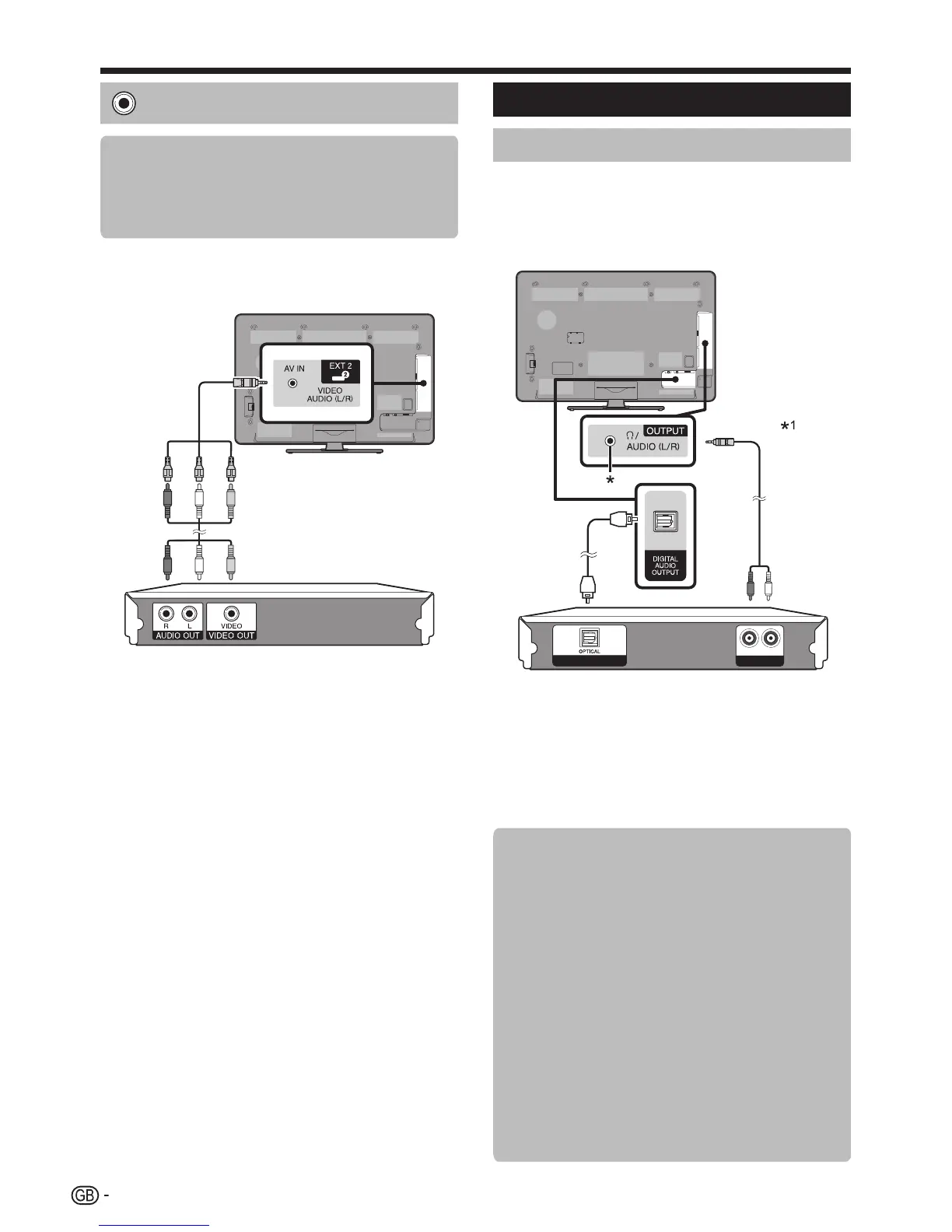
VIDEO connection
Example of connectable devices
E VCR
E DVDplayer/recorder
E Gameconsole
E Camcorder
YoucanusetheEXT2terminalwhenconnectingtoa
gameconsole,camcorder,aDVDplayer/recorderor
otherdevice.
u AV cable (supplied accessory)/Conversion cable
Audio connections
Speaker/amplifier connection
Connectanamplifierwithexternalspeakersasshown
below.
E Connecting an amplifier with digital/
analogue audio inputs
DIGITAL AUDIO IN
AUX1 IN
LR
v Optical audio cable (for digital audio)
w Stereo conversion cable*
1
(for analogue audio)
* Thisterminalisalsousedforheadphones.Reducethevolume
beforeusingheadphones.Overwhelmingsoundmaydamage
yourhearing.
I Thesuppliedconversioncable(AVcable)isonlyusedforthe
EXT2terminal,notfortheAudioIN/OUTterminal.Useastereo
conversioncable(commerciallyavailable)instead.
E After connecting
Digital audio output setting
Afterconnectinganamplifierwithdigitalaudio
inputandexternalspeakersasshown,youshould
setanaudiooutputformatcompatiblewith
theprogrammeyouarewatchingorthedevice
connected.
Go to “Menu” > “Setup” > “Option”
> “Terminal setting” > “Digital audio
output” > select “PCM” or “Dolby
Digital”.
NOTE
• Whensetto“DolbyDigital”,DolbyDigitalisoutputwhen
theDolbyDigitalorDolbyDigitalPlusaudioformatsare
received.Whensetto“PCM”,PCMisoutputnomatter
whataudioformatsarereceived.
• Whensetto“DolbyDigital”,HE-AACaudioformatscan
beoutputasDolbyDigital.
Connecting external devices





 To Next Page