EasyManua.ls Logo

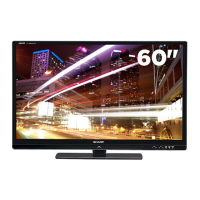
Sharp AQUOS LC-60LE831U - User Manual

Sharp AQUOS LC-60LE831U
81 pages
Print Icon
To Next Page IconTo Next Page
Loading...
LC-60LE831U OPERATION MANUAL MODE D'EMPLOI MANUAL DE OPERACIÓN
SHARP ELECTRONICS CORPORATION
Sharp Plaza, Mahwah, New Jersey 07495-1163
SHARP CORPORATION
Printed in Mexico
Imprimé au Mexique
Impreso en México
TINS-F098WJZZ
11P02-MX-NM
ENGLISHFRANÇAISESPAÑOL
IMPORTANT : Please read this operation manual before starting operating the equipment.
IMPORTANT : Veuillez lire ce mode d'emploi avant de commencer à utiliser l'appareil.
IMPORTANTE : Lea este manual de operación antes de comenzar a operar el equipo.
LC-60LE831U
LIQUID CRYSTAL TELEVISION
TÉLÉVISEUR ACL
TELEVISOR CON PANTALLA
DE CRISTAL LÍQUIDO
OPERATION MANUAL
MODE D'EMPLOI
MANUAL DE OPERACIÓN
ENGLISHFRANÇAISESPAÑOL
LC-60LE831UECover.indd1LC-60LE831UECover.indd1 2011/01/2513:46:012011/01/2513:46:01

Table of Contents

Questions and Answers

  • M
    Melissa LuceroAug 4, 2025
    Why does my Sharp LCD TV power off suddenly?
    • S
      Steven LunaAug 4, 2025
      If your Sharp LCD TV suddenly turns off, the sleep timer may be set. Also, the unit's internal temperature may have increased. Remove any objects blocking the vents or clean them to ensure proper ventilation.
  • S
    Samuel LongAug 9, 2025
    What to do if Sharp LCD TV remote control is not working?
    • W
      Walter WilliamsAug 9, 2025
      If the remote control for your Sharp LCD TV isn't working, first ensure that the equipment to be operated by the remote control unit is set correctly by pressing TV. Make sure the batteries are inserted with the correct polarity. If the batteries are worn out, replace them with new ones. Strong or fluorescent lighting near the TV or remote can also interfere with the signal. Also, a fluorescent light illuminated near the remote control sensor can cause issues. Finally, check if "RC Control Lock" is selected in "Operation Lock Out".
  • J
    jennykelleyAug 14, 2025
    How to fix strange colors on Sharp LCD TV?
    • D
      Dalton WashingtonAug 14, 2025
      If you notice strange color, light color, or color misalignment on your Sharp LCD TV, try adjusting the picture tone. Also, the picture may look dark if the room is too bright.
  • J
    Jordan MurphyAug 19, 2025
    How do I fix a cut off picture on my Sharp AQUOS LC-60LE831U?
    • K
      Kristen DixonAug 19, 2025
      If the picture on your Sharp LCD TV is cut off or has a sidebar screen, check if the image position is correct. Ensure that screen mode adjustments such as picture size are made correctly.
  • H
    henryangelicaAug 25, 2025
    What to do if Sharp AQUOS LC-60LE831U LCD TV cannot be operated?
    • B
      Barry AndersonAug 25, 2025
      If your Sharp LCD TV cannot be operated, it may be due to external influences such as lightning or static electricity. Turn off the power of the TV or unplug the AC cord and replug it in after 1 or 2 minutes.
  • J
    Julian RodriguezOct 29, 2025
    Why is there no sound on my Sharp AQUOS LC-60LE831U?
    • C
      Christine MarshallOct 29, 2025
      If your Sharp LCD TV has no sound, first verify that all connections to external components are correct. Also, ensure the volume isn't too low and that you haven't accidentally muted the TV with the remote. Check the audio output settings of any connected external equipment to ensure they are properly configured and not muted. If using an HDMI cable, you may need to configure the audio to be output through the HDMI cable. For PC or HDMI 1 connections, review the Audio Select settings. Note that depending on the equipment type and media, an audio cable might be needed even with an HDMI-certified cable. Also, when connecting a PC via HDMI, ensure the PC's audio output is correctly configured in Sound Properties. If using a DVI-HDMI conversion cable, confirm an audio cable is connected. Final...

Summary

IMPORTANT SAFETY INSTRUCTIONS

General Safety Precautions

Essential guidelines for safe installation, operation, and maintenance.

Child Safety and Mounting

Advice on preventing injury from tipping and safe installation.

QUICK REFERENCE & SETUP

Supplied Accessories

List of all items included with the TV.

Quick Installation and Setup

Essential steps for initial setup, connecting power, and remote use.

CONNECTING EXTERNAL EQUIPMENT

Connecting Various Devices

Connecting HDMI, Component, Composite, PC, and Audio devices.

AQUOS LINK and HDMI Control

Using HDMI CEC for interactive control of connected devices.

TV OPERATION & MENUS

Initial TV Setup and Tuning

Guided process for language, location, and channel tuning.

Direct Button and Menu Operations

Using remote buttons and the on-screen menu for TV control.

Picture and Audio Settings

Detailed adjustments for image quality, contrast, color, and sound.

MEDIA & INTERNET FEATURES

Media Playback (USB;Network)

Connecting and playing back photos, music, and videos.

Internet Connectivity and Browsing

Connecting to the internet, using the browser, and applications.

APPENDIX & SPECIFICATIONS

Troubleshooting Common Issues

Solutions for common problems like no power, picture issues, or no sound.

TV Specifications and Warranty

Detailed technical specs, dimensions, and warranty information.

Sharp AQUOS LC-60LE831U Specifications

General IconGeneral
Screen Size60 inches
Display TechnologyLCD
Resolution1920 x 1080
Backlight TypeLED
3D TechnologyYes
Refresh Rate120 Hz
HDMI Ports4
Component Video Input1
Composite Video Input1
USB Ports2
Ethernet PortYes
Wi-FiYes
Smart TVYes
DLNA CertifiedYes

Related product manuals