153
Handset Settings
AQUOS sense5G
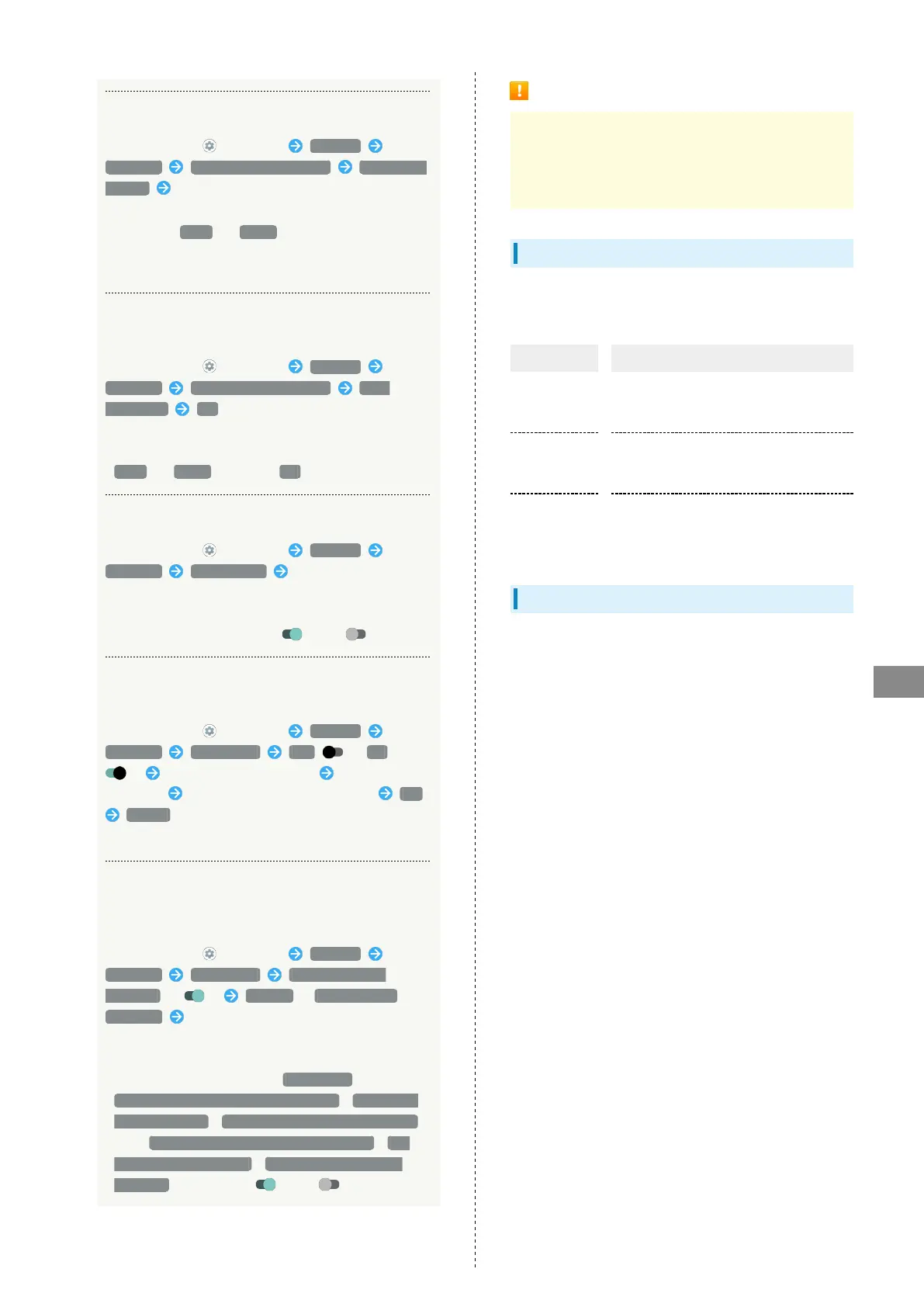
Installing Encrypted Certificates
In Home Screen, (Settings) Security
Advanced Encryption & credentials Install from
storage Follow onscreen prompts
・If method for unlocking screen before change is setting
other than None or Swipe , first unlock screen.
・Credentials may be required when configuring a Wi-Fi
network. How to obtain credentials varies by the issuer.
Deleting All Credentials and Resetting
Credential Storage Password
In Home Screen, (Settings) Security
Advanced Encryption & credentials Clear
credentials OK
・Clearing credential storage also deletes all VPN settings.
・If method for unlocking screen is setting other than
None or Swipe , first Tap OK and unlock screen.
Setting Whether to Show/Hide Trusted Agents
In Home Screen, (Settings) Security
Advanced Trust agents Tap agent name
・Set pattern / lock no. (PIN) / password for unlocking
screen beforehand.
・
Tap agent name to toggle on ( )/off ( ).
Setting Screen of Only Specified Application to
Be Kept in View
In Home Screen, (Settings) Security
Advanced App pinning Off ( On
) Activate application to pin Drag bottom of
Display up Tap icon of application in history Pin
GOT IT
・To unpin, wait while Dragging bottom of Display up.
Requiring Screen to Be Unlocked after Screen
of Only Specified Application No Longer Kept in
View
In Home Screen, (Settings) Security
Advanced App pinning Lock device when
unpinning ( ) Pattern / Lock No. (PIN) /
Password Set pattern / lock no. (PIN) / password
・Set "App pinning" to On beforehand.
・If pattern / lock no. (PIN) / password for unlocking
screen is set beforehand, Tap App pinning to show
Ask for unlock pattern before unpinning / Ask for PIN
before unpinning / Ask for password before unpinning
. Tap Ask for unlock pattern before unpinning / Ask
for PIN before unpinning / Ask for password before
unpinning to toggle on ( )/off ( ).
Screen Lock Cautions
Make sure to make a note of and not forget pattern / lock
no. (PIN) / password set for unlocking screen. If you forget
the code, visit your nearest SoftBank Shop for recovery.
Note that saved files and settings will be lost.
Main Security Codes
The following are main security codes required for handset
use.
Code Description
Center Access
Code
A four-digit code set in subscription
contract.
See "Center Access Code" for details.
SIM PIN
A code for SIM Card. SIM PIN is 9999 by
default (change as needed).
See "Enabling SIM PIN" for details.
Lock No. (PIN)
A code for unlocking screen.
See "Requiring Lock No. (PIN) Entry for
Unlocking Screen" for details.
Center Access Code
Center Access Code is a four-digit code set in subscription
contract; necessary to use optional services from landlines,
etc.
・Do not forget Center Access Code. If you forget the code,
contact us for recovery. For details, contact Customer
Service.
・Be careful not to reveal security codes to others. If misused
by others, SoftBank Corp. is not liable for any resulting
damages.












 To Next Page