AR-M207 M165 M162 EXTERNAL VIEWS AND INTERNAL STRUCTURES 4-4
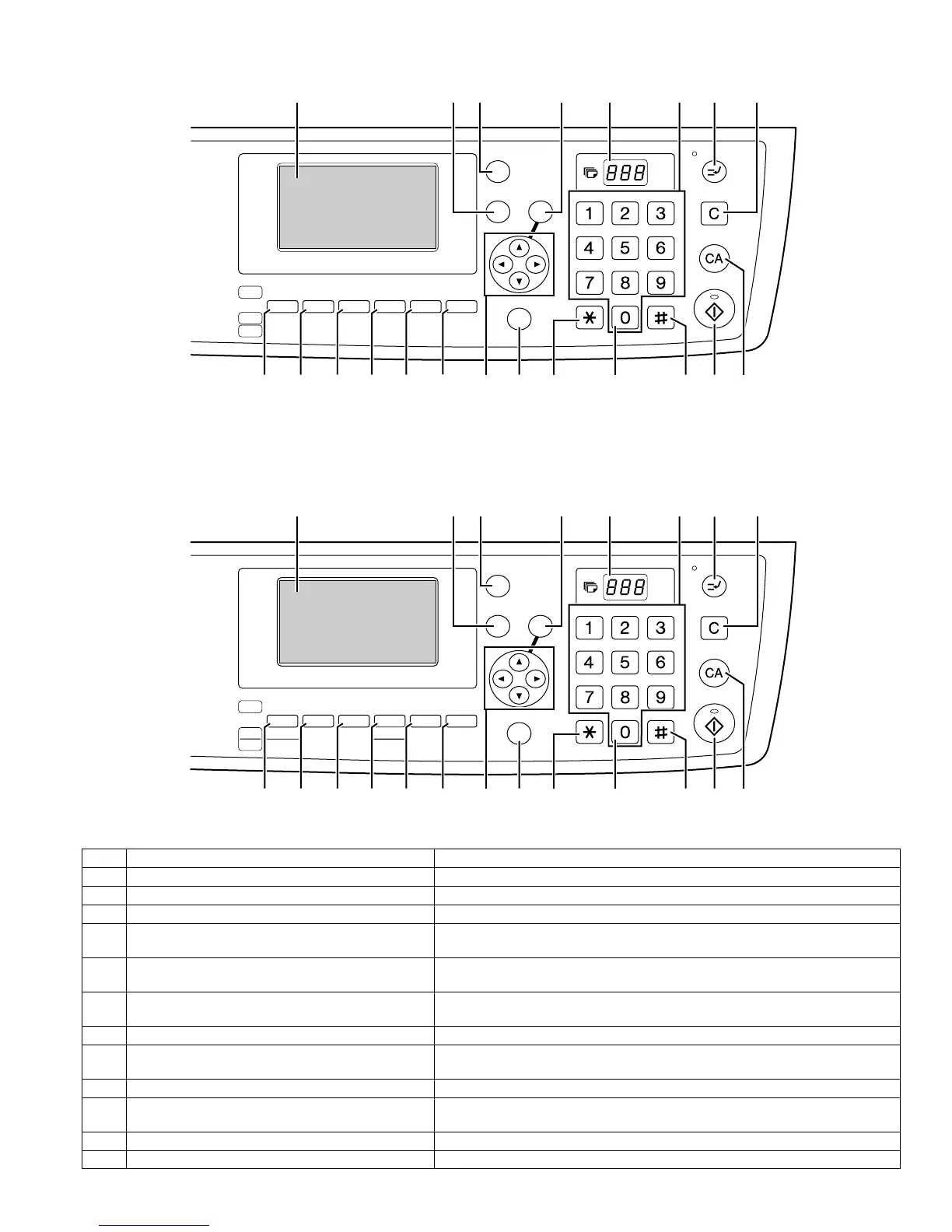
For U.S.A.
For other country
15 [EXPOSURE] key Use to select the exposure mode. "AUTO", "TEXT", or "PHOTO" can be selected.
16 [PAPER] key (PAPER SELECT key) Use to manually select a paper tray.
17 [ZOOM] key (COPY RATIO key) Press to select a reduction or enlargement copy ratio.
18 [AUTO%] key (AUTO IMAGE key) Press to have the copy ratio selected automatically.
19 [SORT] key (Only effective when the dual function
board is installed)
Use to select the sort function.
20 [DUPLEX] key (2-SIDED COPY key) (only on models
that support two-sided printing)
Select the two-sided copying mode.
21 Arrow keys Press to move the highlighting (which indicates that an item is selected) in the
display.
22 [SPECIAL FUNCTION] key Press to select special functions.
23 [ACC.#-C] key Press the end the use of an account and return the display to the account number
entry screen.
24 [0] key Press during a continuous copy run to display the number of copies completed.
25 [READ-END] key When copying in sort mode from the document glass, press this key when you have
finished scanning the original pages and are ready to start copying.
26 [START] key/indicator Copying is possible when this indicator is on. Press the key to start copying.
27 [CA] key Clears all selected settings and returns the machine to the default settings.
5967 8 1011 12
15 16 17 18 19
20
21 22 27262523 24
ABC DEF
JKLGHI MNO
TUVPQRS WXYZ
@.-
_
COPY
EXPOSURE
PAPER ZOOM
AUTO %
OUTPUT DUPLEX
SPECIAL FUNCTION
ACC. #-C
READ-END
SCAN
FAX
COLOR MODE
PROGRAM
RESOLUTION
RESOLUTION
ADDRESS FORMAT
ORIGINAL SIZE DUPLEX SCAN
DUPLEX SCAN
ORIGINAL SIZE
ADDRESS
BROADCAST
OK
BACK
FAX STATUS
ABC DEF
JKLGHI MNO
TUVPQRS WXYZ
@.-
_
COPY
EXPOSURE
PAPER
SELECT
COPY
RATIO
AUTO
IMAGE
OUTPUT
2-SIDED
COPY
SPECIAL FUNCTION
ACC. #-C
READ-END
SCAN
FAX
COLOUR MODE
PROGRAM
FORMAT
BROADCAST
OK
BACK
FAX STATUS
RESOLUTION
ADDRESS
ORIGINAL SIZE DUPLEX SCAN
5967 8 1011 12
15 16 17 18 19
20
21 22 27262523 24
[04]EXTERNALVIEWS.fm 4 ページ 2004年11月12日 金曜日 午後2時8分



 To Next Page