AR-M351U/M451U, AR-M355U/M455U EXTERNAL VIEWS AND INTERNAL STRUCTURES 5 - 1
[5] EXTERNAL VIEWS AND INTERNAL STRUCTURES
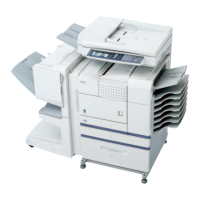
1. Exterior
No. Name Function Note
1 Bypass tray This tray can also be used for special papers including
transparency film.
Option
(AR-DU4)
2 Exit tray The tray is extendable to support large size paper. Extend the tray
when 11" x 17", 8-1/2" x 14", 8-1/2" x 13", A3 or B4 paper is being
used.
Option
(AR-DU4/AR-TE3)
3 Automatic document feeder This automatically feeds and scans multiple sheet originals. Both
sides of two-sided originals can be scanned at once.
–
4 Duplex module Module for two-sided printing Option
(AR-DU3/DU4)
5 Upper paper output area Finished sheets are deposited here. –
6 Upper exit tray extension Provides support for large size paper. Option
(AR-AR-TE4)
7 Operation panel ––
8 Front cover Open to add toner. –
9 Power switch Press to turn power on and off. –
10 Paper tray 1 ––
11 Stand/3 x 500 sheet paper drawer This paper feed unit contains an upper multi-purpose drawer and
two lower drawers each of which can hold a maximum of 500
sheets of 20 lbs. (80 g/m
2
) paper.
Option
(AR-D27)
12 Stand/MPD & 2000 sheet paper drawer This paper feed unit contains an upper multi-purpose drawer and a
lower drawer which can hold a maximum of 2000 sheets of 20 lbs.
(80 g/m
2
) paper.
Option
(AR-D28)
13 Multi purpose drawer Up to 500 sheets of 20 lbs. (80 g/m
2
) paper can be loaded. Also
special papers such as envelopes (standard sizes only) and
postcards can be set.
Option
(AR-MU2)
12345678910
11
12
13



 To Next Page