BD/DVD/CD Playback
_iiiiiiiiiiiiiiiiii)_iiiiiiiiiiiiiiiiiiiiiiiii_,_,,,,,,i,,,bCIIIIIIII_
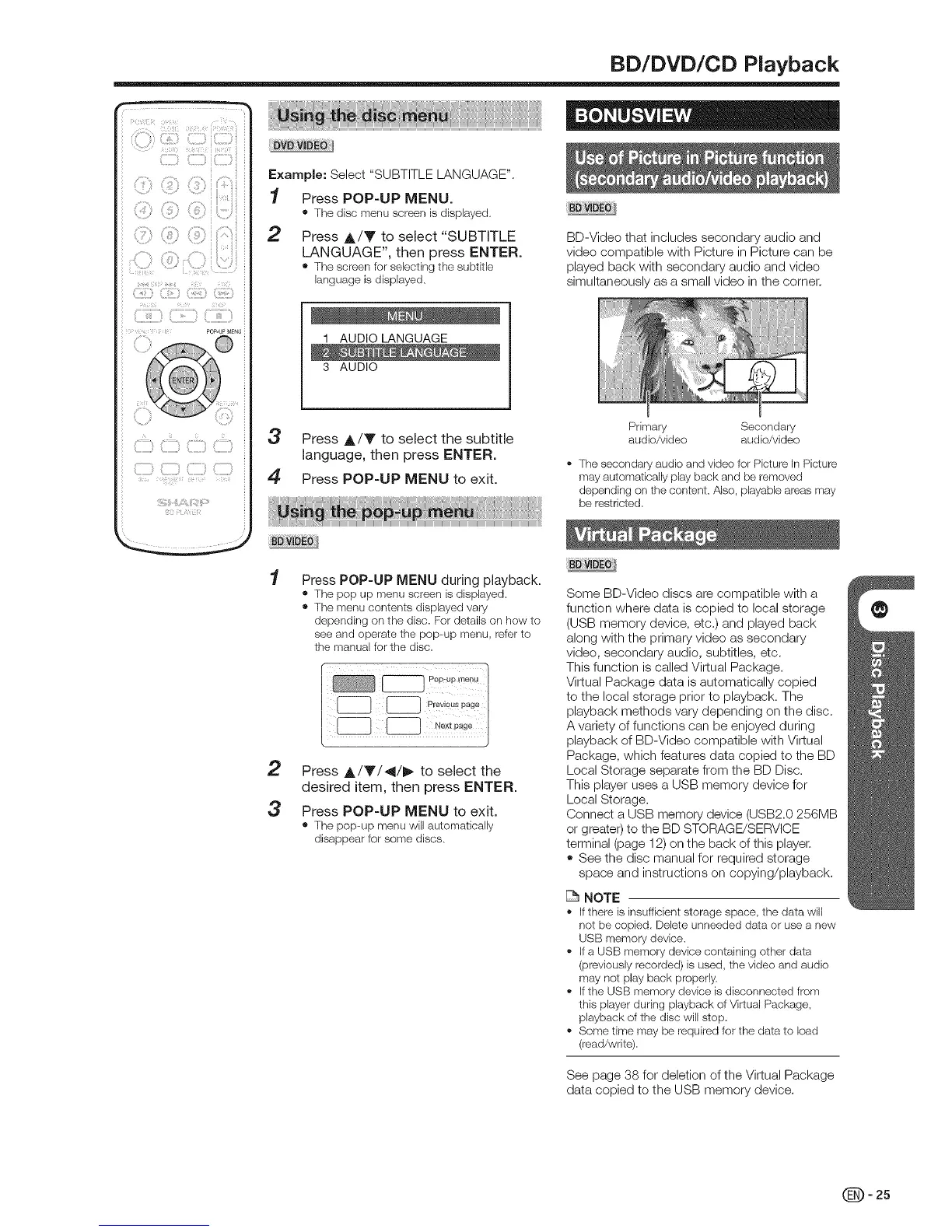
Example: Select "SUBTITLE LANGUAGE".
1 Press POP-UP MENU.
• Thedisc menu screenisdisplayed.
2 Press A/Y to select "SUBTFLE
LANGUAGE", then press ENTER.
• Thescreenfor selectingthe subtitle
languageis displayed.
1 AUDIO LANGUAGE
3 AUDIO
3 Press A/V to select the subtitle
language, then press ENTER.
4 Press POP-UP MENU to exit.
BD-Video that includes secondary audio and
video compatible with Picture in Picture can be
played back with secondary audio and video
simultaneously as a small video in the corner.
Primary Secondary
audio/video audio/video
,, The secondary audio and video for Picture In Picture
may automatically play back and be removed
depending on the content, Also, playable areas may
be restricted,
Press POP-UP MENU during playback.
• Thepop up menuscreenis displayed.
• Themenu contents displayedvary
depending onthedisc. Fordetailson how to
seeand operatethe pop-up menu, referto
the manualforthe disc.
2 Press A/Y/_I/_ to select the
desired item, then press ENTER.
3 Press POP-UP MENU to exit.
• Thepop-up menu will automatically
disappearfor some discs.
Some BD-Video discs are compatible with a
function where data is copied to local storage
(USB memory device, etc.) and played back
along with the primary video as secondary
video, secondary audio, subtitles, etc.
This function is called Virtual Package.
Virtual Package data is automatically copied
to the local storage prior to playback. The
playback methods vary depending on the disc.
A variety of functions can be enjoyed during
playback of BD-Video compatible with Virtual
Package, which features data copied to the BD
Local Storage separate from the BD Disc.
This player uses a USB memory device for
Local Storage.
Connect a USB memory device (USB2.0 256MB
or greate0 to the BD STORAGE/SERVICE
terminal (page 12) on the back of this player.
,, See the disc manual for required storage
space and instructions on copying/playback.
NOTE
,' If thereis insufficientstorage space, the data will
not be copied. Deleteunneededdata or usea new
USB memorydevice.
,, if a USBmemory devicecontainingother data
(previouslyrecorded)is used,the video and audio
may notplay back properly.
,, if the USBmemorydevice isdisconnectedfrom
thisplayerduring playbackof VirtualPackage,
playbackof the discwill stop.
,, Sometime may berequiredfor thedata to load
(read/write).
See page 38 for deletion of the Virtual Package
data copied to the USB memory device.
(_= 25


 To Next Page