Settings uring Playback
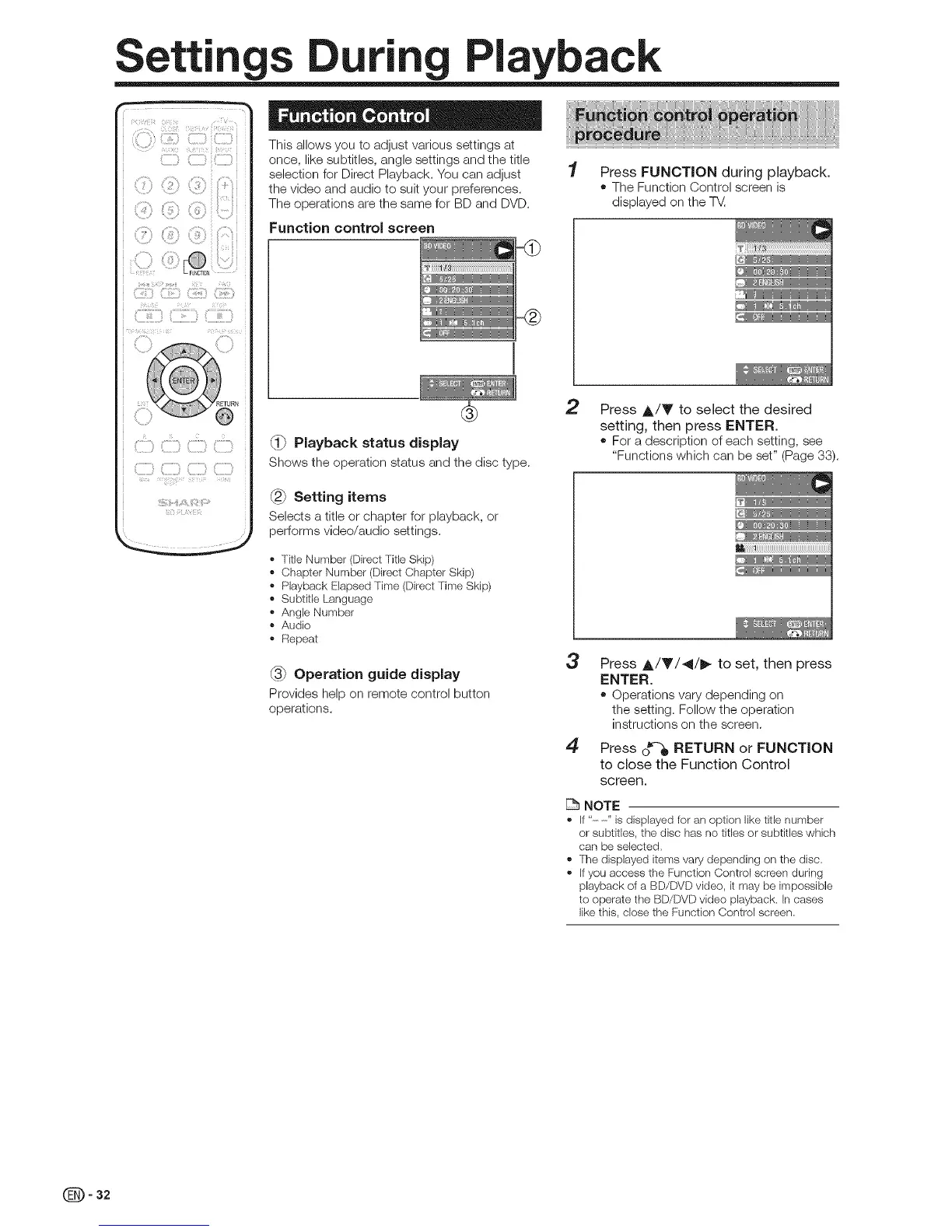
This allows you to adjust various settings at
once, like subtitles, angle settings and the title
selection for Direct Playback. You can adjust 1 Press FUNCTION during playback.
the video and audio to suit your preferences. • The Function Control screen is
The operations are the same for BD and DVD. displayed on the T_.
Functioncontro screen
C,,ii,,,,ii,C,IIIIII_C,D CIIIIIIII_
2 Press A/T to select the desired
setting, then press ENTER.
Playback status display • For a description of each setting, see
"Functions which can be set" (Page 33).
Shows the operation status and the disc type.
Setting items __
Selects a title or chapter for playback, or
performs video/audio settings.
i ..........................................................
_' Title Number(DirectTitle Skip)
_,ChapterNumber(DirectChapter Skip)
_, PlaybackElapsedTime (DirectTime Skip)
_,Subtitle Language
_,AngleNumber
_,Audio
_, Repeat
3 Press ,&/Y/41/_ to set, then press
_-3_Operation guide display ENTER.
Provides help on remote control button ,, Operations vary depending on
operations, the setting. Follow the operation
instructions on the screen.
4 Press o_-_ RETURN or FUNCTION
to close the Function Control
screen.
NOTE
_' If"--" isdisplayedforan optionlike titlenumber
or subtitles,the disc hasno titlesor subtitles which
can be selected.
_,Thedisplayeditems varydepending on the disc.
_,Ifyou accessthe FunctionControlscreenduring
playbackof a BD/DVDvideo, it maybe impossible
to operatethe BD/DVDvideo playback. Incases
likethis, closethe FunctionControl screen.
- 32


 To Next Page