EasyManua.ls Logo

Sharp CD-XP200W - User Manual

Sharp CD-XP200W
32 pages
Print Icon
To Next Page IconTo Next Page
Loading...
Thank you for purchasing this SHARP product.
To obtain the best performance from this product, please read this
manual carefully. It will guide you in operating your SHARP product.
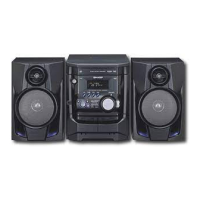
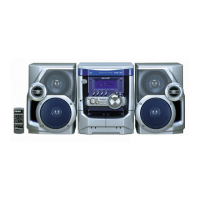
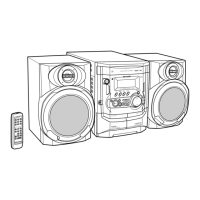
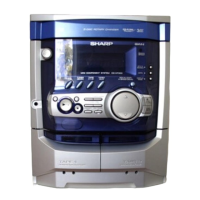
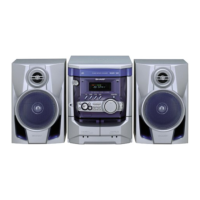
CD-XP200W Mini Component System consisting of CD-XP200W (main
unit) and CP-XP200 (speaker system).
MINI COMPONENT SYSTEM
MODEL
CD-XP200W
OPERATION MANUAL
CDXP200WA_FRONT 02.4.2, 5:31 PM1

Other manuals for Sharp CD-XP200W

Questions and Answers

  • A
    amber52Aug 18, 2025
    What to do if the Sharp CD-XP200W remote control does not operate?
    • C
      Christopher JonesAug 18, 2025
      If the remote control for your Sharp Stereo System isn't working, there are several potential causes: * Ensure the AC power lead of the unit is plugged in. * Check that the batteries are correctly inserted, respecting the polarity. * Replace the batteries if they are dead. * Adjust the distance or angle of the remote. * Make sure the remote control sensor isn't exposed to strong light.
  • R
    Ryan SmithAug 20, 2025
    Why is there no sound coming from my Sharp Stereo System?
    • N
      Nathan ContrerasAug 21, 2025
      If you're not getting any sound from your Sharp Stereo System, try the following: * Make sure the volume isn't set to "0". If it is, increase the volume. * Check if headphones are connected; if so, disconnect them. * Verify that the speaker wires are properly connected. Reconnect them if necessary. * Also, check the karaoke mode settings, as setting it to "L-CH", "R-CH" or "V-CANCEL" may affect the sound output.
  • B
    brandon30Aug 23, 2025
    What to do if my Sharp CD-XP200W Stereo System playback sounds are skipped, or stopped in the middle of a track?
    • B
      brendafarmerAug 23, 2025
      If your Sharp Stereo System is skipping or stopping during playback, consider these factors: * Ensure the unit isn't near excessive vibrations; if it is, move it. * Check if the disc is dirty; if so, clean it. * If condensation has formed inside the unit, allow it to dry out.
  • N
    Nancy AndersonAug 26, 2025
    What to do if my Sharp CD-XP200W Stereo System doesn't respond when a button is pressed?
    • C
      Candace SanchezAug 26, 2025
      If your Sharp Stereo System isn't responding when you press a button, try setting the unit to the power stand-by mode and then turning it back on. If that doesn't work, try resetting the unit.
  • K
    Kenneth CisnerosAug 28, 2025
    What to do if my Sharp Stereo System playback does not start, stops in the middle or is not performed properly?
    • S
      Sean HornAug 28, 2025
      If your Sharp Stereo System is experiencing issues with playback, such as not starting, stopping midway, or not performing correctly, check the following: * Ensure the disc is loaded correctly (not upside down). * Verify that the disc meets the required standards. * Inspect the disc for any signs of distortion or scratches.
  • F
    feliciaphillipsAug 30, 2025
    Why is my Sharp CD-XP200W Stereo System radio making unusual noise consecutively?
    • C
      cynthiagrahamAug 30, 2025
      If your Sharp Stereo System radio is making unusual noise, it might be due to the unit's placement. Try moving it away from the TV or computer. Also, check the placement of the FM aerial or AM loop aerial and adjust it as necessary.
  • O
    ofloydSep 2, 2025
    Why can't I record with my Sharp CD-XP200W Stereo System?
    • L
      lamanthonySep 2, 2025
      If you're unable to record with your Sharp Stereo System, check the erase-prevention tab on the tape.
  • M
    morganandrewSep 4, 2025
    Why can't I remove the tape from my Sharp CD-XP200W Stereo System?
    • S
      Stacy ScottSep 5, 2025
      If you cannot remove the tape from your Sharp Stereo System, and a power failure occurred during playback, the heads may still be engaged with the tape. Do not force the compartment open. Wait until electricity resumes before attempting to remove the tape.
  • C
    Crystal TranSep 7, 2025
    Why is my Sharp CD-XP200W clock not on time?
    • D
      Derek KingSep 7, 2025
      If the clock on your Sharp Stereo System is not on time, it may be due to a power failure. If a power failure occurred, reset the clock.
  • S
    Sheila OrtizSep 9, 2025
    Why can't I record tracks with proper sound quality or erase completely on my Sharp Stereo System?
    • C
      crystal83Sep 10, 2025
      If you're experiencing issues with recording sound quality or completely erasing tapes on your Sharp Stereo System, it might be because you are not using a normal tape. You cannot record on a metal or CrO tape. Ensure the tape is normal.

Summary

Special Notes and Safety Information

Important Safety Warnings

Covers general operating warnings, cautions, and potential hazards.

Regional Usage Notes

Specific usage guidelines for users in Australia and other countries.

Included Accessories

Accessory List

Details the accessories that should be included with the system.

Important Precautions

General Placement and Environment

Covers unit placement, ventilation, voltage, and environmental factors.

Volume and Condensation Advice

Guidance on safe volume levels and the effects of condensation.

Compact Disc Care Guidelines

Proper handling, cleaning, and storage of compact discs.

Controls and Indicators Overview

Front Panel Layout

Identifies and describes all controls and indicators on the front panel.

Controls and Indicators Details

Display Indicators

Details on the various indicators shown on the unit's display.

Rear Panel Connections

Identifies ports and controls located on the rear panel of the unit.

Speaker System Components

Description and identification of the speaker system components.

Remote Control Operation

Remote Control Transmitter Overview

Identification and function of buttons on the remote control.

Battery Installation and Precautions

Instructions for inserting batteries and usage advice for the remote.

Remote Control Functionality Test

Procedure to verify the remote control is functioning correctly.

System Connections Guide

Aerial Connections

Guides for connecting FM and AM antennas for optimal reception.

Transport Screw Removal

Instructions for removing the transport screw before initial use.

System Connections (Continued)

Speaker Connections and Placement

How to connect speakers and recommended placement.

AC Voltage and Power Lead Connection

Setting the AC voltage selector and connecting the power lead.

System Connections (Continued)

FM;AM Span Selector Setting

Adjusting the tuner span selector for different broadcast frequency intervals.

Remote Control Setup

Battery Installation and Precautions

Instructions for inserting batteries and safety precautions.

Remote Control Test Procedure

Procedure to verify the remote control is functioning correctly.

General Control Functions

Demonstration Mode Operations

How to manage the initial demonstration mode and cancel it.

Power On;Stand-by and Volume Control

Basic operation for turning the unit on/off and adjusting volume.

Extra Bass and Equalizer Modes

Using sound enhancement features like X-BASS and pre-programmed equalizers.

Setting the Clock

Clock Setting Procedure

Step-by-step guide to set the clock time for 24-hour or 12-hour display.

Clock Display Confirmation and Readjustment

How to confirm the set time and readjust it after power interruption.

CD Playback Operations

Basic CD Playback Operation

How to load CDs, select a disc, and start playback.

Interrupting and Stopping CD Playback

Commands for pausing, resuming, and stopping CD playback.

Removing CDs from the Tray

Procedure to open the disc tray and remove loaded CDs.

CD Playback (Continued)

Locating Tracks and Positions

Navigating within a CD to find specific tracks or portions.

Starting Playback with a Desired Track

Selecting a specific track to begin playback from.

CD Playback Cautions

Important warnings and precautions for using the CD player.

CD Playback (Continued)

Repeat Playback Modes

Options for continuously repeating tracks or entire discs.

Programmed Playback Setup

Creating custom playback sequences with selected tracks.

Random Playback Operation

Playing tracks from a disc in a random, automatic order.

Listening to the Radio

Tuning to Stations

Methods for tuning into AM and FM radio stations.

FM Stereo Reception

Activating and managing FM stereo reception for clearer sound.

Radio Operations

Memorizing and Recalling Stations

Storing favorite radio stations and recalling them later.

Scanning Preset Stations

Automatically cycling through stored radio stations.

Erasing Entire Preset Memory

Procedure to clear all memorized radio stations.

Tape Playback

Listening to Cassette Tape (TAPE 1)

Instructions for loading and playing cassette tapes in TAPE 1.

Tape Playback (Continued)

Listening to Cassette Tape (TAPE 2)

Instructions for loading and playing cassette tapes in TAPE 2.

Karaoke Playback

Microphone and Audio Setup

Connecting a microphone and adjusting audio and mic levels.

Echo Level Adjustment

Controlling the echo effect for the microphone input.

Karaoke Usage Cautions

Important notes and precautions for using the karaoke function.

Karaoke Features

Changing Audio Modes

Selecting audio modes like STEREO, L-CH, R-CH, and V-CANCEL.

General Stereo to Karaoke Source

Using standard discs/tapes for karaoke by toning down vocals.

Sound Multiplexed Karaoke Disc Notes

Specific notes for using sound multiplexed karaoke discs.

Tape Recording

Recording from a CD (CDs)

Procedure for recording audio from CDs to a cassette tape.

Tape Recording (Continued)

Recording from the Radio

How to record radio broadcasts onto a cassette tape.

Dubbing from Tape to Tape

Copying audio content from TAPE 1 to TAPE 2.

Erasing Recorded Tapes

Instructions on how to erase content from cassette tapes.

Timer and Sleep Operation

Timer Playback or Timer Recording Setup

Configuring the unit for timed playback or recording.

Timer and Sleep Operation (Continued)

Timer Operation Cancellation and Reset

How to cancel or reset timer settings.

Sleep Operation Setup

Setting the unit to automatically turn off after a specified time.

Enhancing Your System

Listening to External Audio Sources

Connecting and listening to external devices like VCRs or DVDs.

Recording External Sources to Tape

Recording audio from external devices onto cassette tapes.

Headphone Usage Guidelines

Instructions for connecting and using headphones with the unit.

Troubleshooting Chart

General Issues and Solutions

Common problems related to the unit's general operation.

Cassette Deck Issues

Troubleshooting specific problems with the cassette deck.

CD Player Issues

Troubleshooting common problems encountered with the CD player.

Karaoke and Remote Control Issues

Problems related to karaoke function and remote control operation.

Tuner Issues

Troubleshooting problems with radio reception and tuning.

Troubleshooting and Maintenance

Clearing All Memory (Reset)

Procedure to reset the unit to factory defaults.

Before Transporting the Unit

Steps to prepare the unit for safe transportation.

Cleaning Tape-Handling Parts

Maintenance instructions for tape heads, capstans, and pinch rollers.

Cleaning the Cabinet

Guidelines for cleaning the exterior cabinet of the unit.

Product Specifications

General and Power Specifications

Details on power source, consumption, dimensions, and weight.

Amplifier and CD Player Specifications

Technical details for the amplifier and CD player components.

Tuner, Cassette Deck, and Speaker Specifications

Technical details for tuner, cassette deck, and speaker systems.

Sharp CD-XP200W Specifications

General IconGeneral
CD PlayerYes
Audio Output ModeStereo
TypeMini System
RadioFM
Playable MediaCD, CD-R, CD-RW
Speakers2-way speakers

Related product manuals