EasyManua.ls Logo

Sharp CE-515P - Page 29

Sharp CE-515P
34 pages
Print Icon
To Next Page IconTo Next Page
To Previous Page IconTo Previous Page
Loading...
Overview
APPENDIX-3
SAMPLE
PROGRAM
|
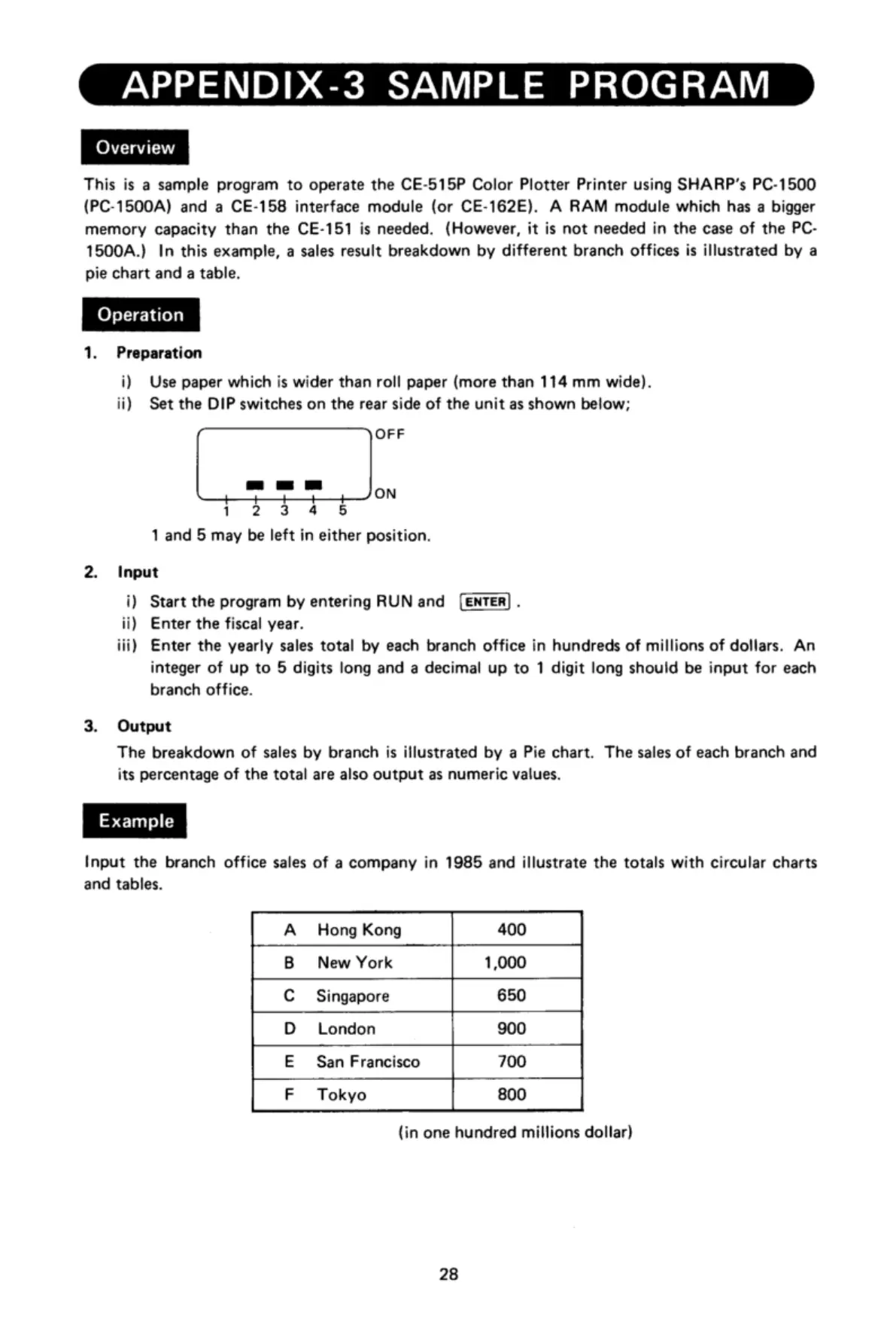
Overview
This
is
a
sample
program
to
operate
the
CE-b15P
Color
Plotter
Printer
using
SHARP's
PC-1500
{PC-1500A)
and
a
CE-158
interface
module
(or
CE-162E).
A
RAM
module
which
has
a
bigger
memory
capacity
than
the
CE-151
is
needed.
(However,
it
is
not
needed
in
the
case
of
the
PC-
1500A.)
In
this
example,
a
sales
result
breakdown
by
different
branch
offices
is
illustrated
by
a
pie
chart
and
a
table.
1.
Preparation
i)
Use
paper
which
is
wider
than
roll
paper
(more
than
114
mm
wide).
ii)
Set
the
DIP
switches
on
the
rear
side
of
the
unit
as
shown
below;
OFF
e
Jon
1
2 3
4
5
1
and
5
may
be
left
in
either
position.
2.
Input
i)
Start
the
program
by
entering
RUN
and
.
ii)
Enter
the
fiscal
year.
iii)
Enter
the
yearly
sales
total
by
each
branch
office
in
hundreds
of
millions
of
dollars.
An
integer
of
up
to
5
digits
long
and
a
decimal
up
to
1
digit
long
shouid
be
input
for
each
branch
office.
3.
Output
The
breakdown
of
sales
by
branch
is
illustrated
by
a
Pie
chart.
The
sales
of
each
branch
and
its
percentage
of
the
total
are
also
output
as
numeric
values.
Input
the
branch
office
sales
of
a
company
in
1985
and
illustrate
the
totals
with
circular
charts
and
tables.
A
Hong
Kong
400
B
New
York
1,000
C
Singapore
650
D
London
900
E
San
Francisco
700
F
Tokyo
800
(in
one
hundred
millions
dollar)
28

Related product manuals