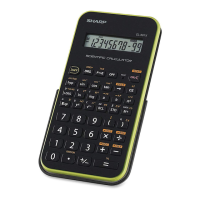
This document describes the SHARP Scientific Calculator Model EL-509E, a device designed for a wide range of mathematical and statistical calculations.
Function Description:
The EL-509E is a versatile scientific calculator capable of performing general arithmetic, function calculations, and statistical calculations. It supports various modes including Normal mode for basic arithmetic and function calculations, and Statistical mode for seven types of statistical calculations (single-variable, linear regression, quadratic regression, exponential regression, logarithmic regression, power regression, and inverse regression).
Key features include:
- Arithmetic Operations: Basic addition, subtraction, multiplication, and division, including constant calculations.
- Function Calculations: A comprehensive set of functions such as trigonometric (sin, cos, tan), inverse trigonometric (sin⁻¹, cos⁻¹, tan⁻¹), hyperbolic (sinh, cosh, tanh), inverse hyperbolic (sinh⁻¹, cosh⁻¹, tanh⁻¹), logarithmic (log, ln), exponential (eˣ, 10ˣ), power (yˣ, x√y), square (x²), cube (x³), square root (√x), cube root (³√x), reciprocal (x⁻¹), factorial (n!), permutations (nPr), and combinations (nCr).
- Random Function: Generates pseudo-random numbers (0 to 0.999), random dice rolls (1 to 6), random coin flips (0 or 1), and random integers (0 to 99).
- Angular Unit Conversions: Supports three angular units: degrees, radians, and grades, with easy switching between them.
- Memory Calculations: Features 8 temporary memories (A-F, X, Y), one independent memory (M), and a last answer memory (ANS). Results of certain functions (e.g., random numbers, coordinate conversions) are automatically stored in X or Y memory.
- Chain Calculations: Allows the use of the previous calculation result in subsequent calculations.
- Fraction Calculations: Performs arithmetic operations with fractions, and converts between fractions, mixed numbers, and decimal numbers.
- N-Base Operations: Converts numbers between binary, pental, octal, decimal, and hexadecimal systems. It also performs basic arithmetic and logical operations (AND, OR, NOT, NEG, XOR, XNOR) in these bases. Fractional parts are truncated during N-base conversions and calculations.
- Time, Decimal, and Sexagesimal Calculations: Converts between decimal and sexagesimal numbers (degrees, minutes, seconds).
- Coordinate Conversions: Converts between rectangular (x, y) and polar (r, θ) coordinates. The results are automatically stored in X and Y memories.
- Modify Function (MDF): This function allows the calculator to use the displayed result (rounded to the specified display setting) for subsequent calculations, rather than the internal 14-digit mantissa. This can be useful for maintaining consistency with displayed values in multi-step calculations.
- Statistical Calculations: Supports single-variable statistics (mean, standard deviation, sum of x, sum of x², number of samples) and two-variable statistics (mean of x and y, standard deviation of x and y, sum of x, y, x², y², xy, correlation coefficient, regression coefficients). It also includes estimation functions for y' and x' in regression models.
- Equation Input and Correction: Features a multi-line playback function to recall and edit previous equations (up to 142 characters). It supports insert and overwrite editing modes, and a deletion key.
- Display Settings: Offers four display notation systems (Floating Point, Fixed Decimal Point, Scientific Notation, and Engineering Notation) and allows specification of decimal places (TAB) for FIX, SCI, and ENG modes. Two floating point settings (NORM1 and NORM2) are available, which define the range outside of which numbers are automatically displayed in scientific notation.
Important Technical Specifications:
- Calculations: Scientific calculations, statistical calculations, etc.
- Internal Calculations: Mantissas of up to 14 digits.
- Pending Operations: 24 calculations, 10 numeric values (5 numeric values in STAT mode).
- Power Source: 3V (DC) from 2 alkaline batteries (LR44 or equivalent) (installed).
- Power Consumption: 0.0002 W.
- Operating Time: Approximately 5000 hours when continuously displaying "55555." at 25°C (77°F). Actual operating time may vary depending on usage and other factors.
- Operating Temperature: 0°C to 40°C (32°F to 104°F).
- External Dimensions: 79.6 mm (W) × 154.5 mm (D) × 13.2 mm (H) [3-1/8" (W) × 6-3/32" (D) × 17/32" (H)].
- Weight: Approximately 95 g (0.21 lb) (including batteries).
- Accessories: 2 batteries (installed), operation manual, quick reference card, and hard case.
- Calculation Range: Generally ±10⁻⁹⁹ to ±9.999999999 × 10⁹⁹ and 0. Values with an absolute value less than 10⁻⁹⁹ are treated as 0.
- Error Handling: The calculator displays error codes (Error 1: Syntax error, Error 2: Calculation error, Error 3: Depth error, Error 4: Equation too long) when operations exceed calculation ranges or are mathematically illegal.
Usage Features:
- Power On/Off: Press
ON/C to turn on, 2ndF OFF to turn off.
- Clearing Data: Various methods to clear entries, memories (independent, temporary, last answer), and statistical data. A
RESET switch on the back clears all memory contents and restores default settings.
- Hard Case: A protective hard case is included. It can be attached to the back of the calculator during use or to the front for protection when not in use. The inside of the hard case contains a quick reference card.
- Display: The display shows the equation and result. Symbols indicate active modes (e.g.,
2ndF, HYP, ALPHA, FIX, SCI, ENG, DEGRAD, STAT, M). Cursor keys allow navigation and viewing hidden parts of long equations or menus.
- Key Notation: Functions printed in orange above keys require
2ndF to be pressed first. Memory specification requires ALPHA.
- Priority Levels: Calculations are performed according to a defined order of operations, with parentheses taking precedence.
- Setup Menu: Accessed via
SET UP, allows configuration of display notation, decimal places, and angular units.
Maintenance Features:
- Battery Replacement:
- Type: Two LR44 alkaline button batteries (or equivalent).
- When to Replace: When the display contrast becomes poor.
- Procedure: Turn off the power (
2ndF OFF), remove two screws to open the battery cover, remove old batteries (using a ball-point pen), insert new batteries with the "+" side up, replace the cover and screws, then press the RESET switch on the back.
- Cautions: Replace both batteries at the same time, do not mix new and old batteries or different types. Ensure correct orientation. Keep batteries out of reach of children. Avoid fluid leakage by removing batteries if the calculator is not used for a long time. Do not dispose of batteries in fire.
- Memory Erasure: Battery replacement or calculator malfunction can erase memory contents. It is strongly recommended to keep permanent written records of important data.
- Cleaning: Use a soft, dry cloth. Avoid solvents or wet cloths, which can cause discoloration or damage.
- Storage and Handling:
- Avoid strong shocks, drops, or pressure, especially in crowded environments.
- Do not place in direct sunlight, hot car interiors, or near heating appliances, as high temperatures can cause deformation or malfunction.
- Keep away from excessively humid or dusty environments.
- The calculator is not waterproof; avoid contact with liquids (rain, juice, coffee, steam, perspiration).
- Do not press keys with excessive force or sharp objects.
- Do not carry with hard or sharp objects in pockets or bags to prevent scratches.
- Automatic Power Off: The calculator automatically turns off after approximately 10 minutes of inactivity to conserve battery power.
- Repair Parts: SHARP maintains repair parts for 5 years after product discontinuation. Repairs may involve replacing with equivalent parts.

 Need help?
 General

 To Next Page