– E-5 –
ALPHA : Indicates that K (STAT VAR), O or R has
been pressed, and entry (recall) of memory contents
and recall of statistics can be performed.
FIX/SCI/ENG: Indicates the notation used to display a value
and changes by SET UP menu.
DEG/RAD/GRAD: Indicates angular units and changes each
time G is pressed.
STAT
: Appears when statistics mode is selected.
M:Indicates that a numerical value is stored in the
independent memory.
BEFORE USING THE CALCULATOR
Key Notation Used in this Manual
In this manual, key operations are described as follows:
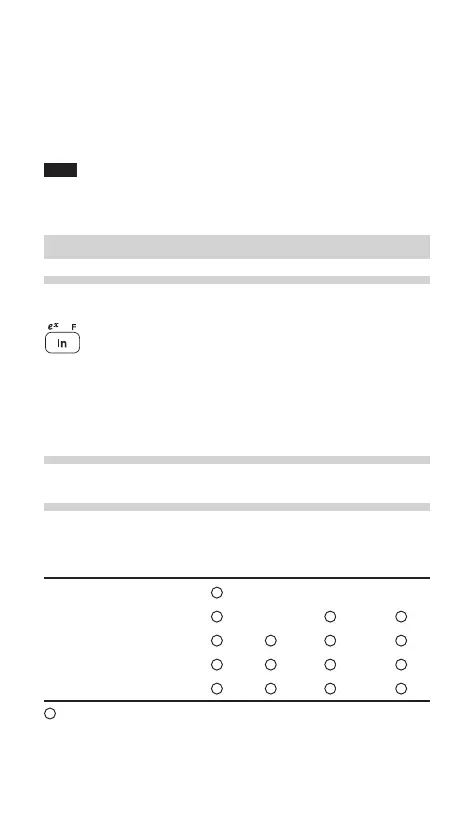
To specify e
x
: @e
To specify ln : I
To specify F : Kü
Functions that are printed in orange above the key require
@ to be pressed first before the key. When you specify the
memory, press K first. Numbers for input value are not
shown as keys, but as ordinary numbers.
Power On and Off
Press ª to turn the calculator on, and @F to turn it off.
Clearing the Entry and Memories
Clearing methods are described in the table as follows:
Clearing Entry M*
1
A-F, X,Y*
2
STAT
*
4
operation (Display) ANS*
3
STAT VAR
*
5
ª ×× ×
@c
×
@∏00*
6
@∏10*
7
RESET switch
: Clear × : Retain
*
1
Independent memory M.
*
2
Temporary memory A-F, X and Y.
*
3
Last answer memory.
*
4
Statistical data (entered data).
509E_en0610.p65 04.6.10, 2:51 PM5


 To Next Page