EasyManua.ls Logo

Sharp GF-777H - Page 16

Sharp GF-777H
35 pages
Print Icon
To Next Page IconTo Next Page
To Previous Page IconTo Previous Page
Loading...
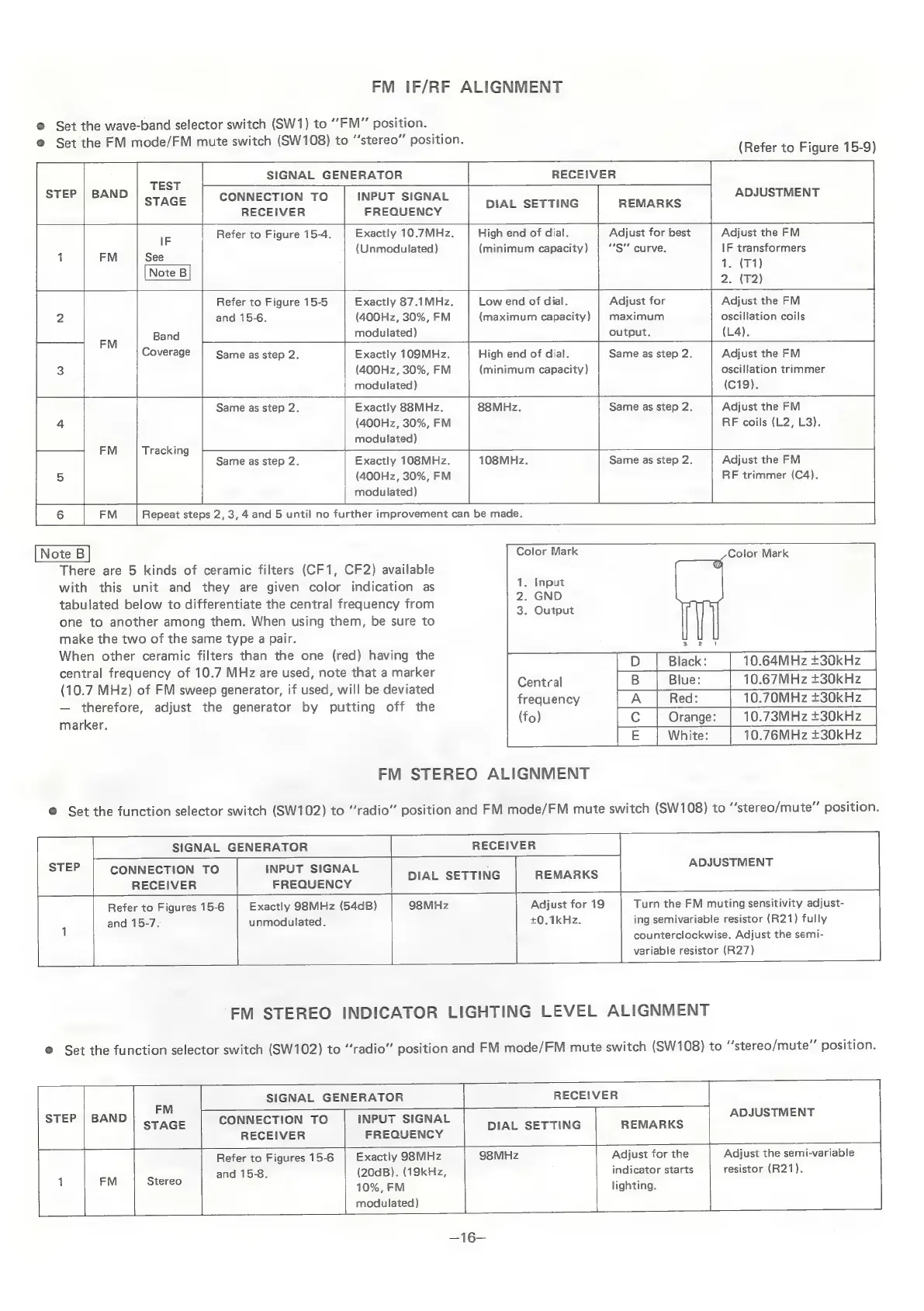
FM
IF/RF
ALIGNMENT
@
Set
the
wave-band
selector
switch
(SW1)
to
“FM”
position.
@
Set
the
FM
mode/FM
mute
switch
(SW108)
to
“stereo”
position.
(Refer
to
Figure
15-9)
>
SIGNAL
GENERATOR
RECEIVER
STEP
|
BAND
P
ADJUSTMENT
STAGE
CONNECTION
TO
|
INPUT
SIGNAL
oak
SEG
BERRI
RECEIVER
FREQUENCY
IF
Refer
to
Figure
15-4.
Exactly
10.7MHz.
High
end
of
dial.
Adjust
for
best
Adjust
the
FM
(Unmodulated)
(minimum
capacity)
“S"
curve.
IF
transformers
1
FM
See
1.
(T1)
Note
B
:
ote
2.
(T2)
Refer
to
Figure
15-5
Exactly
87.1MHz.
Low
end
of
dial.
Adjust
for
|
Adjust
the
FM
2
and
15-6.
(400Hz,
30%,
FM
(maximum
capacity)
|
maximum
oscillation
coils
ei
Band
modulated)
output.
(L4).
Coverage
Same
as
step
2.
Exactly
109MHz.
High
end
of
dial.
Same
as
step
2.
Adjust
the
FM
3
(400Hz,
30%,
FM
(minimum
capacity)
oscillation
trimmer
modulated)
(C19).
Same
as
step
2.
Exactly
88MHz.
88MHz.
Same
as
step
2.
Adjust
the
FM
4
(400Hz,
30%,
FM
RF
coils
(L2,
L3).
modulated)
FM
Tracking
Same
as
step
2.
Exactly
108MHz.
108MHz.
Same
as
step
2.
Adjust
the
FM
5
(400Hz,
30%,
FM
RF
trimmer
(C4).
modulated)
6
FM
Repeat
steps
2,3,
4
and
5
until
no
further
improvement
can
be
made.
|
A
ae
ees
EE
Color
Mark
Color
Mark
There
are
5
kinds
of
ceramic
filters
(CF1,
CF2)
available
with
this
unit
and
they
are
given
color
indication
as
tabulated
below
to
differentiate
the
central
frequency
from
one
to
another
among
them.
When
using
them,
be
sure
to
make
the
two
of
the
same
type
a
pair.
When
other
ceramic
filters
than
the
one
(red)
having
the
central
frequency
of
10.7
MHz
are
used,
note
that
a
marker
(10.7
MHz)
of
FM
sweep
generator,
if
used,
will
be
deviated
therefore,
adjust
the
generator
by
putting
off
the
marker.
1.
Input
2.
GND
3.
Output
10.64MHz
+30kHz
|
D
|
Black:
|
Central
|
B
|
Blue:
|
10.67MHz+30kHz
frequency
|
A
|
Red:
[
10.70MHz
+30kHz
(fo)
10.73MHz
+30kHz
E
|
White:
|
10.76MHz+30kHz
FM
STEREO
ALIGNMENT
@
Set
the
function
selector
switch
(SW102)
to
“radio”
position
and
FM
mode/FM
mute
switch
(SW108)
to
“‘stereo/mute”
position.
STEP
_—
SIGNAL
GENERATOR
-
RECEIVER
ad
CONNECTION
TO
RECEIVER
INPUT
SIGNAL
FREQUENCY
DIAL
SETTING
REMARKS
ADJUSTMENT
Refer
to
Figures
15-6
and
15-7.
Exactly
98MHz
(54dB)
98MHz
unmodulated.
+0.1kHz.
Adjust
for
19
ing
semivar
variable
res
Turn
the
FM
muting
sensitivity
adjust-
iable
resistor
(R21)
fully
counterclockwise.
Adjust
the
semi-
istor
(R27)
FM
STEREO
INDICATOR
LIGHTING
LEVEL
ALIGNMENT
©
Set
the
function
selector
switch
(SW102)
to
“radio”
position
and
FM
mode/FM
mute
switch
(SW108)
to
“stereo/mute”
position.
=F
SIGNAL
GENERATOR
RECEIVER
FM
EP
ND
7
ADJUSTMENT
SiLEr
BA
STAGE
CONNECTION
TO
|
iNPUT
SIGNAL
ser
TiNG
Scans
RECEIVER
FREQUENCY
i
Refer
to
Figures
15-6
Exactly
98MHz
98MHz
Adjust
for
the
Adjust
the
semi-variable
Ss
and
15-8.
(20dB).
(19kHz,
indicator
starts
resistor
(R21).
:
id
eee
10%,
FM
lighting.
modulated)
—16=

Related product manuals