EasyManua.ls Logo

Sharp GF-777H - Page 17

Sharp GF-777H
35 pages
Print Icon
To Next Page IconTo Next Page
To Previous Page IconTo Previous Page
Loading...
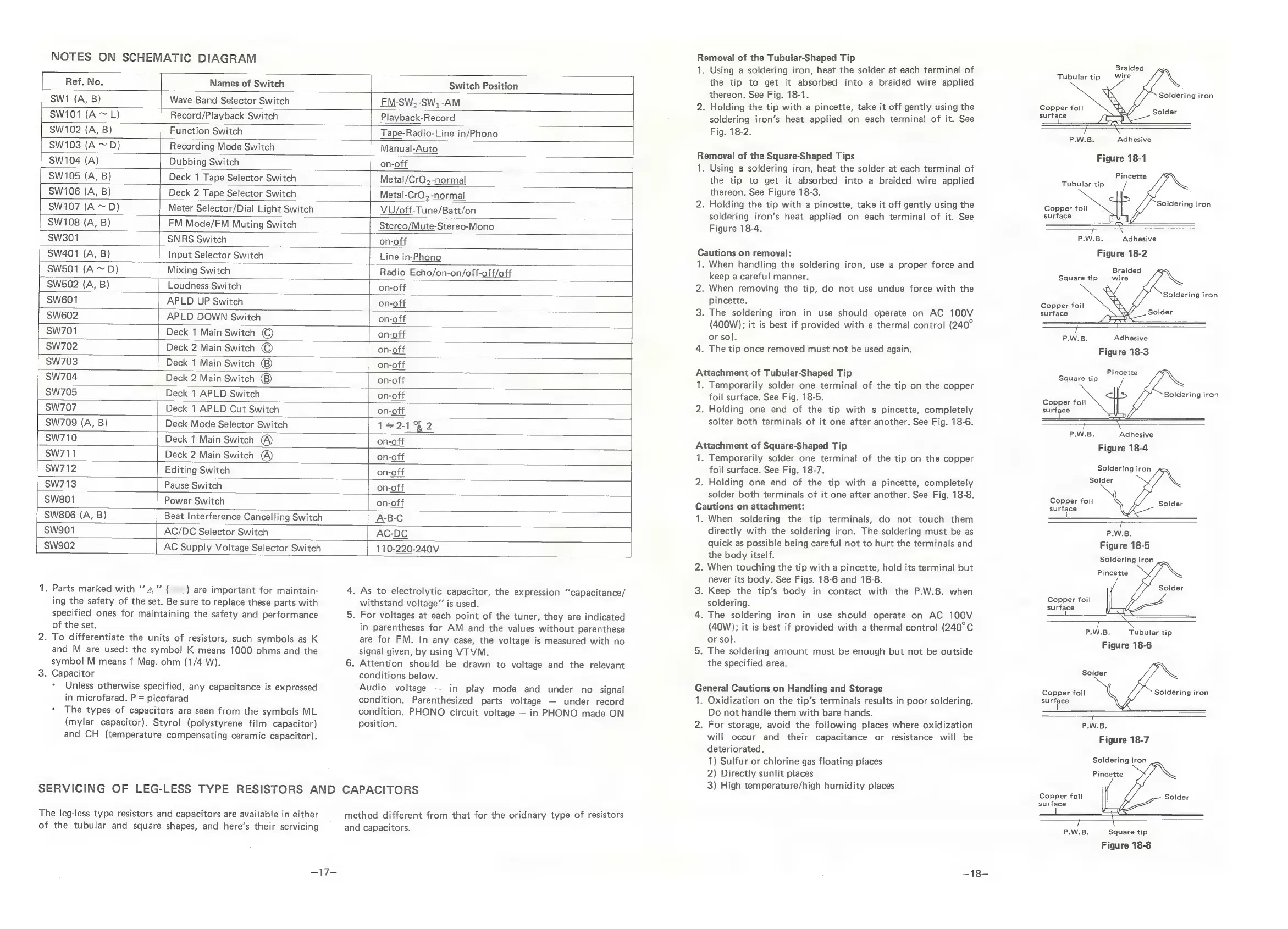
NOTES
ON
SCHEMATIC
DIAGRAM
-
Ref.
No.
Names
of
Switch
|
Swi
(A,
B)
Wave
Band
Selector
Switch
SW101
(A
~
L)
|
Record/Playback
Switch
SW102
(A,
B)
|
SW103
(A
~D)
SW104
(A)
|
SW105
(A,
B)
|
SW106
(A,
B)
SW107
(A
~
D)
Function
Switch
Recording
Mode
Switch
Manual-Auto
Dubbing
Switch
on-off
Deck
1
Tape
Selector
Switch
Deck
2
Tape
Selector
Switch
[
Meter
Selector/Dial
Light
Switch
Tape-Radio-Line
in/Phono
Switch
Position
FM-SW,
-SW,
-AM
Playback-Record
Metal/CrO,
-normal
Metal-CrO,
-normal
VU/off-Tune/Batt/on
SW108
(A,
B)
FM
Mode/FM
Muting
Switch
Stereo/Mute-Stereo-Mono
SW301
SNRS
Switch
on-off
SW401
(A,
B)
Input
Selector
Switch
Line
in-Phono
|
SW501
(A
~
D)
Mixing
Switch
Radio
Echo/on-on/off-off/off
SW502
(A,
B)
Loudness
Switch
[
on-off
|
sw6o1
APLD
UP
Switch
on-off
|
Sw6o2
APLD
DOWN
Switch
on-off
sw701
;
Deck
1
Main
Switch
©
on-off
SW702
Deck
2
Main
Switch
©
on-off
|
sw703
Deck
1
Main
Switch
on-off
|
SW704
Deck
2
Main
Switch
on-off
SW705
Deck
1
APLD
Switch
on-off
|
Sw707
Deck
1
APLD
Cut
Switch
on-off
SW709
(A,
B)
SW710
Deck
Mode
Selector
Switch
Deck
1
Main
Switch
®
5x
or
fe
2-1
*g
2
on-off
SW711
Deck
2
Main
Switch
@
on-off
SW712
Editing
Switch
on-off
|
SW713
Pause
Switch
TET
secre
SW801
Power
Switch
__|_
on-off
SW806
(A,
B)
Beat
Interference
Cancelling
Switch
A-B-C
sws901
AC/DC
Selector
Switch
AC-DC
SWw902
AC
Supply
Voltage
Selector
Switch
Syl
10-220-240V
1.
Parts
marked
with
“a”
(
)
are
important
for
mainiain-
4.
As
to
electrolytic
capacitor,
the
expression
“capacitance/
withstand
voltage”’
is
used.
5.
For
voltages
at
each
point
of
the
tuner,
they
are
indicated
in
parentheses
for
AM
and
the
values
without
parenthese
are
for
FM.
In
any
case,
the
voltage
is
measured
with
no
signal
given,
by
using
VTVM.
6.
Attention
should
be
drawn
to
voltage
and
the
relevant
conditions
below.
Audio
voltage
in
play
mode
and
under
no
signal
in
microfarad.
P
=
picofarad
condition.
Parenthesized
parts
voltage
under
record
*
The
types
of
capacitors
are
seen
from
the
symbols
ML
condition.
PHONO
circuit
voltage
in
PHONO
made
ON
{mylar
capacitor).
Styrol
(polystyrene
film
capacitor)
position.
and
CH
(temperature
compensating
ceramic
capacitor).
ing
the
safety
of
the
set.
Be
sure
to
replace
these
parts
with
specified
ones
for
maintaining
the
safety
and
performance
of
the
set.
2.
To
differentiate
the
units
of
resistors,
such
symbols
as
K
and
M
are
used:
the
symbol
K
means
1000
ohms
and
the
symbol
M
means
1
Meg.
ohm
(1/4
W).
3.
Capacitor
*
Unless
otherwise
specified,
any
capacitance
is
expressed
SERVICING
OF
LEG-LESS
TYPE
RESISTORS
AND
CAPACITORS
method
different
from
that
for
the
oridnary
type
of
resistors
and
capacitors.
The
leg-less
type
resistors
and
capacitors
are
available
in
either
of
the
tubular
and
square
shapes,
and
here’s
their
servicing
y=
Removal
of
the
Tubular-Shaped
Tip
‘lr
Using
a
soldering
iron,
heat
the
solder
at
each
terminal
of
the
tip
to
get
it
absorbed
into
a
braided
wire
applied
thereon.
See
Fig.
18-1.
.
Holding
the
tip
with
a
pincette,
take
it
off
gently
using
the
soldering
iron’s
heat
applied
on
each
terminal
of
it.
See
Fig.
18-2.
Removal
of
the
Square-Shaped
Tips
1.
Using
a
soldering
iron,
heat
the
solder
at
each
terminal
of
the
tip
to
get
it
absorbed
into
a
braided
wire
applied
thereon.
See
Figure
18-3.
.
Holding
the
tip
with
a
pincette,
take
it
off
gently
using
the
soldering
iron’s
heat
applied
on
each
terminal
of
it.
See
Figure
18-4.
Cautions
on
removal:
1;
2.
3:
4.
When
handling
the
soldering
iron,
use
a
proper
force
and
keep
a
careful
manner.
When
removing
the
tip,
do
not
use
undue
force
with
the
pincette.
The
soldering
iron
in
use
should
operate
on
AC
100V
(400W);
it
is
best
if
provided
with
a
thermal
control
(240°
or
so).
The
tip
once
removed
must
not
be
used
again.
Attachment
of
Tubular-Shaped
Tip
I.
2
Temporarily
solder
one
terminal
of
the
tip
on
the
copper
foil
surface.
See
Fig.
18-5.
Holding
one
end
of
the
tip
with
a
pincette,
completely
solter
both
terminals
of
it
one
after
another.
See
Fig.
18-6.
Attachment
of
Square-Shaped
Tip
l.
2.
Temporarily
solder
one
terminal
of
the
tip
on
the
copper
foil
surface.
See
Fig.
18-7.
Holding
one
end
of
the
tip
with
a
pincette,
completely
solder
both
terminals
of
it
one
after
another.
See
Fig.
18-8.
Cautions
on
attachment:
1.
When
soldering
the
tip
terminals,
do
not
touch
them
directly
with
the
soldering
iron.
The
soldering
must
be
as
quick
as
possible
being
careful
not
to
hurt
the
terminals
and
the
body
itself.
.
When
touching
the
tip
with
a
pincette,
hold
its
terminal
but
never
its
body.
See
Figs.
18-6
and
18-8.
.
Keep
the
tip’s
body
in
contact
with
the
P.W.B.
when
soldering.
.
The
soldering
iron
in
use
should
operate
on
AC
100V
(40W);
it
is
best
if
provided
with
a
thermal
control
(240°C
or
so).
.
The
soldering
amount
must
be
enough
but
not
be
outside
the
specified
area.
General
Cautions
on
Handling
and
Storage
iF
2.
Oxidization
on
the
tip’s
terminals
results
in
poor
soldering.
Do
not
handle
them
with
bare
hands.
For
storage,
avoid
the
following
places
where
oxidization
will
occur
and
their
capacitance
or
resistance
will
be
deteriorated.
1)
Sulfur
or
chlorine
gas
floating
places
2)
Directly
sunlit
places
3)
High
temperature/high
humidity
places
Braided
Tubular
tip
wire
Soldering
iron
Copper
foil
older
surface
3
P.W.B.
Adhesive
Figure
18-1
Pincette
Tubular
tip
Soldering
i
Copper
foil
PIngsron
surface
ee
P.W.B.
Adhesive
Figure
18-2
Braided
Square
tip
wire
Soldering
iron
Copper
foil
surface
Solder
P.W.B.
Adhesive
Figure
18-3
Pincette
Square
tip
Soldering
iron
Copper
foil
surface
P.W.B.
Adhesive
Figure
18-4
Soldering
iron
Solder
Copper
foil
surface
a...
oaoS“c=”M(S
SS
———
P.W.B.
Figure
18-5
Soldering
iron
Solder
Pincette
Solder
Copper
foil
surface
P.W.B.
Tubular
tip
Figure
18-6
Solder
Copper
foil
Soldering
iron
surface
ST
<0.
P.W.B.
Figure
18-7
Soldering
iron
Pincette
Copper
foil
surface
P.W.B.
Square
tip
Figure
18-8

Related product manuals