EasyManua.ls Logo

Sharp GF-777H - Page 4

Sharp GF-777H
35 pages
Print Icon
To Next Page IconTo Next Page
To Previous Page IconTo Previous Page
Loading...
52.
APLD
Indicators
56.
Echo
Control
60.
Treble
Tone
Control
53.
Function
Switch
57.
Microphone
Fader
Control
61.
Channel
Balance
Control
54.
Deck
Mode
Selector
Switch
58.
Tape
Fading
Control
62.
Cutput
Volume
Control!
55.
Mixing
Switch
59.
Bass
Tone
Control
63.
Loudness
Switch
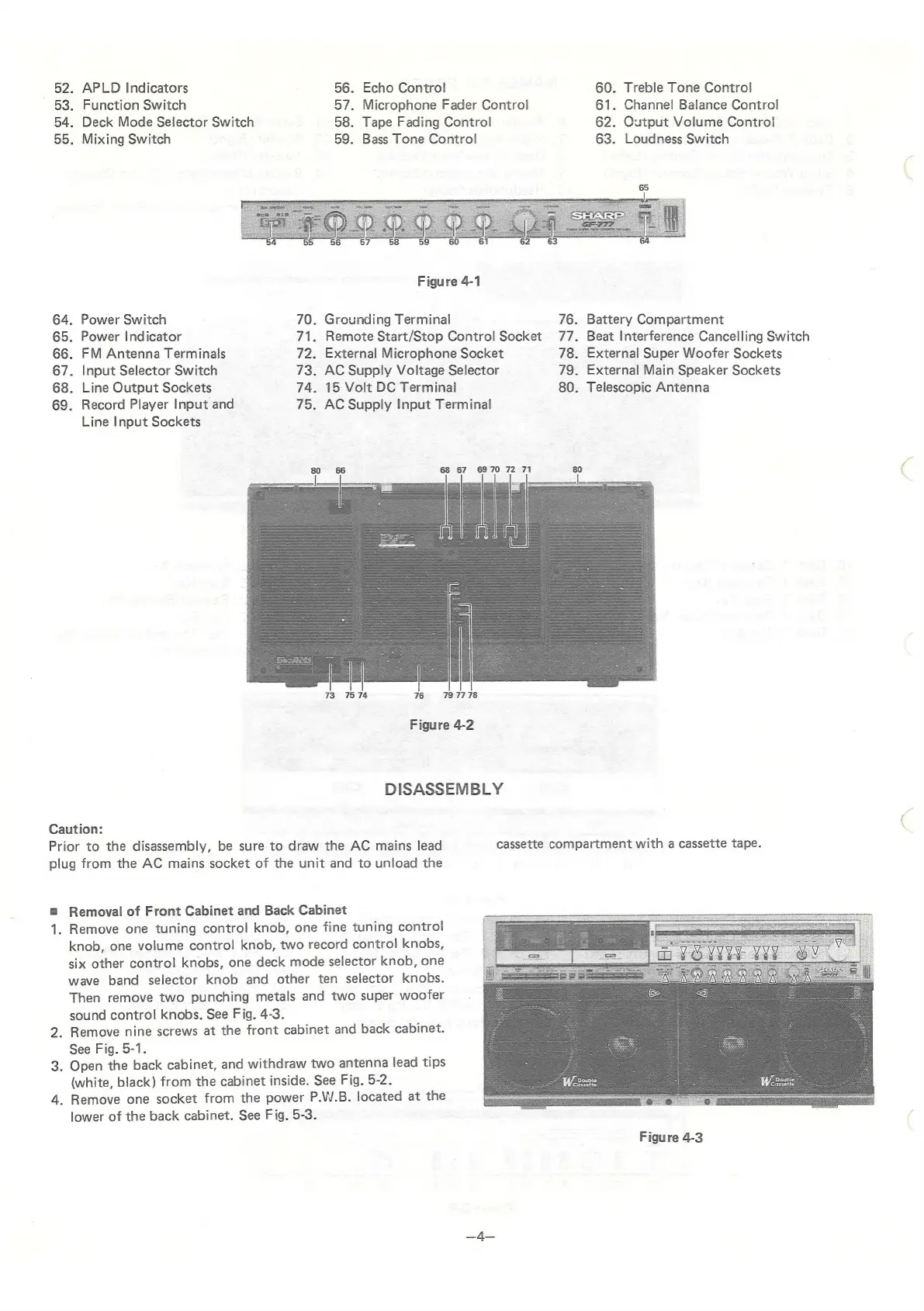
Figure
4-1
64.
Power
Switch
70.
Grounding
Terminal
76.
Battery
Compartment
65.
Power
Indicator
71.
Remote
Start/Stop
Control
Socket
77.
Beat
Interference
Cancelling
Switch
66.
FM
Antenna
Terminals
72.
External
Microphone
Socket
78.
External
Super
Woofer
Sockets
67.
Input
Selector
Switch
73.
AC
Supply
Voltage
Selector
79.
External
Main
Speaker
Sockets
68.
Line
Output
Sockets
74.
15
Volt
DC
Terminal
80.
Telescopic
Antenna
69.
Record
Player
Input
and
75.
AC
Supply
Input
Terminal
Line
Input
Sockets
68 67
6970
72
71
80
73
«7574
76 79
7778
Figure
4-2
DISASSEMBLY
Caution:
Prior
to
the
disassembly,
be
sure
to
draw
the
AC
mains
lead
cassette
compartment
with
a
cassette
tape.
plug
from
the
AC
mains
socket
of
the
unit
and
to
unload
the
=
Removal
of
Front
Cabinet
and
Back
Cabinet
1.
Remove
one
tuning
control
knob,
one
fine
tuning
control
knob,
one
volume
control
knob,
two
record
control
knobs,
six
other
control
knobs,
one
deck
mode
selector
knob,
one
wave
band
selector
knob
and
other
ten
selector
knobs.
Then
remove
two
punching
metals
and
two
super
woofer
sound
control
knobs.
See
Fig.
4-3.
2.
Remove
nine
screws
at
the
front
cabinet
and
back
cabinet.
See
Fig.
5-1.
3.
Open
the
back
cabinet,
and
withdraw
two
antenna
lead
tips
a
I
(white,
black)
from
the
cabinet
inside.
See
Fig.
5-2.
ee
ee
i
4.
Remove
one
socket
from
the
power
P.W.B.
located
at
the
——
a
lower
of
the
back
cabinet.
See
Fig.
5-3.
Figure
4-3
=f

Related product manuals