4
Accessories
• 1x Remote control
• 1x User guide
• 1x Quick start guide
• 1x Warranty lea et
• 1x UK power cord
• 1x EU power cord
• 1x Set of wall-mounting screws
• 4x Silicone feet
• 2 x AAA battery
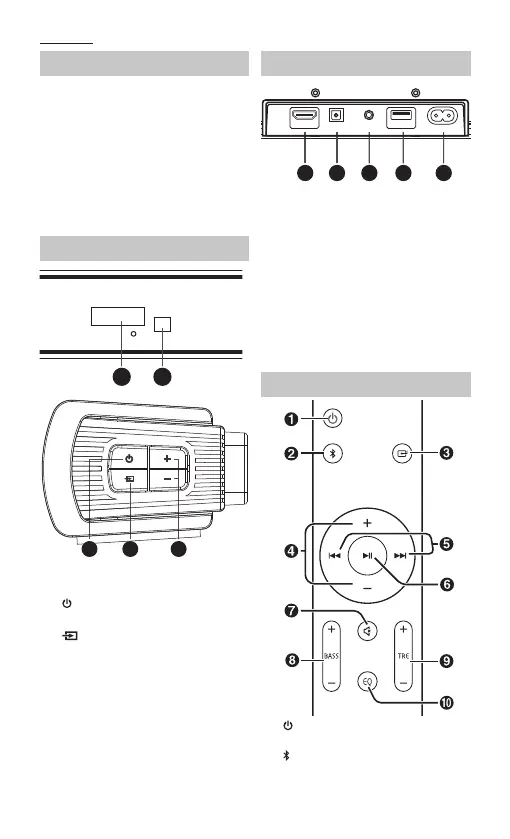
Controls
1 2
3
4 5
1. Display screen
2. Remote sensor
3.
Standby – Switch the unit be-
tween ON and STANDBY mode.
4.
Source – Select the play function.
5. Volume +/- – Increase/decrease the
volume level.
Inputs/Outputs
1 2 3
4
5
ARC OPTICAL LINE IN UPGRADE
~AC IN
1. ARC Socket – Connect to a TV via
HDMI cable.
2. OPTICAL Socket – Opticial input
jack.
3. LINE IN Socket – Connect to an
external audio device.
4. UPGRADE Socket – The USB socket
is for service only. It is not designed
to charge smartphones, tablets or
similar devices.
5. AC~ Socket – Connect power cord.
Remote control
1. – Switch the unit between ON and
STANDBY mode.
2.
– Select the Bluetooth mode.
Press and hold to activate the
pairing function in Bluetooth mode


 To Next Page