EasyManua.ls Logo

Sharp IG-NX2B - User Manual

Sharp IG-NX2B
56 pages
Print Icon
To Next Page IconTo Next Page
Loading...
“Plasmacluster” and “Device of a cluster
of grapes” are trademarks of Sharp
Corporation.
* 1 The number on this technical mark
indicates more than 50,000 ions
supplied into air of 1 cm
3
, which is
measured near the center of space
(0.5 m height from floor) when the air
volume is “MED” by placing the
product in an appropriate place such
as a cup holder beside the driver's
seat.
IG-NX2B
IG-NX2Y
PLASMACLUSTER ION
GENERATOR OPERATION
MANUAL
ENGLISH
เครื่องพนอนุภาค
พลาสมาคลัสเตอร
คูมือการใชงาน
ภาษาไทย
PETUNJUK
PENGOPERASIAN UNIT
PENGHASIL ION
PLASMACLUSTER
INDONESIA
01_IG-NX2B_IG-NX2Y-EN.indd 101_IG-NX2B_IG-NX2Y-EN.indd 1 2/6/2564 BE 20:522/6/2564 BE 20:52
Question and Answer IconNeed help?

Do you have a question about the Sharp IG-NX2B and is the answer not in the manual?

Overview

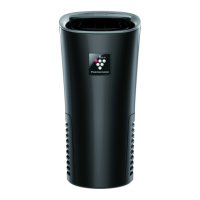
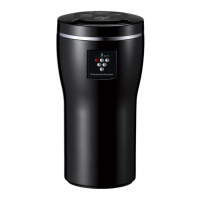
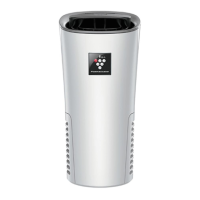
This document describes the SHARP Plasmacluster Ion Generator, models IG-NX2B and IG-NX2Y, designed for in-vehicle use.

Function Description:

The SHARP Plasmacluster Ion Generator is designed to release high-density Plasmacluster ions into the air, aiming to improve air quality within a vehicle. It offers three operational modes: LOW, MED, and TURBO, each releasing a different concentration of Plasmacluster ions. A "QUICK CLEAN" mode is also available for rapid odor removal. The device is intended to operate in conjunction with the vehicle's engine, resuming its last operating mode when the engine starts. It features a Unit Replacing Lamp to indicate when the Plasmacluster Ion Generating Unit needs replacement.

Important Technical Specifications:

  • Models: IG-NX2B / IG-NX2Y
  • Power: Car Adapter
  • Rated Input: DC 12 V
  • Rated Output: DC 5 V (Max. 2 A for 2 ports)
  • Power Consumption:
    • LOW: 0.6 W
    • MED: 0.8 W
    • TURBO: 1.4 W
  • Ion Density (Approx.):
    • LOW: 25,000 ions/cm³
    • MED: 50,000 ions/cm³
    • TURBO: 90,000 ions/cm³
  • Operating Noise Level:
    • LOW: 18 dB
    • MED: 25 dB
    • TURBO: 33 dB
  • Outer Dimensions:
    • Upper dimension: 78 × 76 mm
    • Lower dimension: Φ 65 mm
    • Height: 165 mm (Excluding accessories)
  • Weight: Approx. 295 g (Excluding accessories)
  • Capacity applicable for high-density Plasmacluster: Approx. 3.6 m³
  • Unit Replacement Period: Approximately 17,500 hours (approx. 6 years if operated 8 hours/day). The unit stops working after approximately 19,000 hours (approx. 6 years and 6 months).

Usage Features:

  • Select Mode:
    • LOW: Releases high-density Plasmacluster ions quietly.
    • MED: Releases Plasmacluster ions approximately 2 times as much as "LOW" at standard air flow.
    • TURBO: Releases Plasmacluster ions approximately 3.6 times as much as "LOW" at a strong air flow.
    • QUICK CLEAN: Releases Plasmacluster ions with TURBO mode for 25 minutes, then switches to "MED". This mode is recommended after smoking, eating in the vehicle, or when an odor from the air conditioner is noticeable.
  • Engine Interlocking Function: The product resumes its last operating mode when the vehicle's engine is started. If the product continues to operate after the key is removed or the engine is turned off, the Car Adapter should be unplugged to prevent battery drain.
  • Installation Guidance:
    • Insert the Car Adapter into the accessory socket and connect the USB plug to the Car Adapter.
    • The product can also be used by inserting the included USB cable into a USB connector of a PC, etc.
    • Ensure the accessory socket is clean and free of dirt to prevent faulty contact or fire.
    • The Car Adapter has 2 USB ports; other equipment with 1.5 A or lower current can be connected.
    • Cautions on wiring the Car Adapter: Avoid letting the cord touch or get caught in moving parts, obstruct the driver's view, or be bent/compressed.
    • Cautions on installation: Keep the product at least 30 cm away from the vehicle's electronic key to avoid interference. Place it in a stable location, away from the vehicle's in-glass antenna to prevent radio interference. If interference with TV, radio, or atomic clock occurs, move the product away. Avoid placing the product directly in front of climate control outlets when heating is on, as it may get hot.
  • Troubleshooting:
    • If the Plasmacluster Ion Generator does not work, check the Car Adapter connection.
    • If operation does not stop when the engine is off, unplug the Car Adapter.
    • If the product does not operate in conjunction with the engine, it may be due to the accessory socket supplying power even when the engine is off.
    • If the Unit Replacing Lamp flashes rapidly and operation stops, the unit has exceeded its usage period and needs replacement.
    • If all Operation Lamps flash and the product stops, perform electrode maintenance. If the Plasmacluster Ion Generating Unit is not installed correctly, reinsert it. If the lamps repeatedly flash, contact customer service.
    • If clicking or ticking sounds are heard, this is normal during ion generation, though the sound level may vary. Clean the filter if dust is obstructing it.
    • If the Operation Lamp flashes and the product stops, unplug and re-plug the Car Adapter. If the issue persists, contact customer service.

Maintenance Features:

  • Main Unit Cleaning: Wipe with a dry, soft cloth every month or more often if necessary. For stubborn dirt, use water and a mild detergent, then wipe with a wet cloth and ensure it's dry.
  • Filter Cleaning (PM10 Filter): Clean frequently as necessary.
    1. Remove the Filter Cover (refer to "DISASSEMBLING" steps 1 on page 10).
    2. Remove the filter.
    3. Remove dust with a vacuum cleaner. If the filter is dirty, wash it with water.
    • Cautions: Do not press the vacuum cleaner too hard on the filter. Rinse off any synthetic kitchen detergent. Dry the filter in the shade.
    1. Insert the filters into the Filter Cover.
    2. Reattach the Filter Cover (refer to "ASSEMBLING" steps 4 on page 11).
  • Plasmacluster Ion Generating Unit (Electrode section) Cleaning: Clean every 6 months or more often if necessary.
    1. Take out the Unit Holder and the Unit Cleaning Brush (refer to "DISASSEMBLING" steps 1-4 on page 10).
    2. Wipe dust from the electrodes and around the base using the Unit Cleaning Brush.
    • Cautions: Use only the Unit Cleaning Brush. Do not touch or deform the electrodes or connection terminal directly.
    1. Assemble the product (refer to "ASSEMBLING" steps 1-4 on page 11).
  • Unit Replacement:
    1. Take out the Unit Holder (refer to "DISASSEMBLING" steps 1-4 on page 10).
    2. Remove the claw of the Unit Holder and remove the old Unit.
    3. Attach a New Unit (Model: IZ-C100ME) to the Unit Holder.
    4. Assemble the product (refer to "ASSEMBLING" steps 1-4 on page 11).
    5. Insert the Car Adapter and check that the Unit Replacing Lamp is turned OFF.
  • Disposal: Dispose of the used Plasmacluster Ion Generating Unit according to local laws and regulations. Materials include Polybutylene Terephthalate and electronic parts.

Sharp IG-NX2B Specifications

General IconGeneral
BrandSharp
ModelIG-NX2B
CategoryAir Cleaner
LanguageEnglish

Related product manuals