– 11 –
IM-MT899H/IM-MT899W
REMOVING AND REINSTALLING THE MAIN PARTS
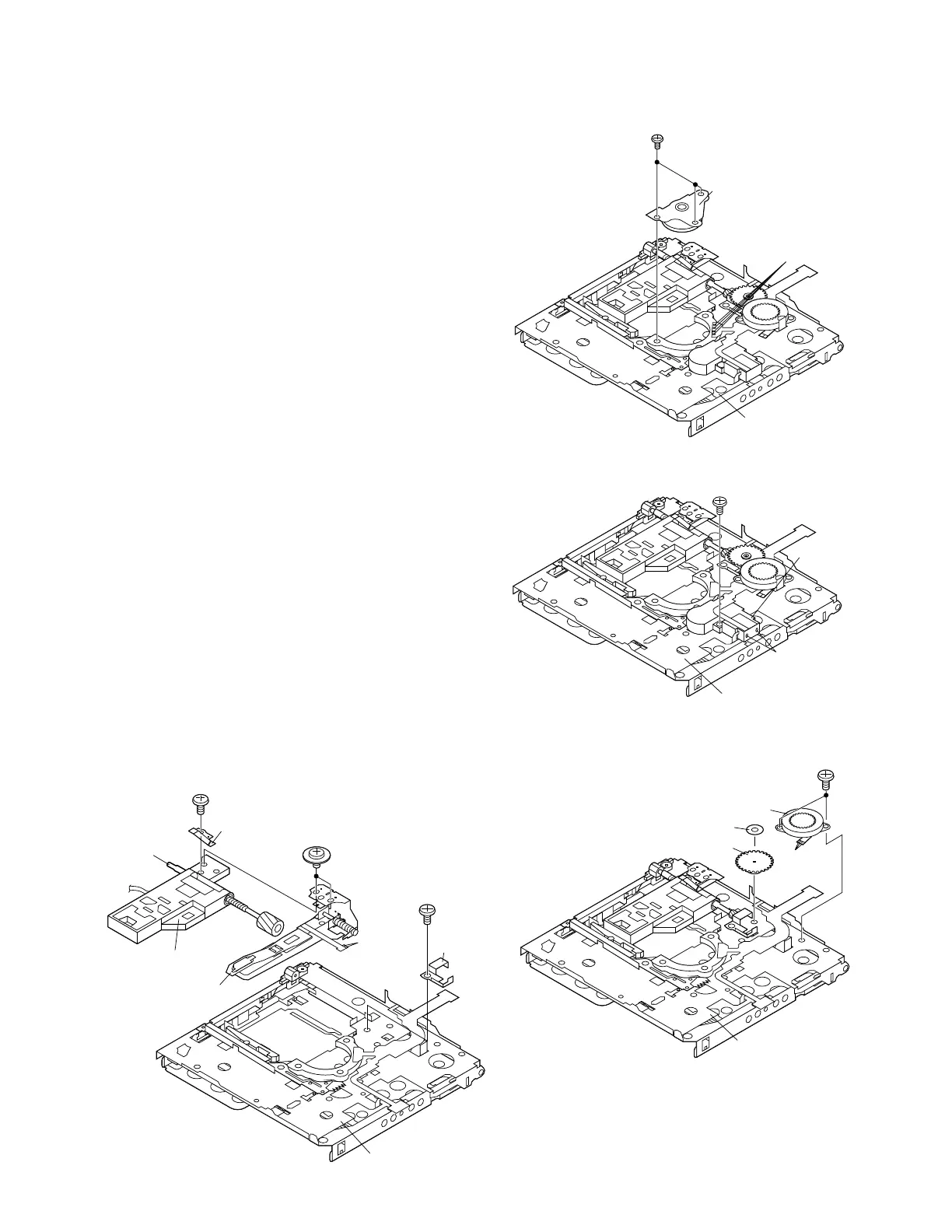
Remove the MD mechanism according to the disassembling
methods 1 to 4. (See Page 10.)
How to reinstall the optical pickup
(See Fig. 11-4.)
1. Remove the screw (E1) x 1 pc., and remove the grip spring.
2. Remove the screw (E2) x 1 pc. to remove the thrust
spring, and remove the drive screw and the optical
pickup from MD mechanism.
Then, remove the drive screw from the optical pickup.
How to remove the magnetic head ass'y
(See Fig. 11-4.)
1. Remove the screws (D1) x 2 pcs. of the magnetic head ass'y
and the optical pickup, and remove the solder joints
(D2) x 2 of the head flexible plate.
Note:
Mount carefully so as not to damage the magnetic head.
How to remove the lift motor (See Fig. 11-2.)
1. Remove the solder joints (B1) x 2 of lift motor lead wire.
2. Remove the screw (B2) x 1 pc., and remove the lift motor.
Note:
Take care so that the motor gear is not damaged.
(If the gear is damaged, noise is caused.)
How to remove the sled motor (See Fig. 11-3.)
1. Remove the stop washer (C1) x 1 pc., and remove the drive
gear (C2) x 1 pc.
2. Remove the screws (C3) x 2 pcs.
3. Remove the solder joints (C4) x 3 of flexible PWB., and
remove the sled motor.
Note:
Take care so that the motor gear is not damaged.
(If the gear is damaged, noise is caused.)
How to remove the spindle motor (See Fig. 11-1.)
1. Remove the solder joints (A1) x 4 of flexible PWB.
2. Remove the screws (A2) x 3 pcs., and remove the spindle
motor.
(A2) x 3
ø1.4 x 1.8mm
Solder Joints
(A1) x 4
Spindle Motor
MD Mechanism
Solder
Joints
(B1) x 2
(B2) x 1
ø1.4 x 3.8mm
Lift
Motor
MD Mechanism
(C1) x 1
(C2) x 1
(C3) x 2
ø1.4 x 1.2mm
MD Mechanism
Solder
Joints
(C4) x 3
Sled Motor
(E2) x 1
ø1.4 x 1.2mm
(E1) x 1
ø1.4 x 1.8mm
(D1) x 2
ø1.4 x 1.8mm
Grip Spring
Drive Screw
Optical Pickup
Magnetic
Head Ass'y
MD Mechanism
Thrust
Spring
Solder
Joints
(D2) x 2
Figure 11-1
Figure 11-2
Figure 11-3
Figure 11-4


 To Next Page