IM-MT899H/IM-MT899W
– 12 –
Entering the TEST mode
1. Setting via port (when no disc is loaded, or the unit is in the stand-by mode or turned off)
(1) Set the port as follows.
TEST0 : "Low"
(2) Press the PLAY button in the stand-by mode. (You can also insert a disc or turn on the unit.)
(3) Test Mode STOP. [ T E S T _ ]
2. Setting by using special buttons (in the stand-by mode)
Test mode : Perform it with the remote control.
(1) Press the "PLAY" button while holding down the "MODE/DISPLAY" button.
(2) Release the "MODE/DISPLAY" button.
(3) Press the "VOLUME–" button while holding down the "PLAY" button.
(4) Initialize the normal mode settings (BASS setting, VOLUME setting, etc.).
(5) Test Mode STOP. [ T E S T _ ]
(6) To check the version of the microcomputer, press the VOLUEM +.
(The version will be displayed on the remote control, but not on the main unit.)
(7) Press the "VOLUME–" to light up the LCDs.
Leaving the TEST mode
(1) Press the STOP button when TEST appears.
Shipping setting method
(1) Insert the rechargeable battery. Do not close the battery lid.
(2) Close the lid while holding down the VOLUME– and PLAY button on the main unit simultaneously.
(3) When “Inl” appears, check that the LCD is lit.
Test Mode
1 High reflection disc MMD-110 (TEAC Test MD) 88GMMD-110
2 Low reflection disc MMD-213A (TEAC Test MD) 88GMMD-213A
3 Low reflection disc Recording mini disc UDSKM0001AFZZ
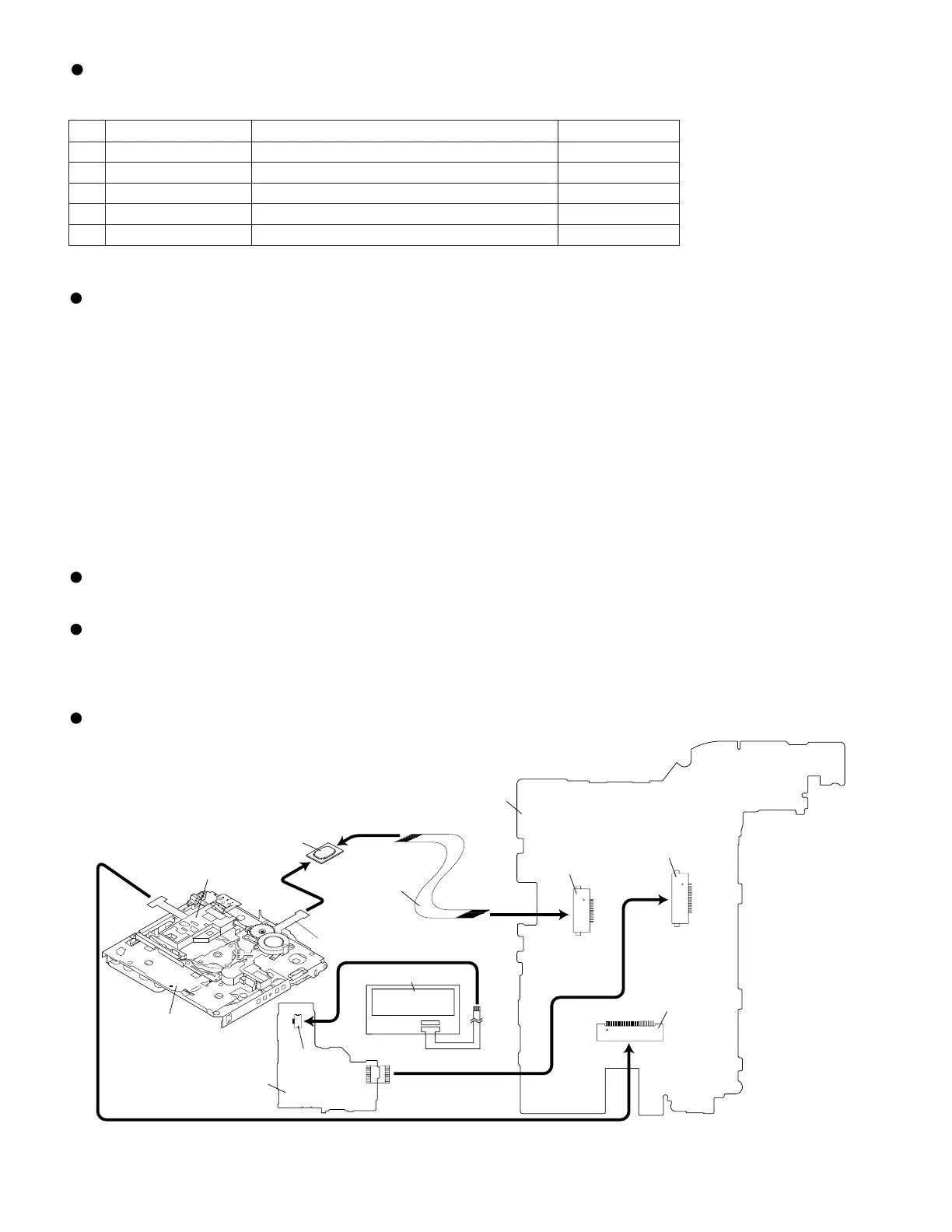
4 Extension cable
For operational inspection (extension cable for motors)
QCNWN6936AFZZ
5 Extension relay PWB
For operational inspection (extension relay PWB for motors)
RUNTK0613AFZZ
ADJUSTMENT
Test disc
MD adjustment needs two types of disc, namely recording disc (low reflection disc) and playback-only disc (high
reflection disc).
Type
Test disc
Parts No.
Note: Use the low reflection disc on which music has been recorded.
Figure 12
CN601
CN451
CN101
CNA01
MAIN PWB
MECHANISM FLEXIBLE PWB
EXTENSION CABLE
(QCNWN6936AFZZ)
OPTICAL PICKUP(19)
MD MECHANISM
LCD/KEY PWB
EXTENSION RELAY PWB
(RUNTK0613AFZZ)
LCD ASS'Y(238)


 To Next Page