IM-MT899H/IM-MT899W
– 22 –
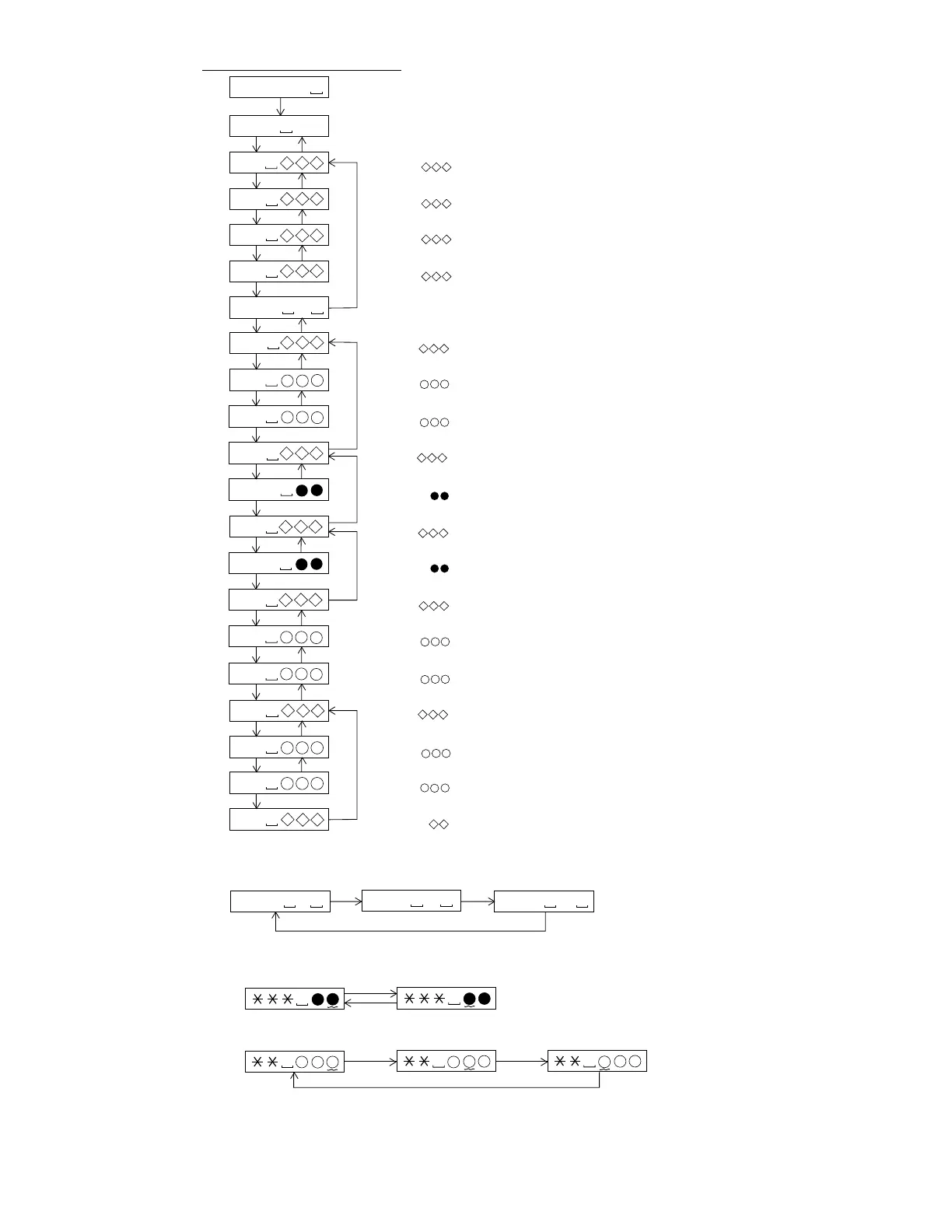
MODE/
DISPLAY
: Pre-Manual Adjustment menu
: Temperature code indication
$ $ : Temperature code
: A signal offset (AINO) measurement
: Measurement value
: B signal offset (BINO) measurement
: Measurement value
: E signal offset (EINO) measurement
: Measurement value
: F signal offset (FINO) measurement
: Measurement value
: Laser ON (play power)
: AB signal level measurement (ABMAXO)
: Measurement value
: A-ATT (focus) tentative setting
: ATT setting
: B-ATT (focus) tentative setting
: ATT setting
: Pit section adjustment COUT level setting
: COUT level setting
: Groove section adjustment COUT level setting
: COUT level setting
: E-ATT (tracking) initial setting
: ATT setting
: F-ATT (tracking) initial setting
: ATT setting
PLAY
M A N U 1
Servo Pre-Manual Adjustment
T M P $ $
A h
SKIP UP SKIP DOWN
B h
SKIP UP SKIP DOWN
E h
SKIP UP SKIP DOWN
F h
SKIP UP SKIP DOWN
L O N P
SKIP UP SKIP DOWN
A B
SKIP UP SKIP DOWN
S a
SKIP UP SKIP DOWN
S b
SKIP UP SKIP DOWN
e f
SKIP UP SKIP DOWN
P C H
SKIP UP SKIP DOWN
e f
SKIP UP SKIP DOWN
G C H
SKIP UP SKIP DOWN
T C
SKIP UP SKIP DOWN
S E
SKIP UP SKIP DOWN
S F
SKIP UP SKIP DOWN
SKIP UP SKIP DOWN
: Pit section EF signal level measurement (LPFEFO)
: Measurement value
: Groove section EF signal level measurement (LPFEFO)
: Measurement value
: TCRS signal level measurement (TCRSMIO)
: Measurement value
: A-ATT (focus) initial setting
: ATT setting
: B-ATT (focus) initial setting
: ATT setting
: TCRS signal offset (TCRSO) measurement
: Measurement value
a b
S A
SKIP UP SKIP DOWN
S B
SKIP UP SKIP DOWN
T H
SKIP UP SKIP DOWN
: AB input level measurement (LPFABO)
: Measurement value
* In the specific setting display state the setting change digit changes when the [MODE/DISPLAY]
button is pressed.
• In the case of the setup value two digits.
1st digit (initial value) 2nd digit
• In the case of the setup value three digits.
1st digit (initial value) 2nd digit 3rd digit
* In the specific state the setting changes in the range of "0h to Fh" when the [VOLUME +/–]
button is pressed.
* If the [GROUP/CLEAR] button is pressed, the display changes as follows.
MODE/
DISPLAY
MODE/
DISPLAY
MODE/
DISPLAY
MENU MENU
MENU
* When the [STOP] button is pressed in specific condition, the "TEST MODE STOP" state is set.
* When you press the [MENU] button with the laser ON (with no disc or the lid open), the laser power shifts as follows.
L O N P
L O N R
L O N M
Play back Record power Maximum power
MODE/DISPLAY


 To Next Page