IM-MT899H/IM-MT899W
– 27 –
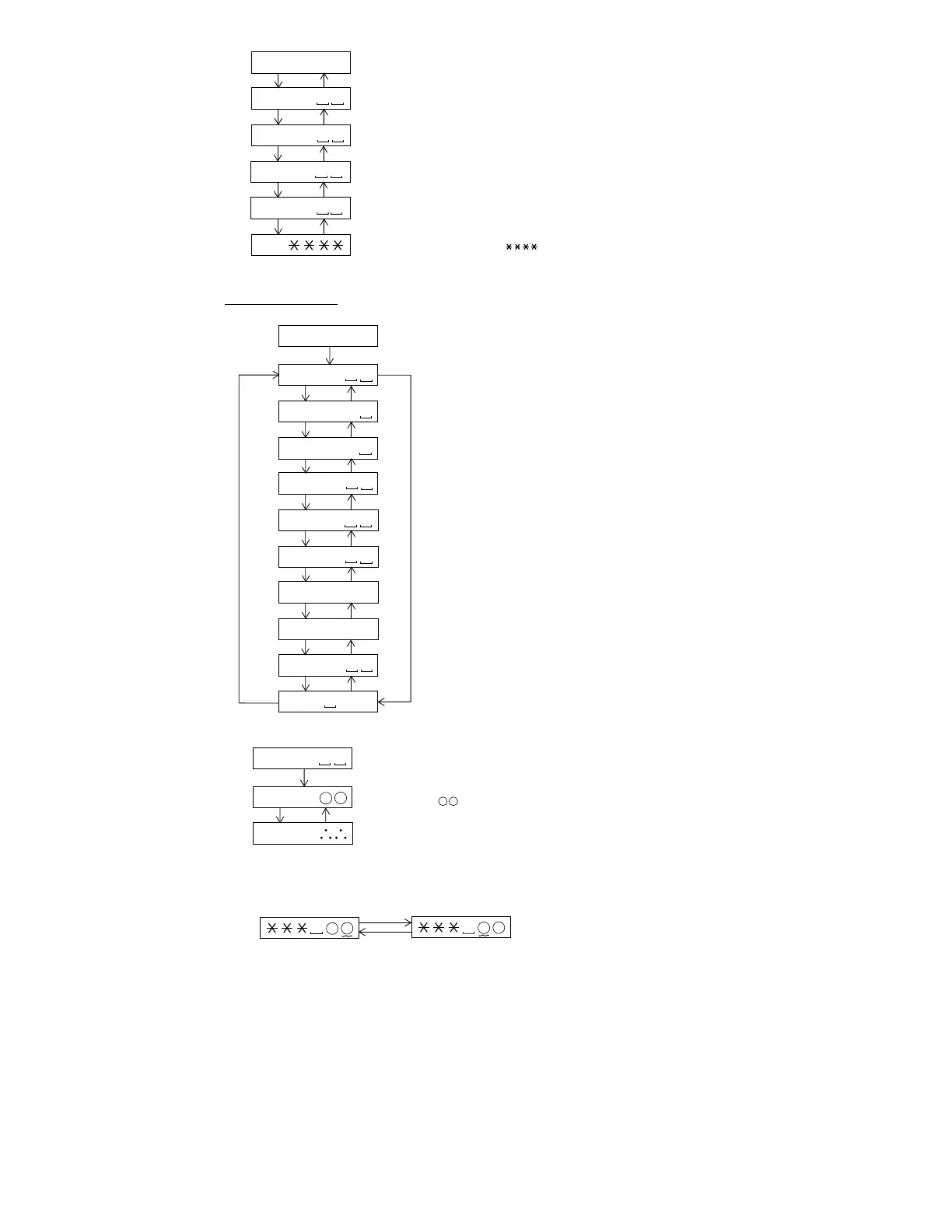
: EEPROM setting menu
: Focus setting menu
: Spin setting menu
: Tracking setting menu
: Sled setting menu
: BASS setting menu
: TEMP setting menu
: Adjustment setting menu
: Digital EQ setting menu
: Control setting menu
PLAY
E E P R O M
EEPROM Setting
F o c u s
S p i n
SKIP UP SKIP DOWN
T r a c k
SKIP UP SKIP DOWN
S l e d
SKIP UP SKIP DOWN
B a s s
SKIP UP SKIP DOWN
T e m p
SKIP UP SKIP DOWN
A D J S E T
SKIP UP SKIP DOWN
D E Q S E T
SKIP UP SKIP DOWN
C T R L
SKIP UP SKIP DOWN
SKIP DOWN
* When the [STOP] button is pressed in specific menu, the "TEST MODE STOP" state is set.
• Menu transition
L S I I F
SKIP UP SKIP DOWN
SKIP UP
: TEMP setting menu
: TEMP standard value setup
: Setup value
$ $ : Temperature code
: TEMP A/D input value indication
PLAY
T e m p
• TEMP Setting
T M $ $
T P i n
SKIP UP SKIP DOWN
* When the [STOP] button is pressed in specific menu, the "TEST MODE STOP" state is set.
* When the [GROUP/CLEAR] button operation is performed in the specific state, the menu changes to
"TEMP SETTING menu".
* When the [MODE/DISPLAY] button is pressed in each state, the set digit is changed.
1st digit (initial value) 2nd digit
MODE/
DISPLAY
MODE/
DISPLAY
* In the specific state the setting changes in the range of "0h to Fh" when the [VOLUME +/–]
button is pressed.
: LSI setting TEST mode menu
: Error history 6 indication
$ $ : Error code
: Error history 7 indication
$ $ : Error code
: Error history 8 indication
$ $ : Error code
: Error history 9 indication
$ $ : Error code
Continued from previous page
E 6 $ $
SKIP UP SKIP DOWN
E 7 $ $
SKIP UP SKIP DOWN
E 8 $ $
SKIP UP SKIP DOWN
E 9 $ $
SKIP UP SKIP DOWN
* When the [STOP] button is pressed in specific menu, the "TEST MODE STOP" state is set.
: Total recording time
R C
SKIP UP SKIP DOWN


 To Next Page